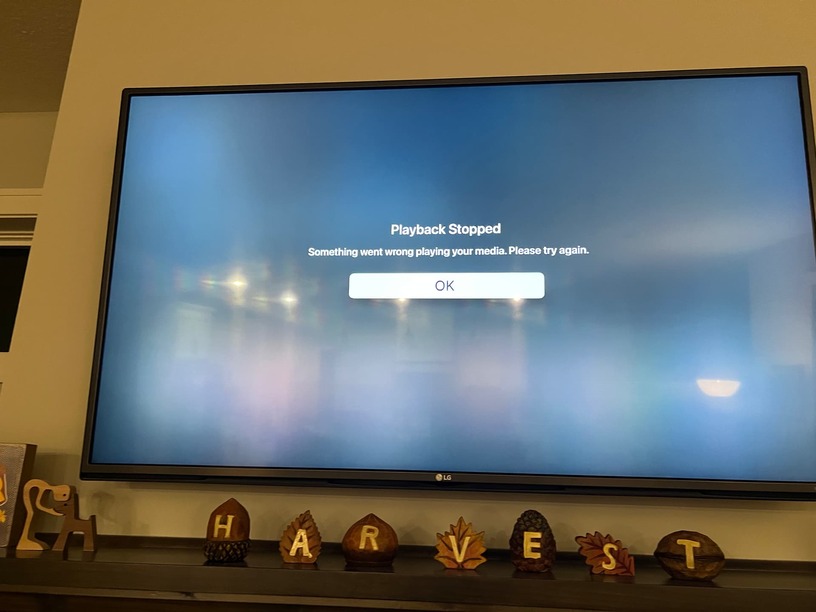
After updating to latest build of macOS Server, Apple TV HD devices are no longer able to play transcoded media, they just pinwheel and crash.
There also appears to still be an issue with HDR metadata and macOS Server, my FireTV clients are still washed out when viewing transcoded HDR10 media (and DOVI but I see there is still and issue with DOVI).
I do see the return of more quality choices for transcode on the iOS app now, and I’m not seeing any washed out issues with HDR media on iOS client.
@dklein under the notes for hdr->sdr you will see that android devices (such as the fire TV) will still have issues until a new client rolls out. Can you send me the logs from your server after attempting to play on your apple tv?
correct, We do not expect the old player to work here. I will talk to the apple team to see if they can disable HEVC when using the old player (we thought it already was).
I can confirm that the crashing does look to be related to the “old” player as I’m able to replicate when forcing AppleTV 4K to the old player vs mpv/experimental. The last version you pushed out did not have any issue with the “old” player.
I’ve been working with Craig over on the new Apple TV beta engine, and I think it’s probably time to force h264 only on the AppleTV HD, as the plex client just can’t handle HEVC with the mpv or experimental players on that device. If you’re saying the server side is going to drop support for the “old” player as well, that device will no longer be able to direct play HEVC or transcoded HEVC content and should force back down to h264.
Using the “old” player right now is the only way to direct play HEVC media on AppleTV HD.
The GPU or other hardware device that will be used for transcoding. The default setting will have the Auto option selected. If you have multiple devices capable of hardware-accelerated transcoding (e.g. both an integrated and discrete GPU), you can select a particular device. (Requires an active Plex Pass subscription for the server owner account.
To me, that doesn’t imply or state that if you don’t have something in the transcoder device dropdown menu other than Auto that there is a problem with the configuration. To me, that’s saying that Auto is the default, that selecting anything else is optional, and if you only have one GPU the selection doesn’t actually matter. Because of that, I’ve never thought anything of the fact that no GPU showed up in the dropdown before now.
FWIW: Proxmox is not an officially supported distro . We help with it where we can because it’s a whole other distro suite on top of base Debian (which we do support)
Unsure of the Apple TV HD, but the Apple TV 4K (any model I think) DOES support HEVC and HEVC transcoding on the old player. HEVC movies and tv shows are currently direct streamed to the old player using HLS fmp4 if I’m not mistaken.
My previous posts were specifically in relation to Live TV (HDHR) - which when transcoded uses the HLS mpegts format. Apple TV 4K only supports HLS mpegts in h264… HEVC requires HLS fmp4.
So I suppose the solution (for Apple TV 4K anyway) would be to allow HEVC transcoding for movies and tv shows and either allow HEVC HLS fmp4 transcoding for Live TV or force h264 transcoding for Live TV.
Just putting this forward as would be a shame to lose HEVC transcoding on the old player on Apple TV 4K as a result of the old Apple TV HD hardware.
AppleTV HD does support HEVC on the old player as well, it’s just the mpv and experimental players that it is broken on. Infuse doesn’t have any issue with HEVC content on the AppleTV HD either.
However, today’s server release breaks compatibility with the Old player on both my Apple TV HDs and 4K units.
I just ran another round of tests on the AppleTV 4K and the HD with the “old” player, client version 8.41 (9333) on both machines. If I try to transcode to 1080p on the AppleTV 4K while mid playback (ie from the slide down menu), the client will either crash back to the Movie poster or the generic “Something went wrong” as in the image below:
Disabling the “old” player and using the new experimental plays as expected.
On the AppleTV HD, I immediately get the Playback stopped error when starting a UHD movie from the library (as it’s trying to transcode to 1080p HEVC) with the “old” player enabled. However, if I enable PGS subtitles, this forces the server to do a software transcode to h264 and everything plays as expected with the “old” player.
Which apple tv plex client software are you running? I’m trying to see what our differences are that allow you to play HEVC transcodes with the old player enabled.
Just tested on my i7-7700K using Quicksync with a movie from my library to the Plex Windows App and it felt like it as a lot quicker than the current Plex transcoder in commencing the stream and changing between different bitrate profiles. Was a 24Mbps 4K/HDR10 HVEC source.
Plex is installed within Docker in a Ubuntu 22.04.1 VM running on Proxmox v8.2.
Had a chance to do more testing with the AppleTV HD. I set the Home Streaming limit on the client to 3Mbps 720p to force transcodes on all playback sessions, with the Old Player turned on.
I found that if I transcode SDR 1080p or 720p source content to HEVC, the Old Player works as expected and all plays fine. There is no crash or error message. Also, if I try to play UHD content that is SDR, the HEVC transcodes work as expected and content plays fine with the Old Player.
It is only when I am trying to play and transcode UHD HDR10 or HDR10/DOVI files (disc remuxes) to 1080 or 720 HEVC that the Old Player crashes and refuses to play the HEVC file, almost like the transcode itself isn’t starting.
I was able to replicate this consistently with every UHD HDR10 or HDR10/DOVI file I tried, all MKV sources, various HDR profiles. UHD SDR Remux content did not have playback issues.
@tree2369, would love to take a look at the XML and see if there’s anything that flags for me. Have you tried to play any UHD HDR Remux media with the Old Player?
I am also able to replicate this on my AppleTV 4K with the Old Player… all 1080/720p SDR to HEVC plays fine and so does all UHD SDR content. It’s only UHD HDR or HDR/DOVI content that is causing the crashes here to.
The other interesting thing I noticed is that when I attempt UHD HDR/DOVI playback, Tautulli is reporting that the “current” position of playback is greater than the total run time of the file.
For instance, in the file playing below, Tautulli is reporting that the AppleTV 4K is starting playback at 65 minutes and 40 seconds, even though the file is only 37 minutes and 2 seconds in length.