For what it’s worth, I found I only need the /dev/dri directory mounted.
Mounting the directory includes the files within by default and so the renderD128 file inside is automatically included, at least on Proxmox LXC.
For what it’s worth, I found I only need the /dev/dri directory mounted.
Mounting the directory includes the files within by default and so the renderD128 file inside is automatically included, at least on Proxmox LXC.
@dklein which generation of the apple tv hd do you have? Also, which generation 4k?
I really want to try this version but, there is no PMS for dsm 7.2.2. Any chance to have one?
Hi Chris,
Apple TV HD - A1625 32GB
AppleTV 4K - 1st Gen - A1842
I also reverted to Version 1.41.1.9012 (previous HEVC server support) and the Old player does not have the crashing issues with HDR and HDR/DOVI content on either device, color is just washed out due to the macOS server HDR metadata bug.
Synology does support docker.
@chris_decker08, the Old Player crashing issue can also be replicated on my iOS 13 Pro with the latest HEVC transcode release with HDR and HDR/DOVI content. The issue is not present in the original HEVC transcode release, nor is there an issue with SDR UHD/1080/720 content.
@vertigo235
where is docker image?
Use the linuxserver.io image, and utilize the undocmented feature with the following ENV variables.
PLEX_DOWNLOAD=“https://artifacts.plex.tv/plex-media-server-experimental”
VERSION=1.41.1.9012-0fb7f45fc
I have this exact problem. The files play fine and transcode to HEVC on my pixel and ipad but I get a manifest error trying to play them in chrome. If i turn off transcoding to HEVC regular HW transcoding works fine.
Try resetting your chrome://flags settings.
I did that initially and tried again just now, no dice. It’s not the end of the world, just mentioning it so it can be looked into.
@dklein No all of my media is SDR.
Looks as though you pinned it down to UHD HDR content not transcoding?
That’s correct. Only UHD HDR and HDR/DOVI content doesn’t transcode with the Old Player in latest release. It does transcode in previous release.
That’s specifically for the previous build. I believe the updated ENV for this newest release would be:
PLEX_DOWNLOAD=“https://artifacts.plex.tv/plex-media-server-experimental”
VERSION=1.41.1.9043-2ace0d939
(Got it from parsing the info from one of the new download links)

Use the linuxserver.io image, and utilize the undocmented feature with the following ENV variables.
PLEX_DOWNLOAD=“https://artifacts.plex.tv/plex-media-server-experimental ”
VERSION=1.41.1.9012-0fb7f45fc
Is there a similar mechanism with the Plex Inc image or is this only possible with the LinuxServer one?
I can’t tell if I’m mistaken but it feels like the 1.41.1.9043 preview update increased the bandwidth usage for each quality preset. For my media it seems like the 720P 4mbps preset averages to 5-6 mbps on h264 and 8-9 mbps on hevc. I know the bitrate presets were modified for this but I would think it should be the other way around and the hevc bandwidth should be lower than h264.
I’m using an arc A310 for transcoding and the OS is Ubuntu 22.04.5 on kernal 6.8.0-45 generic.
I think there’s still something strange going on with DVR recordings, their bitrate. While it is significantly less than previously (70K down to 18K) it’s still double the bitrate of a raw, non-trancoded DVR recording.
I have a 60 minute recording, raw(no transcode), with a bitrate of ~9800kbps
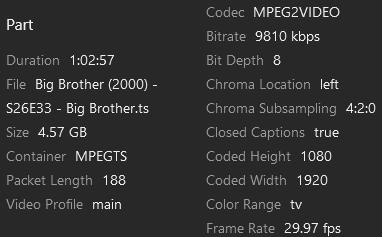
Then I have a similar recording where I enabled DVR to transcode to HEVC during the recording and it’s ~18000kbps

So am I missing something? Shouldn’t the HEVC transcoded DVR recording have less bitrate than a raw recording? Sure it’s 30 extra minutes but it’s 3x the file size… Im… PerPLEXed…
Is it just the fact Im using hardware(GPU) instead of software(CPU)… Even if that’s the case it doesn’t explain why when I optimize the 1st recording it’s actually compressed smaller than the original.
Question: What is the “Transcode” parameters exactly when enabling it for DVR recordings?
This is with 9/25/2024 release.
my nvidia shield client just seem to hang and give a black screen when transcoding 4k DV material and hevc encoding enabled. Need to unplug to restart. When hevc transcoding is disabled I get a HDR stream that plays ok. plain 4k and HDR seem ok, only DV material seem to be the problem.
Nvidia shield pro 2019 → Sony HT-ST5000 soundbar → LG OLED E8, Plex Server running on Windows 11.
@MowMdown for live tv we dont know the origonal bitrate of the livetv stream so we have to guess something reasonable. I’ll think on further improvements that could be made.
DV issues on an android client is already listed under known issues.
