Yes, 129.0.6668.90 (Official Build) (64-bit) (cohort: Stable)
Seems to be an issue with the web profiles, i’ve reached out to a web dev. Seems to only happen with certain files.
I don’t remember seeing any actual feedback in here other than people posting various bugs so here’s my experience:
I’ve limited the resolution to 1080p with my “hacked” Transcoder and watched my largest movie (2160p@75Mb/s) last night and everytime I’ve experienced any sort of stuttering/buffering I lowered the bitrate and I ended up with 1080p@7Mb/s (that is without the subtitle penalty).
Which seems rather low? I think the source video is a little unusual (most of my 4K videos are in the 20s) but I chose it specifically to establish the maximum viable bitrate. Still it feels like my GPU (Intel UHD 630) should be capable of way more but I haven’t investigated the problem yet (Transcoder crash, memory leak, GPU hang, power limit, rate limit, HDD speed, etc.). The peak bitrate is 122Mb/s.
Well maybe the limit needs to be an inverse relation (k / S = L)?
525 / 75 = 7
Because the day before I was watching a 25Mb/s movie at 2160p@40Mb/s just fine (albeit only for a few minutes). This would be unfeasible for a user-facing setting though. Will investigate more.
I’ve noticed a little difference when playing 4k HVEC HDR10 media from Plex on my Sony XR-65A80L TV and transcoding down to 1080P HVEC between the two transcoder versions. Colours seem to shift quite a lot in the pre-alpha transcoder.
File direct streamed using pre-alpha


File transcoded to 12Mbps 1080p using pre-alpha

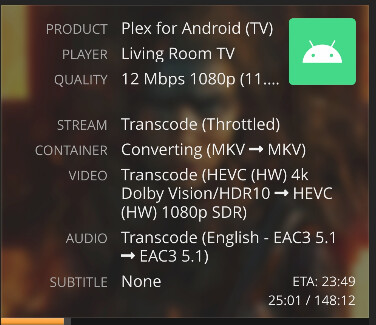
File transcoded to 12Mbps 1080p using current stable Plex


File details

@kesawi there is a known issue with direct streaming dovi files which should be adressed in the next revision
Interestingly my TCL 65C855 doesn’t appear exhibit the same behaviour with the colours looking similar.
@chris_decker08 What’s up with the issue HEVC Live TV Transcodes not playing on Apple Devices?
I’ve not had any issues myself so Im just curious about it.
It was reported earier in this thread, i’m waiting on an apple engineer to investigate as i dont actually own any apple clients
So yesterday I did another test with a 2160p@25Mb/s file and could narrow the limit down to 1080p@7.5Mb/s. Today I tried to investigate why the limit was so low by increasing the log verbosity on my server and on my client and also adding -loglevel verbose to the Transcoder but I (unfortunately) can no longer trigger it. I must’ve hit some kind of bug which triggers for bitrates over 7.5Mb/s (regardless of resolution) with the results being semi-consistent (every bitrate above would eventually get stuck but the timings were sometimes different), I remember it being mostly linear e.g. crashing after 21 minutes at 9Mb/s and 23 minutes at 8Mb/s but then e.g. 7.9Mb/s would crash after seconds and 7.8Mb/s would crash after an hour (those aren’t actual numbers). Anyway hitting the bug and hitting my GPU limit would initially look the same (spinning circle, client overlay would say something like "buffering: 10% and the dashboard would say buffering) but in the bug scenario the stream would never recover.
Now that the bug is no longer happening I watched a movie at 2160p@70Mb/s without any buffering but I’ll continue watching movies that way (fixing the bitrate even when it’s larger than the source) until I encounter another buffering or am confident in that number.
So my key takeaways from this beta so far are:
- Burning-in will make 4K transcoding impossible for me (regardless of codec)
- There’s a bug which makes transcoding fail when the target bitrate is bigger than 7.5Mb/s (at any resolution) but the problem might be unique to me (your
ffmpegfork seems to be 2 years old and a rebase could help) - My (4K) limit seems to be high enough to not be hit under regular circumstances but I’d still appreciate a server-side limit
@Ari as ive mentioned before, updating the transcoder is my next task
Is it possible to get an option where we can decide transcoding bitrate limit.
The purpose is that if direct stream is not possible for client, then transcoding bitrate limit is applyed.
You mean like this one?

Like this, but not this
This is a global network restriction.
If i use rhis settting, direct access is no more possible
It limits remote(WAN) streaming bitrate only. It does not limit local(LAN) streaming bandwidth if that’s what you’re concerned with.
The only time it would affect anyone is if they have the capability to remotely direct play something that is greater than the specified limit UNLESS you whitelist their IP address as a LAN network. (This is how I do it personally)
I can’t see a benefit to limiting only transcoder bitrate.
Why would it makes sense to remotely direct play something that is 20+Mbps but at the same time limit a transcode to something smaller(for example 4Mbps) if bandwidth was a concern?
Why would it makes sense to remotely direct play something that is 20+Mbps but at the same time limit a transcode to something smaller(for example 4Mbps) if bandwidth was a concern?
=> because
1/ i’ve WAN network bandwith, so people who have the capacity to direct stream 4KHDR movies are welcome
2/ for people who need transcoding, i want to “preserve” and manage MY gpu ressources by limiting transcoding bitrate and mostly with HEVC encoding
hope this help to understand
2/ for people who need transcoding, i want to “preserve” and manage MY gpu ressources by limiting transcoding bitrate and mostly with HEVC encoding
Keep in mind, plex only transcodes enough data to fill the transcoder buffer which you can control the duration for. Filling up a 60 second buffer vs filling up a 300 second buffer is a matter of seconds and then the transcoder throttles freeing up the GPU.
I personally don’t see how a 4K > 1080p @ 20Mbps would impact a GPU vs doing 4K > 1080p @ 2Mbps. The source material is the choke point, not the GPU.
So if you wanted to better preserve your GPU resources, don’t allow 4K transcoding and up your buffer time.
As a final measure, you can also simply limit the amount of concurrent transcodes that can occur. If your GPU can only handle 6 simultaneous transcodes it won’t matter what the output bitrate is if you’re over 6 transcodes.
TL;DR output bitrate does not negatively affect GPU resources. Limiting these serves no purpose other than to preserve upload bandwidth.
Thanks for this answer
Focus, people.
This is the HEVC transcoding test. Not open forum to dictate unrelated things you want in Plex.
I wanna throw in my own 2 cents, this works amazingly! However, I do experience an infinite spinner on my Apple TV 4K’s, but not with all content weirdly enough. Sometimes if I let it sit for a while, the audio will start playing but the infinite spinner is still on the screen.
It’s a file I’ve encoded to AV1 HDR10 myself, so it could be my own doing causing Plex to trip up. The same file does transcode fine when played in the Plex for Windows app or the browser (Arc using chromium).
Logs:
Plex Media Server Logs_2024-10-15_11-17-45.zip (4.0 MB)
If you need anything else, please let me know.
