@9Blowout I didn’t quite get enough logs to ensure everything is behaving correctly, however if I were to guess i’d say that there is something about the incoming data the transcoder does not like. Do you still see the errors if you disable HEVC transcoding (But leave DVR transcoding on?) how about if you disable HW encoding for DVR? (Under your tuner device settings).
@charlie2alpha I misspoke, the known android issue had to do with HDR, not HEVC. Any chance you can attach server logs from a download? Also, is the original file HEVC?
Sorry about that Chris. I did more test recordings since then using H.264 HW DVR transcoding because I’m trying to figure out the quality level settings so these logs should have more data for you. I used a late 2012 Mac mini for my non-transcoding Plex server before this 2018 mini — because I never really needed transcoding until I started running out of space because of the large MPEG-2 recordings — so I’m a bit new to this.
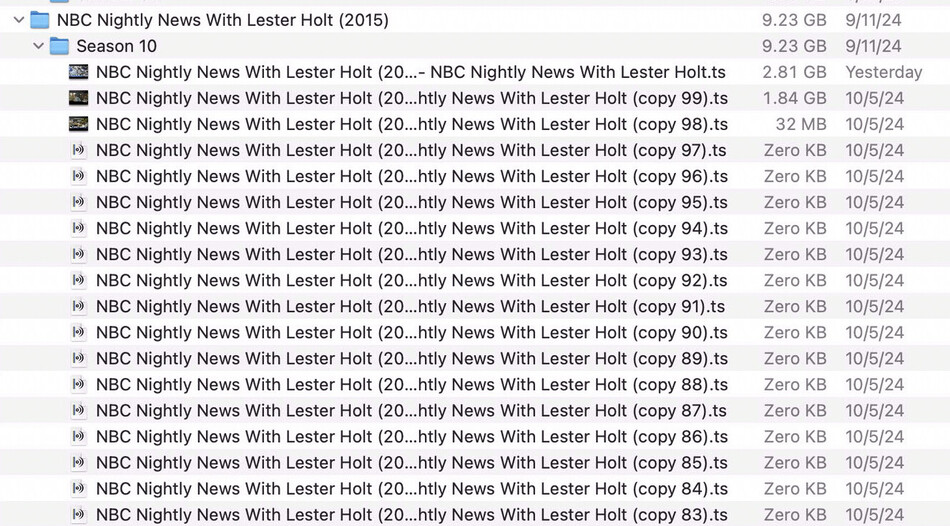
I’ve also included some screenshots showing settings and a lot of files with copy in the name so it must be encountering an error then retrying over and over attempting to save under the same name but macOS (or Plex?) is adding suffixes. All those zero KB files is what happens when I try H.265 DVR transcoding while recording — hundreds of empty files— which I didn’t notice until today.
The most recent successful recording is transcoding with H.264 with 30 quality and it’s still about 1GB larger than a standard half-hour MPEG-2 recording so either that’s an error or, more likely, I don’t understand the quality settings yet and need to try lower values?
Thanks again.


Plex Media Server Logs_2024-10-07_08-10-30.zip (2.0 MB)
@jjlSD I just confirmed that h264->HEVC optimization is working for me. can you include the logs of an optimization?
@9Blowout I would suggest disabling hw encoding for dvr recordings. if the bitrate of the broadcast is very low you will likely need a very low quality setting to match the un-transcoded size.
Thanks, I will leave it on MPEG-2 until 265 works.
Quicksync 264 isn’t worth it for me but 265 would. However, Quicksync simply isn’t as good as Apple Silicon Video Toolbox. The size reduction and quality is bananas but it’s a pain to transfer vids to my M1 Pro, process, transfer back, etc. Maybe I’ll look into setting up folder actions or a triggerable script.
Thanks again.
@9Blowout I would defiantly try again once i complete the transcoder update. I suspect the issue has already been resolved and unfortunately I can’t justify tracking down this issue with an experimental feature when my next task is updating the transcoder.
@Ari what is you’re clients “burn subtitles” setting set to?
You ignored the part where it says Limit remote stream bitrate.
Also, I’m not sure this thread is the place for this…
It is, because a new feature was introduced and I’m proposing an idea how to make it better/more useful.
SRT but all subtitles have to be burned-in (it’s a limitation of the streaming protocol used to send the video to the client).
Plex Transcoder.
Plex should be using hardware transcoding instead of software transcoding to burn-in subtitles as of version 1.41.0.8994.
- (Subtitles) Improved subtitle burn-in performance when Hardware Transcoding (PM-1764)
See forum thread from the testing. Lots of success stories with significantly improved performance burning subtitles in 4k.
My comment may got lost in here but it’s because of DASH. I shouldn’t have brought it up because it’s not strictly related to this feature, it just got worse when going from AVC to HEVC.
The only thing I need from you are server resolution/bitrate limits, given that HEVC is more taxing than AVC.
This should contain it, I am not in debug mode though? My Brilliant Friend might be a good example of this
Plex Media Server Logs_2024-10-07_07-10-47.zip (4.4 MB)
@jjlSD I see whats going on, just don’t know what to do about it yet. I’m hoping to have it addressed in the next build I put up
I’m having the same issue as @Kermee.
Same version, Lan has s4032 (Manifest) error, Wan clients are able to transcode without error.
Good to know I’m not the only one. — This has sort of manifested itself over the years but I never investigated it fully or brought it up. Browser LAN clients gets a s4032 (Manifest) error but WAN clients seem fine. This has happened before with earlier PMS Ubuntu/Debian releases at least the past two years with normal/production releases and HW H264 transcoding. But of course, while on LAN, I rarely transcode so it wasn’t a biggie to solve.
I don’t think I’ve gotten this error before and I can make it go away by disabling “Enable HEVC video Encoding (experimental)”.
Interestingly, the file I’m testing with at the moment is already in HEVC and should be able to direct play but the log is saying that isn’t an option and is trying to transcode.
“no direct play video profile exists for http/mkv/hevc/opus” seems to be the reason for that.
Even more interesting, this doesn’t seem to be a Lan vs Wan issue.
I can play the HEVC file I am testing with on my samsung tv, it direct plays the video, transcodes the audio
@shinjikun34 are you using chrome?
