Thanks so much for adding this feature, I’ve been hoping for it for a looong time.
HEVC transcoding while recording to DVR isn’t working for me unfortunately; it looks like it’s starting to record, the activity indicator ring spins for a few seconds then it stops. It still records normally if transcoding during recording is off.
2018 Mac mini 6-core i7 - latest macOS Sonoma
HDHomeRun Flex Quattro
For this one I manually started a recording, the activity indicator spun around a few second then it stopped. The red recording dot was still showing on the TV show listing so I clicked it to see what it would do; it just showed a generic error message.
Yep. I just tried it again with regular 264 transcode and it works. I just never use regular 264 transcoding because the file sizes are much bigger than native MPEG2 recordings, for some reason. (I wish I could change compression settings but I don’t think that’s possible?)
There seems to be something amiss with DVR recording with HEVC Transcoding enabled for recordings. Mind you the bitrate from the stream is only 20Mbps MAX since this is an OTA recording from an antenna…
Also the image is washed out like it was trying to tonemap but the source is SDR already.
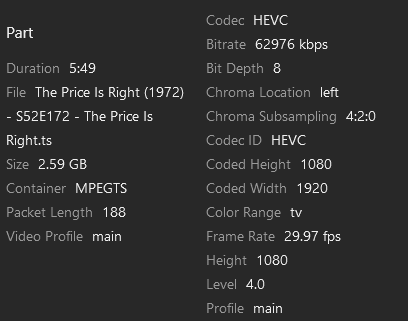
Why is a 6 minute recoding in HEVC over 2.5GB?
Without HDR>SDR Tonemapping enabled (image is still washed)
For comparison purposes here’s a DVR recording with H264 transcoding:
With all the issues users have been having with dvr recordings there is a very real possibility I will be removing support for this feature. It does not appear the hw encoders are fault tolerant enough for ota data.
@MowMdown I have added the large file size of dvr recordings to the known issues (thanks for pointing put its bitrate related). I’m not sure what to tell you about the washed-out image as I am currently unable to reproduce.
I’m confused, why use HEVC if the resolution isn’t increased for the same size stream? Are you saying the resolutions are going to remain the same for the same stream bandwidth? I’m not sure that is the goal we, the customers, are after. Higher quality 2Mbps 480p (it’s never been 720p no matter what the menu says) isn’t something we need.
In my transcoding experience, HEVC 4Mpbs should be either a “low” or “medium” 1080p. 2Mbps should be a “high” 720p at minimum.
I mentioned this to Chuck as well, we need a 6Mbps option. The jump from 4Mbps to 8Mbps is too great for those of us who are upload bandwidth limited. 6Mbps 1080p is plenty good enough for most users (is for me).
I already brought this up above and Chris said it is on the roadmap to have different resolutions per bitrate for HEVC and X264, but it’s a more complex change and it’s still in design.
That is what confuses me. I would have thought the main goal of HEVC is to provide higher quality and higher resolution in lower bandwidth streams. I’m glad it is on the roadmap, but I sure hope that is the roadmap to v1.0 and not after the release, otherwise, what is the purpose of releasing HEVC transcoding?
Don’t get me wrong, I’m very excited about HEVC transcoding! It’s a bit of a game changer, if able to deliver better quality and resolution in the same package size, which I have no doubt it will.
@Kilgry It will likely not be included on the release. Many users are excited about the better quality and the lack of tone mapping and we don’t want to hold up this work on a future feature. I can promise you we are well aware that the quality selection needs a complete revamp.
Any plans on supporting Intel Quicksync/Synology (Apollo Lake/Intel Celeron J3455/UHD 500/Synology 918+) devices that encode up to 8-bit HEVC only, not 10-bit HEVC (but have 10-bit decode support), if plans allow whenever-in-the-far-off-not-defined-future, or not being considered at all ever?
@staknhalo I ran into some issues using 8-bit only devices with our current transcoder. My next big task is going to be updating our transcoder to a much newer ffmpeg (and make it much easier to update in the future). After the update is complete I will re-visit the issue and see if the issues go away.