HEVC Transcoding: Error code: s3014

Server Version#: 1.41.4.9380
Player Version#: 4.144.1
OS: unraid v7
GPU: Nvidia P1000

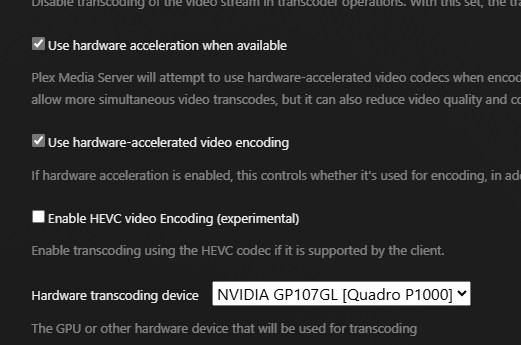
When i enable HEVC transcoding in the new build, it transcodes for a few seconds then stops with error code: s3014. I have the GPU selected in the plex settings, and x264 hw transcoding works for both encoding and decoding.

See attached server log.
Plex Media Server Logs_2025-01-22_15-44-47.zip (4.2 MB)

Which version of the Nvidia drivers are you using?

( Specific version please, not “latest” )

Your logs show that no GPU is found.

Jan 22, 2025 15:29:39.287 [22456802302776] DEBUG - [Req#cd/Transcode] Starting a transcode session t9zuk6btnoln19luvwsjeiai at offset -1.0 (state=3)
Jan 22, 2025 15:29:39.289 [22456802302776] DEBUG - [Req#cd/Transcode] TPU: hardware transcoding: enabled, but no hardware decode accelerator found
Jan 22, 2025 15:29:39.291 [22456802302776] INFO - [Req#cd/Transcode] CodecManager: starting EAE at "/run/plex-temp/pms-3f79be73-6552-49a6-bc50-bbb270756585/EasyAudioEncoder"
Jan 22, 2025 15:29:39.291 [22456802302776] DEBUG - [Req#cd/Transcode/JobRunner] Job running: "/config/Library/Application Support/Plex Media Server/Codecs/EasyAudioEncoder-8f4ca5ead7783c54a4930420-linux-x86_64/EasyAudioEncoder/EasyAudioEncoder"
Jan 22, 2025 15:29:39.291 [22456802302776] DEBUG - [Req#cd/Transcode/JobRunner] In directory: "/run/plex-temp/pms-3f79be73-6552-49a6-bc50-bbb270756585/EasyAudioEncoder"
Jan 22, 2025 15:29:39.294 [22456802302776] DEBUG - [Req#cd/Transcode/JobRunner] Jobs: Starting child process with pid 419
Jan 22, 2025 15:29:39.295 [22456802302776] DEBUG - [Req#cd/Transcode] [Universal] Using local file path instead of URL: /media/Movies/The Remarkable Life of Ibelin (2024)/The.Remarkable.Life.of.Ibelin.2024.1080p.NF.WEB-DL.H264.SDR.DDP.5.1.English-HONE.mkv
Jan 22, 2025 15:29:39.296 [22456802302776] DEBUG - [Req#cd/Transcode] TPU: hardware transcoding: final decoder: , final encoder: 
Jan 22, 2025 15:29:39.297 [22456802302776] DEBUG - [Req#cd/Transcode/JobRunner] Job running: EAE_ROOT=/run/plex-temp/pms-3f79be73-6552-49a6-bc50-bbb270756585/EasyAudioEncoder FFMPEG_EXTERNAL_LIBS='/config/Library/Application\ Support/Plex\ Media\ Server/Codecs/e613bce-97f23d579c1001d8e9cc0d2e-linux-x86_64/' X_PLEX_TOKEN=xxxxxxxxxxxxxxxxxxxxxxxxxxxxxxxxxxxxxxxxxx

nvidia driver: 565.77

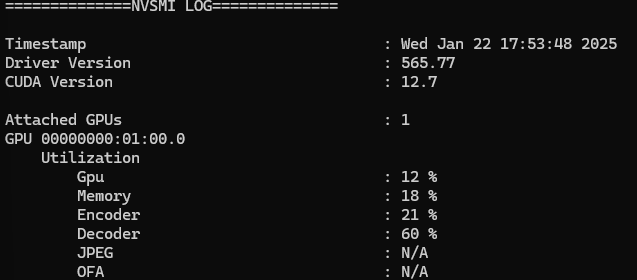
Very strange since I see the GPU working with nvidia-smi right before it crashes

and the gpu is shown in the plex settings

strange, now both x264 and hevc give the same error even tho i see it transcoding with nvidia-smi

edit after bouncing the docker, x264 hw dec/enc is working again.

so plex obviously sees the gpu.

Same error after enabling HEVC, bouncing the docker image and trying to transcode again. See attached updated logs, its the last thing i played (around 5:55 EST)

I can also confirm I see load on the GPU with nvidia-smi

Plex Media Server Logs_2025-01-22_17-56-15.zip (2.8 MB)

Strange enough, with HEVC encoding enabled, it works fine on an android client. No error and the dashboard shows HEVC transcoding. See attached log, latest playback is hevc encoding with android client.
Plex Media Server Logs_2025-01-22_18-16-31.zip (1.2 MB)

I use LXC instead of Docker (easier for me)

The important part here, which I hope you can translate, is confirming the Nvidia runtime is passed into the container

  nvidia.driver.capabilities: all
  nvidia.require.cuda: "true"
  nvidia.runtime: "true"
devices:
  gpu:
    gid: "110"
    type: gpu
  media:
    path: /glock/media
    readonly: "true"
    source: /glock/media
    type: disk

I have the full Nvidia drivers installed on the host. This is where the kernel modules (DKMS) are.

The above configuration ensures the runtime element, including nvidia-smi comes through to the container (you don’t need to install it in the container)

Yes?

The logs show me that while the GPU is seen on the PCI bus,
it is not enumerated into /dev/dri

I’m getting a quick 3016 error code followed by this 3014 error code when playing on Safari on MacOS. Intel iGPU on the latest server version.

@clars821

Where is your server running?

This is Linux . I can’t help with MacOS (don’t own a Mac)

Server is Linux. The new transcoding functionality is working well for all my Android clients, but I’m getting the same s3014 error code OP mentioned after a few seconds of transcoding on Safari. Thought I’d mention it in case the Nvidia gpu is a red herring, as I have an Intel GPU that’s been very stable the past 2 years.

Edit: I want to note that like OP, the issue started when I selected the “enable HEVC encoding” option and then persisted even after unselecting it. Perhaps a web client thing, as OP is using Edge and I’m using Safari?

1 Like

Can confirm nvidia runtime is passed to the container. This shell is within the plex container:

As @clars821 also observed, no transcoding problems with android clients, only plex-web based clients. It also isn’t only nvidia gpu’s causing the error, they have an intel gpu with the same issue. I’d agree that i haven’t had issues with transcoding up until I enabled HEVC transcoding.

Web clients do not do well with HEVC. It’s not guaranteed.

I have Chrome. Chrome on Linux with HEVC output does not work.

I have Nvidia GPU for my desktop. This is the known failure point.
Supposedly, Intel iGPU driving the desktop display works but I cannot confirm it.

I’ve confirmed Shield (Android) and Apple (ATV 4K) work as does iPhone 11 (new beta player)

1 Like

Ok, i guess i’ll keep hevc transcoding disabled until the bug is fixed. thanks for confirming

There will be a few hiccups as we launch this. There was a lot of testing but, like any big release, we’re going to find edge cases.

I found 3 such edge cases today myself.

Keep in mind that only two browser-based configurations were listed as supported: Chrome on macOS and Windows and Safari on macOS.

Confirmed its not crashing on chrome.

FYI, also crashing on the latest plex for windows (which I believe is based on plex web)

Plex for windows Version 1.107.1.293-575aed08

Plex Media Server Logs_2025-01-23_18-15-46.zip (2.3 MB)

This topic was automatically closed 90 days after the last reply. New replies are no longer allowed.