I’ve got some series that have specials that aired mid-season. I’d like to flatten the series and sort by airing date, so that the episodes and specials play in the order they were actually aired.
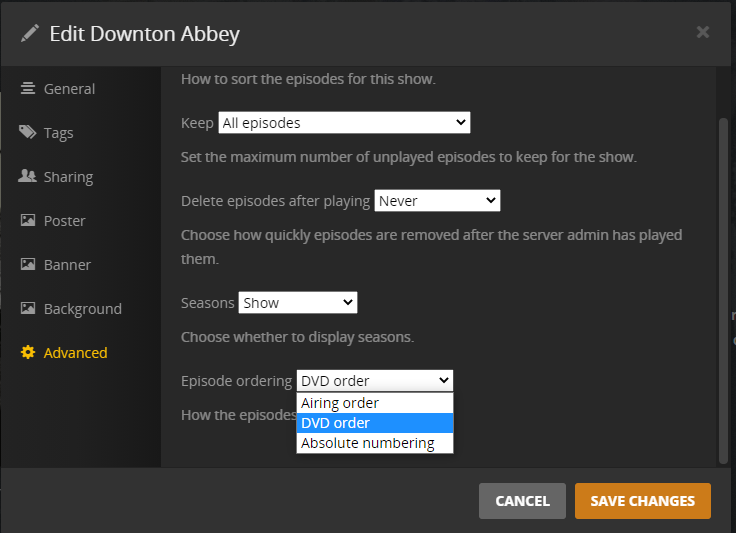
I’ve got the episodes named so all the specials are s00eXX. I can edit the series settings, go to the Advanced tab, and set Seasons to “Hide”. I’ve got Episode sorting set to “Oldest first”, and Episode ordering set to “Airing order”.
While the seasons are indeed hidden, unfortunately, it still sorts by season then date, rather than just by date. Is this working as intended? Suggestions that don’t involve renaming files?
Check the DVD order or Absolute order for the series on TheTVDB.com.
Does that provide the episode order you want?
If so, rename the files accordingly, then edit the show in Plex and choose DVD or Absolute order (at the show’s main page, click the pencil icon, then choose Advanced)
Downton Abbey example
Using airing order, the episode “Christmas at Downton Abbey” is S00E02. Using DVD order it it S02E09, which places it as the last episode in season 2, which is when it aired.
Thanks for that suggestion. Absolute numbering would allow me to end up with the episodes sorted by air date across seasons. Unfortunately, I still need seasons to exist. I was hoping that there was a non-destructive way to accomplish this, since I would like to toggle back and forth as needed.
I suppose I should either file a bug report that ‘Episode sorting > Oldest first’ isn’t aware of ‘Seasons > HIde’, or maybe a feature request so those two settings play nice.