Server Version#:1.19.3.2764
Player Version#:4.30.2
Is there any way of adjusting the brightness, contrast or colours on the Plex screens on my W10 PC ? The default is muddy grey faint text on a black background and is very difficult to read without squinting.
This maybe a resolution issue of your monitor, as I have no problem even with my old eyes.
Unless your setting for night light is activated.
Click for zoom
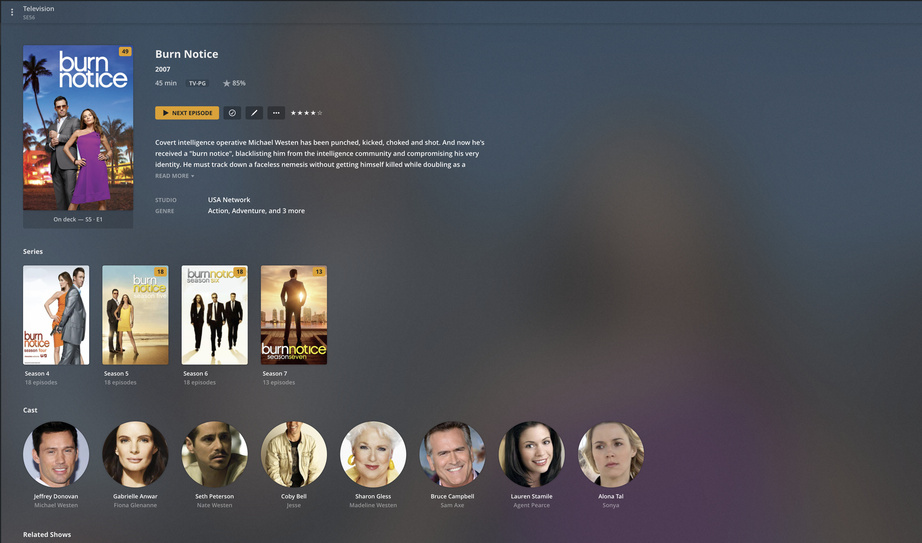
Where do I find the setting for night light please ?
There is no such setting in Plex. (If you use the same-named setting in Windows, either disable it while using Plex, or at least dial back its intensity.)
If the Plex web app appears how you describe it above, there is something wrong with either your web browser or your computer in general.
-
make sure that your web browser doesn’t block or override any style sheets / formatting instructions.
Sometimes there are browser settings engaged, which are supposed to enhance readability for vision-impaired persons.
Sometimes, you have a web browser add-in activated, which blocks parts of websites. -
Sometimes, similar vision-impairment settings are engaged at the operating system level.
In Windows for instance, you can find settings regarding this under Control Panel - System - Display
as well as under Control Panel - Ease of Access - High Contrast
Make sure to disengage any such settings and browser add-ins.
Sometimes there are other factors as well, like incorrect color profiles or a crass misadjustment of the display or simply a technical defect.
Use this test page to check some basic parameters of your web browser and your display (only after you checked for and disabled the above mentioned settings): https://chromachecker.com/info/en/page/webbrowser
This topic was automatically closed 90 days after the last reply. New replies are no longer allowed.
