How can I edit what resolution Plex reports?

While I’m running my Plex server on Windows I’ll bet this applies to every Plex server. I have a bunch of 30s, 40 and 50 movies that were ripped at a JUST shy of 1080p resolution. Plex dutifully lists them as 720p rather than 1080p and there doesn’t seem to be away to change that. For instance, here’s a movie from the 50’s that I wold like to stick into the 1080p category but Plex shoves it into the 720p because Width isn’t greater tan 1920 and height isn’t greater than 1080.
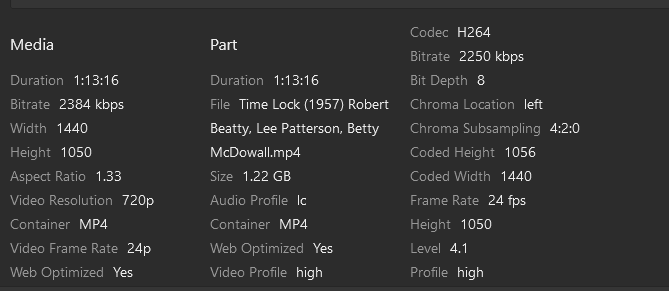
image

Is there some config file I can edit to either change the global definition of 1080p or are there a way to edit the metadata on an individual movie basis?

I asked this question a couple years ago but the answer was no then. I was just hoping it had changed by now.

Sorry it has not changed

That’s REALLY annoying. For instance I just put that file on Plex tonight knowing it was (SHOULD be) a 1080p file and looked for it as such. When it didn’t show up in my 1080p movies I made sure the file was actually in the library and THEN I searched for the title and saw that Plex demands this be called 720p. I get that it doesn’t quite get to 1080p standards, but it’s WAY closer to 1080p than 720p.

And there are other movies I have that are even closer. I seem to remember there was one that was only 6 pixels shy (so 1074 height)! That just seems ridiculous to me.

This topic was automatically closed 90 days after the last reply. New replies are no longer allowed.