No offense… you were not actually asking for a feature (at least not in this thread) but ranting all across the forum 
The reason most users consider it “destroying” the video is that a video comes with a defined aspect ratio – for TV content this is currently 16:9, for Movies it’s a wider aspect ratio (e.g. 21:9). In older days content was offered in 4:3.
When you want to fit content with a different aspect ratio than the one of your playback device, you’ll need to modify it.
Examples:
1. Letterboxing
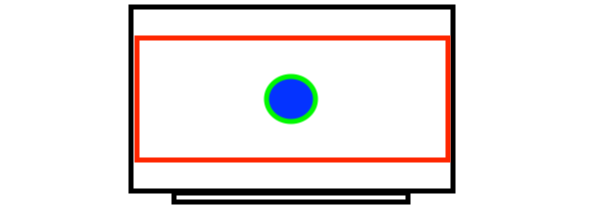
The video remains its original aspect ratio and is “squeezed” on your screen. If you e.g. put a 21:9 movie on a 16:9 screen, this will give you black bars above and below the picture (the red box below indicates the actual movie, the black frame is my take on a TV).
A different letterboxed scenario would be old 4:3 tv content on a 16:9 screen – with this example you’ll get black bars on the left and right of the screen.
Important: In all letterboxed scenarios, the aspect ratio of the original content is maintained.
2. Zooming
With this approach you basically scale the video so it covers the space usually occupied by black bars. However… by proportionally scaling the content, you’ll end up with some parts of the movie cut away. The diagram below is supposed to show the content you loose when zooming.
You sometimes notice this when text displayed on the screen is cut off at the sides.
However… same as with letterboxing the aspect ratio of the original video is maintained (indicated by the still “circlish” circle).
Scaling also works for e.g. 4:3 content on your 16:9 screen – in this case content from the top and bottom of the picture will be cut away to make the video “fit”.
3. Stretching:
Some TV sets try to avoid the ominous black bars by stretching the video. This basically leaves the video’s width untouched but increases its height.
By doing this, you won’t loose any content (as with zooming). However the content gets distorted (indicated by the circle which as now turned into an egg).
Long story short… when dealing with this, most users feel very strongly about (a) not cutting away and (b) not distorting their content. That’s why you got such a strong reaction and why most current media players go with the letterboxing.
By the way: Content derived from an optical disc include those black bars “out of the box” (at least for content not provided in native 16:9 aspect ratio).
Some TV sets still provide features such as zooming or stretching for their users. Apps usually try not to mess with the content and provide it as it is delivered, leaving any re-touching to the TV.