I have been off and on searching for a solution for months and cannot find one.
I just want my plex server to have my media server and not the free plex one.
The best I can do is to disable the online media sources, but that still leaves a blank tab that plex defaults to when you first load up plex.
I want plex to default to my server, or to remove the free plex server so that the only choice is my server on the home page.
Does anyone know how to do this?
It’s an account setting. https://app.plex.tv/desktop/#!/settings/online-media-sources
Disable them and they will not show up.
- if you use a web browser as your default Plex client, make sure that it doesn’t delete the cookies from the domain plex.tv when you close it.
You might also want to consider using “Plex for Windows” as your default client, so you don’t have to deal with the restrictions of a web browser. - perform the “Reset customizations” procedure, where you are asked for your default server https://support.plex.tv/articles/customizing-plex-web#resethome
This is what you get when you diable all online media sources, i dont want a blank home page, i want the home page to be my server.
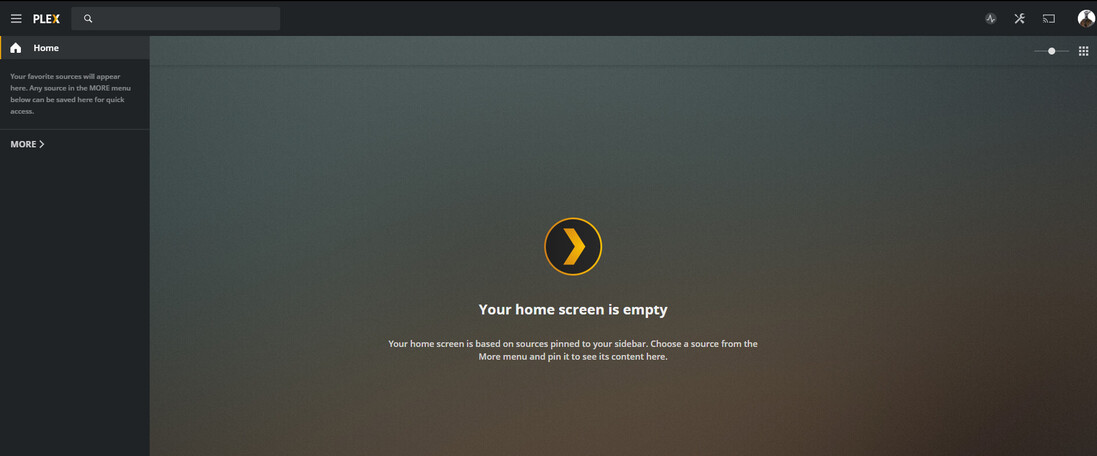
Do your libraries and your server appear on the left side bar, after you click on MORE >?
If they do, pin some of them.
This topic was automatically closed 90 days after the last reply. New replies are no longer allowed.
