Server Version#: 1.18.7.2438
Player Version#: 1.6.3.1009-57cf57c8
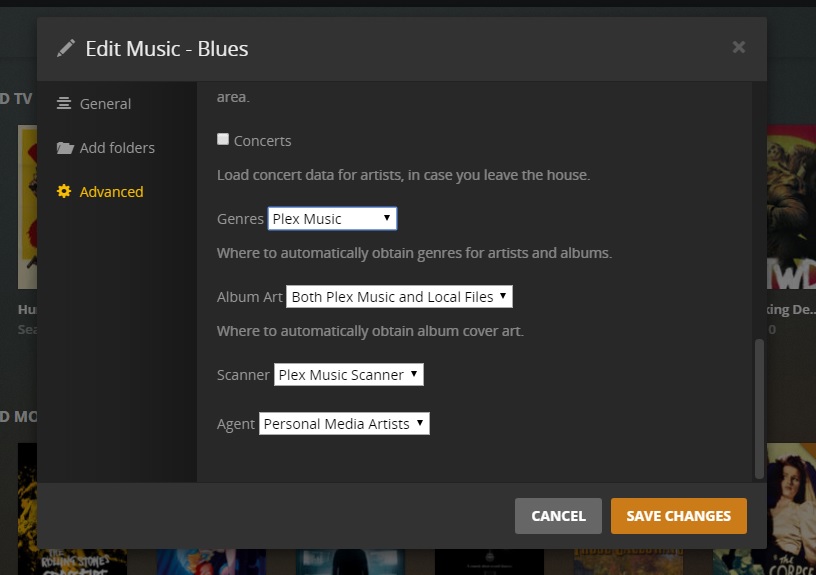
After one of recent server updates I’ve noticed some problem with multi-disc albums. After some experiments decided to completely rescan my music library to refresh metadata. I have all the required metadata in tags (album artists, genres, covers). I use iTunes Media folder as a source for my music library in Plex (have been doing so for years - everything was perfect). After rescan my library became a complete mess - even with checked “Prefer local metadata”, “Embedded tags” for genres and “Local files only” for album art , Plex keeps pulling info from internet (probably last.fm), replaces cover art with something irrelevant, sometimes leaves “Genre” empty and sometimes even replaces Artist/Album names (probably fixing what he supposes to be misprints).
I’ve tried it with “Plex Music” scanner and “Plex Music” agent selected. If i try “Plex Music scanner” and “Personal media assets” - I don’t get any genres and covers at all.
The question is - is it possible to completely disable any integration with online services to fill metadata for music library ONLY from embedded tags? Several attempts to perform Plex Dance, recreate library, restart server with different settings, etc did not help. I’ve tried to block Plex from accessing last.fm and musicbrains by adding dummy lines to /etc/hosts, but without access it just stucks when scanning the library, so it’s not an option.
After some more experiments I’ve found the solution - maybe it helps someone. The “Album art” drop-down box should be set to “Both Plex Media and Local Files”. With this setting everything is perfect (at least after the initial scan). If I choose “Local Files only”, Plex starts making mess with genres, covers, artist names etc. I reproduced this several times on a model “library” of a couple of albums. Very strange behaviour - evidently a bug.
I have been thinking I should set the “Album Art” to just “Local Files Only” on my system. All of my media has embedded artwork or side-car files for the album artwork, and I don’t need or want the artwork that Plex can download. If changing that option messes with the library that seems to be functioning, I’ll live with the extra artwork.
Correction: I just checked the settings for my Music Library, and at some point in time I have set the Artwork to “Local Files Only”
All of my music has only the local artwork as a selectable option in the Edit screens.for albums added in the last 2 months, Albums older than that have the downloaded posters as an option.
So I’m not sure that option actually was the fix for your problem, unless it’s a Mac only problem (I’m running Windows)
Now I need a way to get rid of all the extra artwork. I’m assuming a refresh of the whole library will clear them out, but that takes forever.
I have both the agent and scanner set to “Plex Music,” genres to “Embedded Tags” and Album art to “Local Files Only”
There’s still a few bugs in the new music scanner and agent as far as I’m concerned, but after deleting and recreating the library 3 times, and fixing even the tiniest of mistakes in folder/file structure and embedded metadata, it works 98% of the time perfectly.
Albums with two artists like Leon Russell and Willie Nelson’s “One for the Road” is an example. Plex will place it in one of those artists, not in one by itself. So you need to do some splitting and hand editing to get it to work.