How to have Plex Media Server start at Login

Server Version#: do not know
Player Version#: d0 not see
<If providing server logs please do NOT turn on verbose logging, only debug logging should be enabled>

Hi there

I am running Plex Media Server on my Apple laptop.
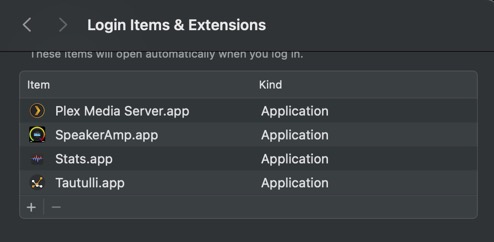
What I want is the media server to start when I start the system up. But it does not show up in my list of applications in the systems settings, where I want to mark it as an app to be starting at login.

Also this “app” has to be double clicked separately TWICE before it starts. Not a double click, but after two times it starts. Very strange, all other apps start at one click only.

Happy for some advice. Thanks

Firstly Add it to Login items. It will appear after enabling in PMS Chevron menu.

After a Restart a Chevron will be added to the menu bar. Add Login item by clicking Open at login

You can and I do have PMS as a Bookmark or even a home page. Now if you want PMS to open after login or start up add your Browser to login items for a automatically Launched PMS.
Bookmark
https://app.plex.tv/desktop/#!/

Now if you have your Laptop powered from the wall socket, add the following.

Hi, thanks for your answer, but on IOS the Plex Media Server does not appear as an app. At least not with me…


So I do not understand it…

Hi,
I’m now confused. You said a laptop, laptops don’t normally use iOS but MacOS. So are you using a Laptop or a iPad?

Now if you are really on a Laptop, open the Plex Chevron in the Menu bar at top of Desktop. Click Open at Login

Thx! I found it…have a nice day…

This topic was automatically closed 90 days after the last reply. New replies are no longer allowed.