I made a Youtube video to show this issue.
Hi guys! I’m trying to understand when this issue started. is it recent in the 1.15.x PMS releases? or something that started earlier? Could anyone narrow down when this issue started to occur?
It has been happening as far back as August. I am always on the newest build and it didnt work back then. Thats when I got the P2000.
I downloaded Plex on my gaming pc. It uses a 1080ti. That seems to work as expected. I was able to transcode 4K HDR HEVC H265. CPU usage was higher at about 30% and GPU went to about 20% which is pretty correct.
I believe it is an issue with Quadro cards or their drivers. In the way that Plex interacts with them. It seems to be an issue exclusive to Quadro cards.
Also I did more testing and it appears to be tied to 10 bit. I believe because they dont have support up for 10 bit HDR, it is failing to turn on NVEDC. So then it just errors out and flounders. You can test this by watch a movie that is 4k h265 but no 10bit HDR(its hard to find).
I’ve got to chime in here. I’ve been using Plex on my core i7 2600 (old dog) for a while coupled with a p2000 and it USED to have trouble transcoding 4k content… the clients would constantly buffer.
UNTIL I created a ramdisk and told the transcoder to use that specifically for transcoding processes.
Since then I’ve had zero issues with my p2000 transcoding all kinds of 4k content to my various clients.
I’m on Win7x64 just FYI and I’ve got 32GB of Ram of which 15GB is made into a ram disk. Transcoding 4k takes a LOT of speed (think nvme if you’ve got it) and space. The transcoder can’t work fast enough to keep from buffering without.
4k transcoding is hard, and p2k is not a magic bullet. 
I am using a 16gb Ram drive. Can you post a video or screen shot of you doing 4K HDR H265 transcoding??? This is the first person I have seen that can do it. Please show your tautulli speed while its happening as well as GPU usage and CPU usage.
If its driver related, its possible windows 7 uses a different driver or something different with it that allows it to work.
Sure. Here ya go…
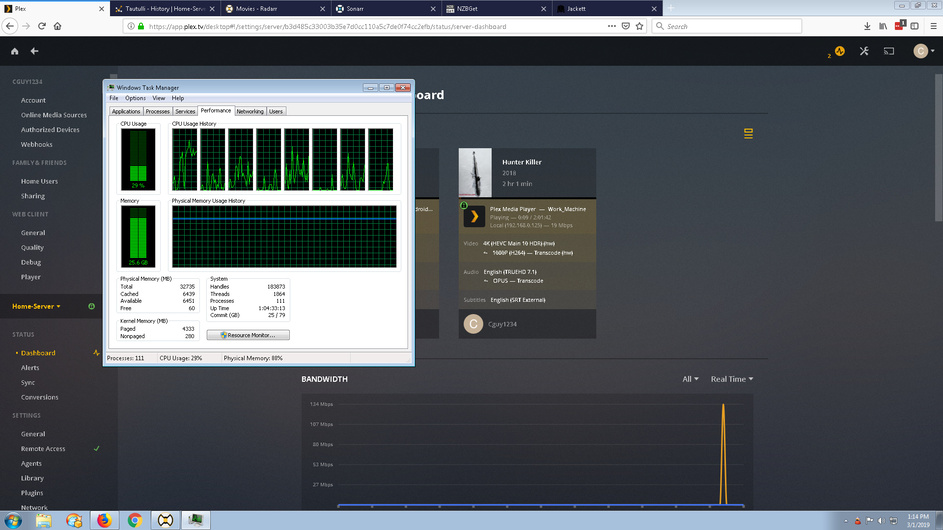

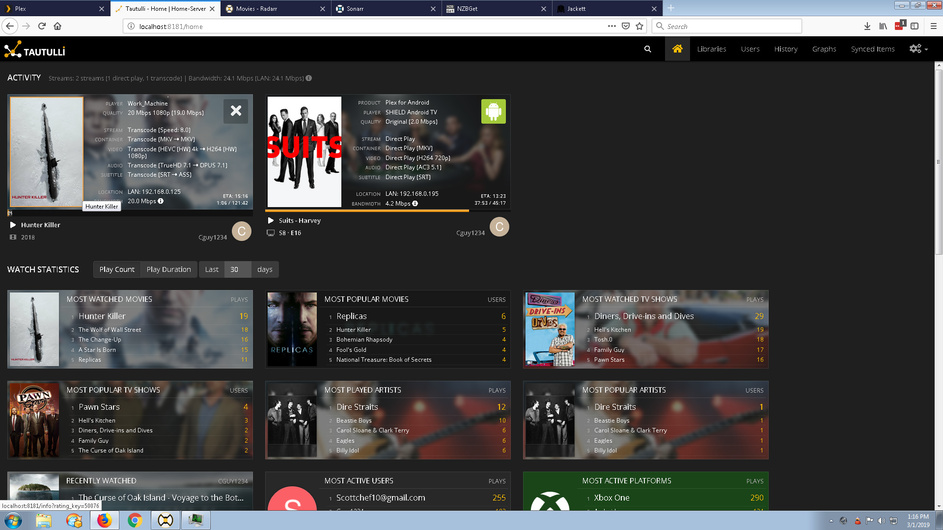

This is with a local plex client set to playback 1080p at 20mb.. but I have MANY remote users that transcode to 720p (xbpx 360) or roku.. and it works fine for them as well.
You’ll note that in the screenshots the transcode speed is from 8.0 to 0.0 - this does fluctuate up and down as the movie plays, sometimes even staying at 0.0 or 1.0 for a bit but the movie never buffers for my users.
And keep in mind my system is OLD by today’s standards. a core i7 2600, on a p8z68 mobo…
It must be related to windows 7 and/or windows 7 quadro drivers. Because that is not at all how ours are behaving. Yours is indeed working correctly! Thank you for posting that. Are you on beta or stable Plex releases?
You pretty much confirmed my theory of it being driver related.
I’m on Beta server channel, but this has been working for at least 6+ months for me. Are you saying that this doesn’t work on Windows 10? What flavor are you trying it on?
Hey Mongoose, I know you’re going to install windows 7 for a test at this point. Please let me know if it does fix it 
Hey, I just remembered something…
you folks having problems, before you do anything else can you make sure that you have your transcoder settings to Automatic?
https://app.plex.tv/desktop > settings > transcoder > quality = automatic
I am using beta Plex but stable doesnt work either. I am using Windows 10 Pro. Yea it doesnt work on Windows 10. I tried my 1080ti on windows 10 and that worked fine so thats why im thinking its quadro driver related. By that I mean they way Plex is interacting with the quadro cards, not that there is an issue with nvidias drivers. Also, it only affects h265 not h264.
Funny enough, Emby released a new version on their beta channel a few days ago. Its now behaving exactly how it does in Plex They changed the way the transcoding chain works and added some new features. Its possible Plex already made these changes and this is where the issue lies.
I tried changing this just now. It had no affect either way.
@manuwood I think im good on trying a fresh OS install lol it took me many months to get my server in the shape its in now!
I’m sorry for being the bad monkey on your shoulder  By the way it should work properly with Win 10 PRO. I hope for a fix.
I got curious about Emby transcoding so I running some tests there too.
Emby in browser gets the same poor results as Plex unless I disable subtitles. Running with subtitles transcodes at 18 fps, and without at 40 fps. But it can still transcode the same film to my phone with and without subs flawlessly -while the transcode in the browser is running at the same time.
So while there is some weird stuff going on with Emby it seems to prove that the Windows 10 Pro + Nvidia Quadro drivers combination is working.
The thing is if you use embys stable release, the quadro will get way in the 50s with sub tittles on. So it is an issue and not web site related
I wanted to add my 2 cents here. I am using Windows Server 2016, and I am getting similar behavior to Mongoose. I will not re-hash all of it here, since I would basically be saying the thing as Mongoose.
I did try the RamDisk by CGuy_1234 (good idea by the way). Unfortunately, my results were the same… I believe Windows Server 2016 and Windows 10 are built on the same kernel, so it would make sense that Mongoose and I have similar behavior.
I had a nVidia GTX 1060 and had the same behavior as the P2000. I contacted nVidia, and they asked me what I did for them to “duplicate” the issue. From the response is they were able to. I got the response, "Thanks, we’ll have to investigate this and see if its a expected behavior or a bug. " They went on to confirm that I had the latest driver installed (which I did).
This may be a silly question - would it be worth creating a VM (Windows 7) and see if the behavior improves?
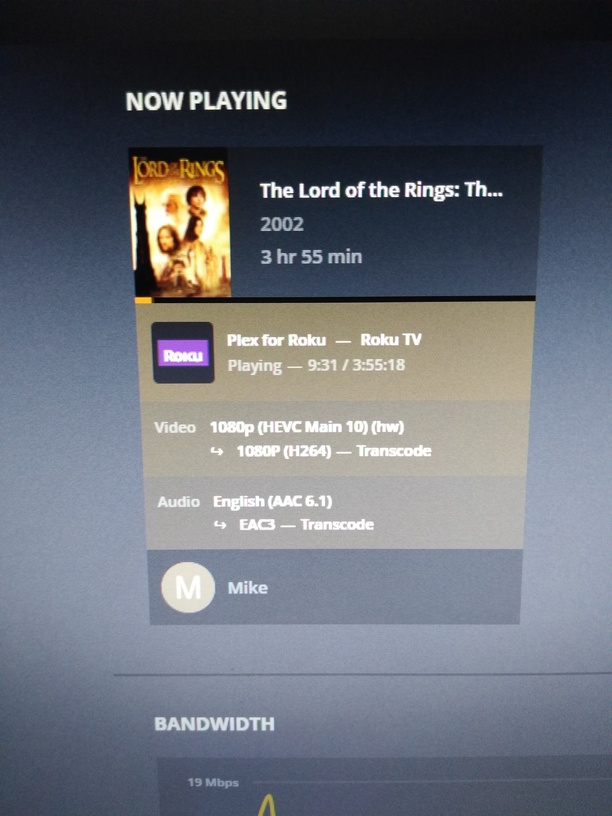
Thank you for your response, but it appears yours is 1080p. How does your set up transcode 4k? That is what we have been referring to. I probably was not clear in my post, so for that, I apologize
My bad… Im not fully invested in 4k yet. Being over 50 with tri-focals I really don’t see a difference between 1080 and 4k on a 50" or under. Im about half way through transcoding my library to HEVC with really good results using handbrake. In an effort to save hard drive space I’ve also transcoded the 4k files to 1080 with handbrake for use on this server. My brothers server run 4k native
Plex can transcoded it fine. I just think handbrake does a nicer job.


