HW Transcoding question

Server Version#: 1.29.1.6316
Player Version#: Any

I am running PMS from a Windows Scheduled Task at system start with my credentials. Everything is working as expected except HW transcoding.

This is a Windows 11 PC with an Intel CPU with Quick Sync.

Doing some tests I can see in the Dashboard “Transcoding (hw)”
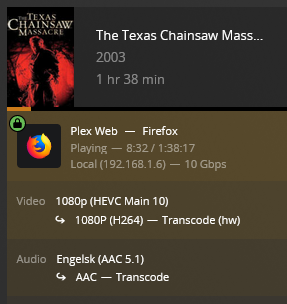
Screenshot 2022-10-23 115810

but according to the logs, there is no hw transcoding happening

Oct 23, 2022 07:57:54.776 [5984] DEBUG - [Req#25e/Transcode] TPU: hardware transcoding: enabled, but no hardware decode accelerator found
Oct 23, 2022 07:57:54.787 [5984] DEBUG - [Req#25e/Transcode] TPU: hardware transcoding: final decoder: , final encoder: mf

and

Oct 23, 2022 07:57:53.462 [5984] DEBUG - [Req#25b/Transcode] Codecs: hardware transcoding: opening hw device failed - probably not supported by this system, error: Unknown error occurred
Oct 23, 2022 07:57:53.462 [5984] DEBUG - [Req#25b/Transcode] Could not create hardware context for h264_nvenc
Oct 23, 2022 07:57:53.462 [5984] DEBUG - [Req#25b/Transcode] Codecs: testing h264_mf (encoder)
Oct 23, 2022 07:57:53.525 [5984] INFO - [Req#25b/Transcode] [FFMPEG] - MFT name: 'Intel® Quick Sync Video H.264 Encoder MFT'
Oct 23, 2022 07:57:53.859 [5984] DEBUG - [Req#25b/Transcode] Codecs: testing hevc (decoder) with hwdevice nvdec
Oct 23, 2022 07:57:53.859 [5984] DEBUG - [Req#25b/Transcode] Codecs: hardware transcoding: testing API nvdec
Oct 23, 2022 07:57:53.859 [5984] ERROR - [Req#25b/Transcode] [FFMPEG] - Cannot load nvcuda.dll
Oct 23, 2022 07:57:53.859 [5984] ERROR - [Req#25b/Transcode] [FFMPEG] - Could not dynamically load CUDA
Oct 23, 2022 07:57:53.859 [5984] DEBUG - [Req#25b/Transcode] Codecs: hardware transcoding: opening hw device failed - probably not supported by this system, error: Unknown error occurred
Oct 23, 2022 07:57:53.859 [5984] DEBUG - [Req#25b/Transcode] Could not create hardware context for hevc
Oct 23, 2022 07:57:53.859 [5984] DEBUG - [Req#25b/Transcode] Codecs: testing hevc (decoder) with hwdevice dxva2
Oct 23, 2022 07:57:53.859 [5984] DEBUG - [Req#25b/Transcode] Codecs: hardware transcoding: testing API dxva2
Oct 23, 2022 07:57:53.860 [5984] ERROR - [Req#25b/Transcode] [FFMPEG] - Failed to create Direct3D device
Oct 23, 2022 07:57:53.860 [5984] DEBUG - [Req#25b/Transcode] Codecs: hardware transcoding: opening hw device failed - probably not supported by this system, error: Unknown error occurred
Oct 23, 2022 07:57:53.860 [5984] DEBUG - [Req#25b/Transcode] Could not create hardware context for hevc
Oct 23, 2022 07:57:53.860 [5984] DEBUG - [Req#25b/Transcode] Codecs: testing aac_mf (encoder)
Oct 23, 2022 07:57:53.862 [5984] INFO - [Req#25b/Transcode] [FFMPEG] - MFT name: 'Microsoft AAC Audio Encoder MFT

The only way I have gotten HW Transcode to work is if I log in and run PMS as a program with the tray icon active as opposed to a Scheduled Task.

Is there any way to get HW Transcoding to work without being logged in and launching PMS as a program?

Thanks

As I recall, HW Transcoding is not supported when Plex is ran as a service on Windows. While you are not running as a service starting the process as you with a scheduled task at start up is basically the same thing. I don’t think anything has changed in that regard last I looked at running PMS as a service on Windows.

Thanks

I was actually running PMS as a service before but changed to the scheduled task approach for that reason, thinking that HW transcoding would work but apparently it doesn’t.

AFAIK, running as a scheduled task does not run PMS as a system service.
You just need to make sure to run it under your regular user account and not under the “Administrator” or “SYSTEM” Windows user account.

If you are using Remote Desktop, you might want to read Windows Remote Desktop breaks HW Transcoding (QSV) - Here's the fix!

1 Like

It’s not the same but they are similar. Especially with the “run whether user is logged on or not”. It won’t have access to the gpu render. Same way by default an RDP user does not either. System wants to leave that for the console user.

1 Like

Thanks

I do indeed use Remote Desktop but I’m rarely logged in. Only log in when I have to do some maintenance or work with Calibre, mkvtoolnix, ffmpeg, SubtitleEdit, etc.

The PC goes to hibernation every night at 1 AM, wakes up at 11 AM and launches PMS with the Scheduled Task. This task runs with my credentials and “run whether user is logged on or not” so PMS runs without a user logged in.

I’ve tried the settings in Group Policy mentioned in the linked post and

HKEY_LOCAL_MACHINE\System\CurrentControlSet\Control\Terminal Server\PerSessionTempDir

was already set to 0

My guess - I may be wrong - is that HW transcoding is not accessible without a user logged in.

Anyway, not a show stopper for now. Most of my media Direct Plays but I may give access to some family members and I don’t know the capabilities of the devices they will be using. It’d be nice if I could find a way to make it work.

Don’t know if “Automatically log in” at PC restart would help.

Are you running this machine without a monitor? That won’t initialize your video card so it’s not accessible. Attach a monitor or a dummy hdmi plug so the graphics does get initialized.

There is a monitor - an old Samsung - attached with a VGA to HDMI adapter and functional though always turned off unless I need to update BIOS or do some other task that requires local access.

I’ve done a new test.

  • Rebooted
  • Logged in locally - not with RDP. Monitor active.
  • Started a movie in Firefox in my own PC. This requires transcoding (HEVC Main 10)
Oct 25, 2022 14:45:45.239 [10944] DEBUG - [Req#ca/Transcode] TPU: hardware transcoding: enabled, but no hardware decode accelerator found
Oct 25, 2022 14:45:45.260 [10944] DEBUG - [Req#ca/Transcode] TPU: hardware transcoding: final decoder: , final encoder: mf

It looks like when PMS is starting as a scheduled task before I log in, HW transcoding is not available.

This seems to be a Windows issue. I believe several NAS do HW Transcoding without users being logged in.

Solved - I think :smiley:

For future reference, this is what I did:

  • Disabled the Windows Scheduled Task that started PMS at system start up
  • Enabled “Start Plex Media Server at Login”
  • Enabled automatic logon with Sysinternals Autologon

Now I am automatically logged on at system startup and PMS is launched

Did some tests and these are the results

Oct 26, 2022 08:14:52.351 [10840] DEBUG - [Req#c4/Transcode] TPU: hardware transcoding: using hardware decode accelerator dxva2
Oct 26, 2022 08:14:52.351 [10840] DEBUG - [Req#c4/Transcode] TPU: hardware transcoding: zero-copy support present
Oct 26, 2022 08:14:52.351 [10840] DEBUG - [Req#c4/Transcode] TPU: hardware transcoding: using zero-copy transcoding
Oct 26, 2022 08:14:52.389 [10840] DEBUG - [Req#c4/Transcode] TPU: hardware transcoding: final decoder: dxva2, final encoder: qsv

HWTrans2

I think everything is working as expected. I just have to remember not to sign out when using RDP but just disconnect.

I don’t know if there might be some security issues with me being always logged on in a PC that is mostly unattended. Hope not.

Any comments are most welcome.

Only if the atttacker has physical access to the machine. But then, there is almost no protection in general in this case.

If someone other than me - and my wife - had physical access to the machine without me knowing I’d be really worried. For the security of my home :slightly_smiling_face:

Once you log in through RDP the console is locked so you would need a password to unlock. Having the RDP port open to the public, even if using PATing, is more dangerous than leaving an unattended computer logged in.

This topic was automatically closed 90 days after the last reply. New replies are no longer allowed.
