Hi,
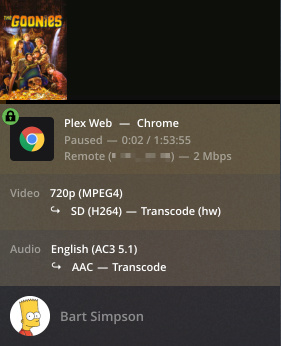
As I understand things there are 2 stages to transcoding (decoding and encoding) and both can benefit from hardware acceleration. However in Plex articles and on other sites, this is conflated and just called transcoding. When I look at screenshots of hardware transcoding in Plex I see 3 versions:
1 - where both the decoding and the encoding have (hw) next to them
2 - where only the encoding (the 2nd line) has the (hw) next to it
3 - mine, where only the decoding (the 1st line) has the (hw) next to it
Thanks Big wheel, that was the page that I got the Plex screen shot, I am basically asking is that page complete?
Why does it not explain this variation in transcoding marking on the dashboard?
Why does the screenshot on that page show only one part of the stream being hardware accelerated?
Basically, should step 7 on that page have more info?
Thanks Juice.
I agree that I have not seen the (hw) next to audio on mine or other systems. So I assume that audio streams are transcoded by software.
What do you mean by "“Graphics’ - the audio doesn’t have any of it maybe…”
single stream but on old h/w, so my iGPU on my SandyBridge CPU cannot activate as I have a Barts based ATI GPU.
So was my initial summary in the first post right?
There are 3 states of h/w transcoding and all three are supported by Plex?
I was wondering if sometimes it shows version 2 even where there is full transcoding.
not sure what you mean by “full” transcoding. We usually use that term to mean both audio and video are being transcoded regardless if HW or not. So all three of those are full transcodes
In the old days when your media file was in a format your client would not accept, you simply couldn’t play it. One of the magic features of plex is that its’ clients recognize what they can handle and what they can’t play, and they share that with the server. When you try to play a file the client can’t handle, the server is instructed to change it to an acceptable format on the fly. This is transcoding.
Transcoding decodes the media file from the format it happens to be in, then it encodes it into the format required by the client. The container, audio, video, even subtitles can need to be transcoded. It does this while you are watching your media, a little bit at a time, sort of a just in time approach.
Your server CPU does both the encoding and the decoding tasks for all (container/audio/video/subtitles) of these items by default. If you had enough server CPU, everything would work perfectly. Unfortunately, we don’t always have enough server CPU, and that is where hardware-assisted transcoding comes in.
If you have
A) a plex pass
B) hardware acceleration enabled
C) Intel quicksync or NVENC/NVDEC hardware in your server
D) graphics driver on your server
then you have additional options for video only. You may be able to offload the video encode and/or the video decode to this extra hardware. It is important to note that these are separate processes and hardware acceleration will be used for one, both or neither process.
The items that determine if hardware assist kicks in are
Plex has the support in your OS for this exact video format (it almost always does, but bugs happen)
The graphics driver in your server has support for this exact video format (again, bugs happen)
When decoding, your GPU hardware must support hw acceleration of the exact video format your source file happens to be in.
When encoding your GPU hardware must supports hw acceleration of the exact video format your client needs.
For #1) you can ask here.
For #2 you can often find details in the driver release notes.
For #3 and #4 just check the table for intel here