Server Version#: 1.22.0.4163
Player Version#: 7.14.1 (on iPad OS)
Noticed a very strange behavior with any iOS devices trying to play video on the same LAN as the PMS. (Plume wireless in bridge mode, Ubiquiti EdgeRouterX). All clients could see the PMS and pull up libraries, but as soon as I would try to play something it would sit and spin like it was buffering except it would almost never play. Periodically, it would say there was an indirect connection and playback bandwidth would be limited.
The host is an HP DL380p running Windows Server 2019 with a Windows 10 VM running Plex. I have a NIC team with the 4x1Gb NICs with a Hyper-V switch shared with host on top of it. Never has caused any issues before, and file copies, ping, RDP, etc. work fine. In testing, I found that if I pulled one of the NICs out of the team, assigned it to its own vSwitch, and only connected Plex to it, the buffering / indirect playback issue resolved itself.
It was really frustrating as only Plex seems to have issues with the Hyper-V switch shared with anything else. Hopefully this saves someone else pulling their hair out over it.
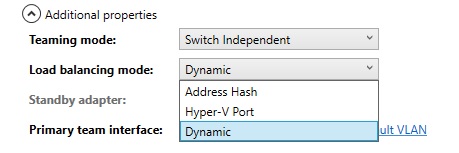
Which NIC teaming & balancing mode? Some of the modes mean packets are sent with changing MAC addresses. I could see that causing trouble for a mesh router or a locked-down edgerouter.
Mostly I just wanted more aggregate bandwidth across multiple VMs on the same vSwitch so as to not restrict traffic to a single NIC (with Plex DVR recording, file transfers, etc.). No traffic should have been passing through the EdgeRouter itself if it is direct LAN streaming though, right? I was using Dynamic as the NIC team mode, as that seems to be the recommended (and is the default).
“In the vast majority of cases, Dynamic should be your load balancing algorithm of choice. In fact, if you are ever in doubt as to which algorithm to use, I would recommend using Dynamic.”
It very well could be that I was trying to use it in the very few edge cases where it is not ideal. I also noticed some issues with Windows Admin Center gateway on another VM on the NIC teamed vSwitch (long load times). Once I disabled the team altogether and just did one HyperV switch per physical NIC, the issue seemed to resolve itself.
I don’t recall having this issue before with HyperV and NIC teams, so it’s possible the 4x1Gb HP NIC just doesn’t play well with it. In either case, I think I’ll be sticking to a 1:1 ratio for vSwitches and physical NICs until I have the need for 10Gb at some future point.