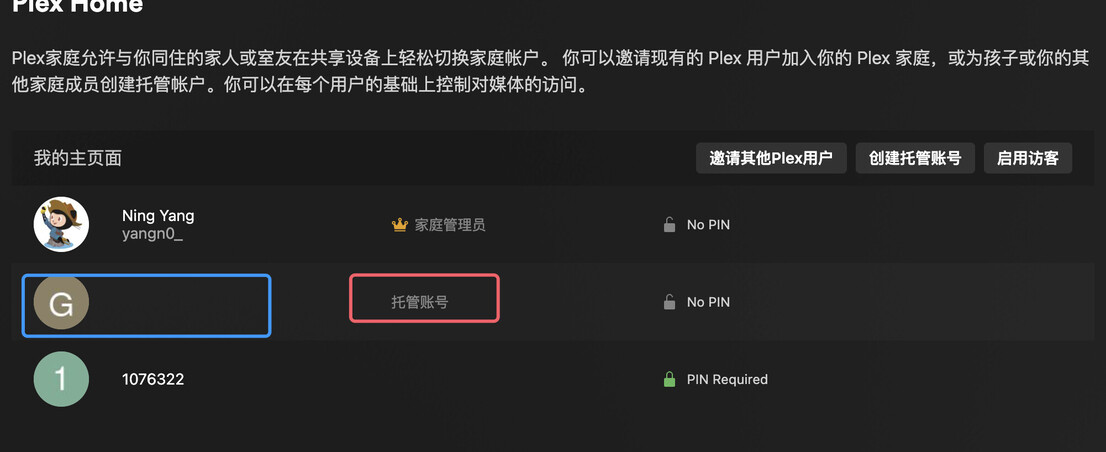
I can't delete the Managed Users in plex home

I can’t delete the Managed Users in plex home.


When I created the Managed Users, my username used emoji characters. This will cause display issues and deletion issues.

Of course you cannot, because that would mean that you are deleting yourself.

As far as I can see, it doesn’t anymore.
So what are you trying to achieve now?

The username, “friendly name”, and avatar of the home owner can be set here: https://app.plex.tv/desktop/#!/settings/account

Hi,
Thanks for your help.

I’m so sorry I used the wrong word. The host account means Managed Users.


There are three users in my plex home. And I’m using the admin user.
When I created the Managed Users, I used emoji characters as username.
My issues are:

  1. These emoji characters are not displayed correctly as shown in the screenshot.
  2. When I try to delete the managed user (username contains emoji characters). I get an error.

See Error message when trying to delete managed user - #4 by dane22

1 Like

It doesn’t work. I cant edit the managed user. When I try to click it to edit, it takes me to an error page.

This topic was automatically closed 90 days after the last reply. New replies are no longer allowed.