As the description says, my new I7 can’t use hardware acceleration. I’m looking for something used from eBay that’s not a ton of money that can transcode a stream or two to some friends or family. I found a used Geforce gtx 1050 ti 4gb oc but people were saying GeForce doesn’t work well. I just want something cheap that lets me have a stream or two going. I download 4K movies lots of times remuxes with HDR. It works great in my network but shudders outside. Why is the GeForce bad and what is recommended? I don’t care about, like, 8 streams. Just to share with some friends and family and probably not at the same time.
I also watching this thread. I have Nvidia Quadro P2200 and now interested in purchasing a Faster motherboard and want to make sure the money I spent on P2200 card will work on it.
I got the k version that’s why i bought a cheap GPU used for 50 bucks on ebay decided to sell the 12th gen I7 k non gpu version. For a 13th gen I5 with intel quick sync. The gpu was cheap so I might as well throw it in there. I have 1000 gb upload realistically when tested its in the 800s but im about to build like an enterprise tiny network with pfsense. Maybe ill actually get the GB speeds with the new network. I guess ill just sell the 12th gen I7 k version on ebay. The 12th gen I7 and 13th gen I5 are around the same price and ive read the 13th gen I5 is a better value.
I read somewhere that 11th Gen is also good at Transcoding to 4K with less power
Maybe my experience can shed a bit of light on your situation so you don’t spend an unnecessary amount of money for something that isn’t needed:
the whole hardware transcoding aspect with an iGPU is a bit overdone, definitely in your case since you said you’re only transcoding a stream or two…
waaaaay back in the day, yes it was necessary… maybe any intel that was below 8th gen needed the oomph a igpu or gpu offered, but really the newer cpus (especially by amd) are so far beyond powerful that it’s not needed… again, i know this from experience. how do i know? I use plex to save a TON of money… check it out:
- i live in boston
-my family’s home is on cape cod
-my parents live in NJ
-my chick lives in manhattan…
and they all stream movies and tv shows from my plex server (currently based upon a ryzen 5 7600). my last plex server was an i9-9900k.
i upgraded to the ryzen bc my plex server (on win10 IoT ltsc 22h2) is also a media download station (sonarr/radarr/nzbget) and a video rendering station (handbrake for converting mkv to h.265 mp4). handbrake is THE ONLY REASON I HAVE A CPU WITH ANY POWER!
when transcoding a remote streams, the i9-9900 barely registered as being used… and it’s even less so with the ryzen.
my limiting factor in it all is my internet connection (comcast 400/10). with multiple streams going simultaneously, neither cpu registered any activity…
you’ve got so much processing power at your disposal that the igpu will be a non sequitur… my current PMS is based upon a ryzen 5 7600 and has only been in service for a few weeks.
despite the rise of ryzen and it actually having a very very good igpu, plex still has very poor support of it, so the amd igpu isn’t called into action on my pms… again, more streams than ever and processing power isn’t registering… it’s definitely transcoding, says so right in the dashboard for all my non-local streams (cape house, manhattan, NJ, yes all simultaneously, all 1080p streams dumbed down to 720p @ 3mbps limit bc of my upload speed).
sorry for being so long-winded… my point is; try what you have before spending money on a gpu. the cpu you have is more than powerful enough and will handle more streams than any of the gpu’s you mentioned.
I hope that helps
That processor should support Quick Sync and work for this. The 1050ti is the cheapest option and will work well, but a 1660 will have the newer encoder chip and work a little better.
https://www.elpamsoft.com/?p=Plex-Hardware-Transcoding
That list will show what gpus can do for Plex. You will also need to unlock the encoder to fully utilize the card.
Thanks i actually got a 13th gen I5 that has graphics i got the gpu from ebay already for 50 bucks used I’ll just use both of them for transcoding i sell stuff on ebay returns suck. Am I able to use both the intel graphics and the 1050ti at the same time for transcoding? I had the k version 12th gen I7 so it didn’t have graphics but doing research the next gen I5 is actually better than the 12th gen I7. But if I cant use both at the same time i guess ill return the 1050. So can i use both or is it one or the other?
Thanks for your lengthy experience. I should have no problems thankfully I have GB speeds up and down. With my current router its more like 800 mbs up and down. But that’s my next project im going to build a network made for like a small business. I got a mini pc for routing and firewall to run pfsense. Then unifi managed switches and wifi 6 acces point.
also, what i’ve done that made a really dramatic improvement in the playback (and i first noticed it when i ran pms from my old netgear readynas, linux jessie based os), create a ramdrive! pms allows for you to tell it where to cache files as it’s transcoding… it’s under settings->transcoder, “transcoder temporary directory”. in linux you can look up instructions on line how to create a ramdrive and have it be persistent… in windows, you need a 3rd party app… i use “imdisk” toolkit… it’s free and open source, and absolutely BY FAR the best out there for windows… where the other ramdisks only let you have a few gigs, imdisk will allow you to make it as large as you want (mine is currently 80 gigs). IT WORKS AWESOME! direct pms to use the ramdisk and the transcoding is much MUCH quicker and playback will be very smooth.
just shoot the guy a donation… i did, really well written software.
No. You can select which one to use in Settings → Transcoder. If Plex hits the limits of the GPU it will fall over to using the CPU.
Since you are running PMS on Windows (per tag on thread), if you want to transcode and tone map 4K HDR media, you must use the Nvidia GPU.
K has nothing to do with graphics. K version CPUs support overclocking.
F version CPUs do not have graphics.
There are also KF CPUs, which have no graphics and support overclocking.
Example:
i7-12700: No overclocking. Has graphics.
i7-12700F: No overclocking. No graphics.
i7-12700K: Supports overclocking. Has graphics.
i7-12700KF: Supports overclocking. No graphics.
I ended up returning my k cpu and went with the I5 13th gen with integrated graphics. Doing some research the 13th gen i5 is better than the 12th gen i7 ane their like the same price.
Zero support for windows? I want to put linux so bad but i use a windows only pulling software and it works great. It looks like unraid and wuch doest support usb drives which i have a bunch of on my 90 TB pool. And windows pro has been working great.
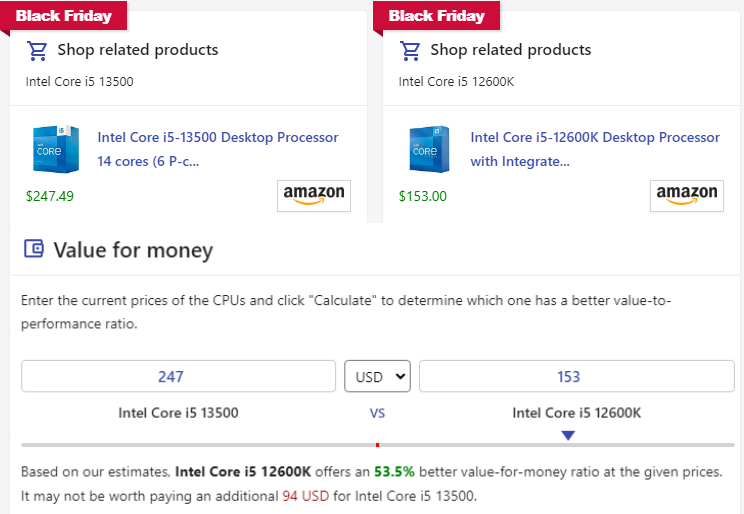
For anyone else in the market there’s some pretty attractive sales on 12th gen
Intel Core i5-12600K -29% $153.00
Intel Core i7-12700K -25% $211.00
I was looking at the Intel Core i5-13500 @$247.49 but this is hard for me to ignore
Most benchmarks and UDH 770 graphics are identical
Im now using just quick sync with an intel 13th gen I5 i wish i could stick this gpu in and do both. Now i just have an extra gpu with no use for. Because the quick sync is better. I might just put it back on ebay.
This topic was automatically closed 90 days after the last reply. New replies are no longer allowed.
