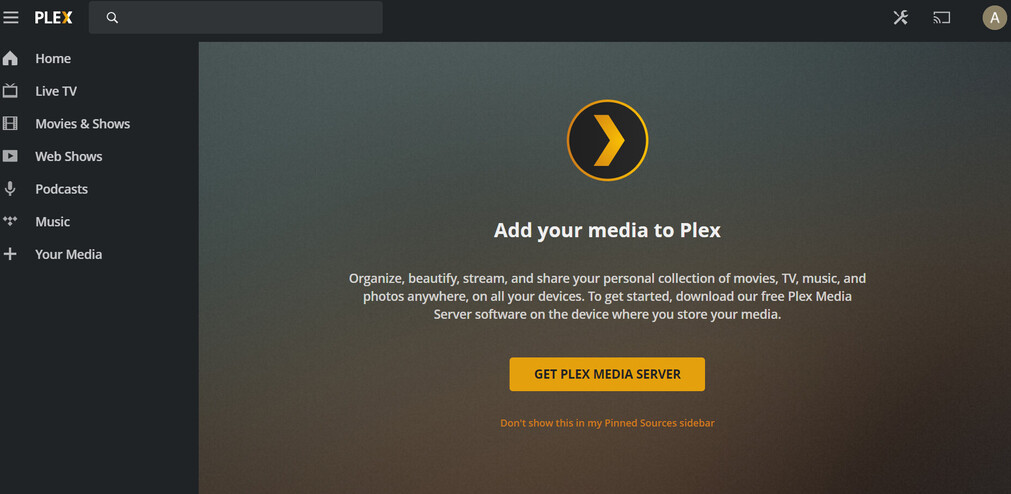
I bought plex pass. How do I install the plex server from scratch so that it allows me to add dvr service.
See if these articles help:
There is a definite bug, please look at why it is not detecting I am a Plex pass member, and it is not giving me n option for tuner, it should show it to me. If you point to the code that detects paid member may be I can point the bug out.
Would you mind sharing some more details about how far you get in the process of setting up your Plex Media Server?
What tuner (brand/model) are you trying to connect? Are both devices on the same machine or subnet?
Hi Tom,
I am not sure why does it matter about the tuner. It should say tuner not detected. But I do not even see the option for DVR. Can we do some sort of debugging where I can give you my OAUTH token or cookie depending on your Auth mechanism, and you can see what payload you get when you see my authorization in terms of capability. I am thinking even though I got the lifetime pass your membership still thinks otherwise.
Is there a simple way of debugging this? Also send me a direct link where I can download the Plex server for windows and is there a way to cleanly remove Plex from Windows and then reinstall if that is a problem. Earlier I used to use Plex on this box with another email and was using single signal through google. I then changed to a different email and got the Plex Pass for this new account. ashutoshvsingh@yahoo.com
the old account was ashutoshvsingh@gmail.com
Ashutosh Singh
Your screenshot shows that the web app (or desktop app) is not seeing your server at all regardless of DVR or Plex Pass
if you are using the same server but signed into the web app with a different account then that new account likely cannot see your server because the server is still claimed/signed into by the old account.
I would either sign back into the web app with your old account which should allow you to access server settings and sign out of the server.
or try this Why am I locked out of Server Settings and how do I get in? | Plex Support
or if you want to completely uninstall the there is info here. Uninstall Plex Media Server | Plex Support
(force refreshing browser or clearing site data/cache may need to be done as well after either of the things above)
Direct download:
Hi Big Wheel,
Now it is working and showing me the DVR. The installer is really buggy. I had two plex servers installed and one Plex installed. I cleaned all of them. I then logged back into the older account and signed out from the server and took over that server with my new Plex account.
Now I am having trouble adding DVR for locast2plex DVR that is detected but stopping at no channels found. However, I can see on the locast2plex output that it has 50 channels.
What am I missing. I have copied ffmpeg into the same directory as locast2plex.
Ashutosh Singh
I don’t know what “locast2plex” is.
Apparently :
A Python script and Docker image to connect locast to Plex’s live tv/dvr feature. Seems to work for Emby, Jellyfin, and Kodi too!
Uses ffmpeg, python, and a few awesome python modules to do most of the heavy lifting. A lot of code was inspired from telly as well.
Have you already created a Locast account and subscribed to their monthly service? This is required in order to use the service within Plex. If so, I would recommend using wouterdebie/locast2dvr over tgorgdotcom/locast2plex. locast2dvr is slightly newer and though it’s no longer being actively worked on by the main developer, it still works. I’m currently using it now.
If you have a Locast account and subscription, follow the instructions for setting up locast2dvr and let me know where you’re getting stuck. Screenshots and terminal output (running locast2drv) would be helpful.
I figured out the problem. If you add it manually it all works. The auto detect does not think it is a tuner. What can I say?
