Hey there. I made a bash script that I wanted to share with you.
After setting up the variables and changing the settings to you liking, you can run the script.
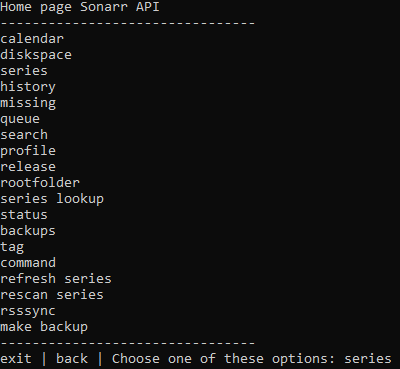
When you run the script, it’ll give you an interface where you decide between the plex api or the sonarr api (picture 1). If I choose plex, by typing plex, I go to the api-homepage of the plex api (picture 2). At every place in the api, you can type “exit” to exit the script, type “back” to go to the previous page or type one of the options to use special features of the script (picture 4). And when you’re done with using the plex api, you can go back to the “home screen” and access the sonarr api (picture 3). There you have the exact same screen as in the plex api, just with the options for the sonarr api. See the screen shots:
The home page

The home page of the plex api (I’m choosing the option “refresh” and then giving the name of the library that I want to refresh and it does it for you).

The home page of the sonarr api
Sonarr>backups; choose the special feature called “download backup”; give the path to the backup (or cancel if you suddenly don’t want to); it downloads the backup file to the current dir and shows you that. After that you can exit the script or go back to the homepage.

To conclude, it enables you to access the plex- and sonarr api without ever using an api key or making a thousand requests just to get to that certain episode of a certain series in the plex api.
Copy the code and run it. Test it out. Let me know what you think. There are lots of features and options that you just have to try out. It all explains itself. You don’t have to understand api’s to be able to use them now.
Don’t use CTRL+C to exit the script. Use “exit” to exit the script. Using ctrl+c will mess up advancedplexapivar.txt. If somehow advancedplexapivar.txt messes up (which happens when you use ctrl+c), run the script, type “exit” and run it again. That should fix it.
There are two files that make this script: advancedplexapi.sh and advancedplexapivar.txt. The first one needs to be executable ofcourse. advancedplexapi.sh needs to have read and write access to advancedplexapivar.txt. They have to be in the same folder and the names can’t be changed.
Carefully check the options inside the script to fit what you prefer. The options are located at the lines (alt+g in nano):
required variables=3
options=36, 532, 554, 1108, 1130
Fill the files with the following:
advancedplexapivar.txt:
advancedplexapi.sh:
It took me way to many hours to make this, so let me know if you like it or not!
Bye!
Any changes to the script (bug fixes or added features) are applied to the original pastebin link. The script in the original pastebin link in this post is updated when the script is updated.
Edit (17-2-2021): added support for music library in plex api (previously only shows and movies)
