[Implemented] - Multiple Cuts Of Movie

So, after making a post about this feature, I’m now brought to this topic…from 7 years ago, and yet, still has not been implemented. Of course, I voted in this one, but if it’s been this long, I don’t see it ever happening. What a shame…it’s such a simple feature. My workaround for now has been the Collections feature…making a collection for just the one movie, and putting all the different cuts (made as separate entries) in that, and hiding those entries afterwards, so that when I’m on the Plex app, it’ll show just the collection for that particular movie. This works fine on the Android and Fire Stick apps, but if I’m on Kodi, it’ll show these as separate entries unless I go into my collections. The other workaround is having them as “extras”, labeling each of these cuts as “-scene”, but if you have a movie with a ton of extras, like Blade Runner or Halloween, sifting through the extras to find that cut can sometimes be annoying. Instead, I’ve limited the “extras” option to lesser-quality cuts, like TV edits with alternate scenes, and Workprints.

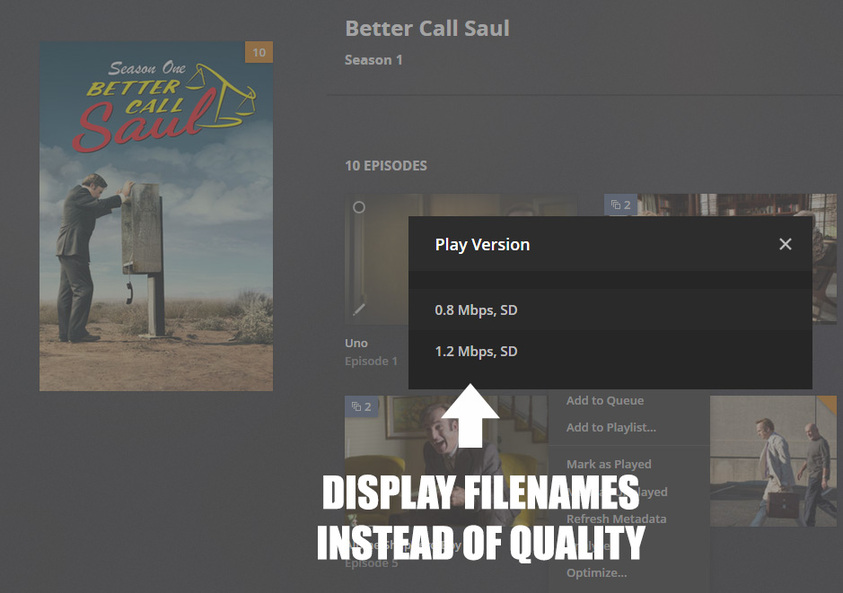
Hopefully, one day, we’re finally allowed to either be able to label the multiple versions accordingly (instead of just seeing quality and bitrate), or have a new feature all together for multiple cuts of the same movie.
1 Like

TL;DR: Show the filenames in the version selector.

7 years and 588 votes and nothing? Come on. This is just sad.

This is an important feature and it is VERY easy to implement. Just show the filenames in the version selector. That way we can include the version differences in the filenames. By prefixing for example. This goes for Movies and TV shows as well.

Language Prefix Examples:

  • [EN] Better Call Saul s01e01 Uno.mkv
  • [FR] Better Call Saul s01e01 Uno.mkv

Video Type Prefix Examples:

  • [WideScreen] Better Call Saul s01e01 Uno.mkv
  • [OpenMatte] Better Call Saul s01e01 Uno.mkv
  • [Stereo3D] Better Call Saul s01e01 Uno.mkv

Version Prefix Examples:

  • [Theatrical] Better Call Saul s01e01 Uno.mkv
  • [DirectorsCut] Better Call Saul s01e01 Uno.mkv

Everyone could tailor the filenames and versions the way they want.

5 Likes

^^ This is btw how the green competitor solved this issue.

I stumbled on this thread while trying to find what the proper naming conventions should be for these situations.

I intended to follow the official instructions, but after reading a few of the more recent posts, I don’t think I will. If Plex is going to show all versions as recently played / in progress, that’ll be annoying. I don’t want to pollute my UI with stuff like that.

I’m currently evaluating Plex and this could be a deal-breaker for me. I decided to ditch Kodi because it became too much of a burden to manage and would’ve gladly paid for Plex, but it is extremely worrisome that the Plex Team has let this request linger for so long. I fully expected some form of a status update on the request at the bottom of the page from someone at Plex.

Without reading through this entire thread, could someone clue me in as to why Team Plex has not implemented a cleaner solution for this? @kamhouse has some wonderful directions they could take, though I would prefer a sub-directory for Versions rather an appending " -cut" on every folder. That would be a better way of organizing it, I think.

Technically a “version” is another copy of the same movie (720p, 1080p, etc).

I thought about having everything in a “cuts” sub-directory, but it seemed like having a director’s cut with multiple versions alongside an extended cut or 3D cut also with multiple versions … could screw up the organization.

1 Like

AH, I gotcha. I’m beginning to see why this may have been so difficult for Plex to implement.

If you’re going to allow multiple versions of the same movie, i.e. with " - 1080p" appended to the end of the filename, how can Plex intelligently decide what is a “Cut” and what is a “Version”? You would have to come up with a list of key phrases, like “Director’s Cut” or “Theatrical”, but where would that end? Studios routinely exploit the idea of “Cuts” to generate additional income for a property, so I can see why Plex may not have adopted a solution for this.

If themoviedb.org began indexing alternative cuts, I doubt this would be as big a problem for Plex to solve. The only site that really comes to mind that catalogs those releases is movie-censorship.com, and I doubt they’d want to open up their DB to Plex or its users.

I suppose the issue of a Cut having its own Featurettes poses an even bigger challenge to overcome. There’s also the potential for a Cut to have multiple versions of itself, and how would they go about managing those within the context of a single title?


Having said all of that, I don’t see why Plex couldn’t expose the linkage of movies, listing them in a row below “Featurettes” for a title. There is already a property tag labeled “Original Title”, so I don’t see why that couldn’t be used to link all the cuts of a movie together.

What might be the best solution, would be to introduce a new system called something like “Cut Groups”. In the drop-down for a movie not yet associated with a “Cut Group”, you’d see two options, “Create Cut Group” and “Add to Cuts”. If the movie had duplicates, Plex could give the user the option to break all of those duplicates up (so long as the duplicates were not within the same folder) when creating a new Cut Group.

I’m not super fond of the term “Cut” in this context, because “Add to Cuts” seems like a counterintuitive option. But I can’t think of a better word to use if “version” is already taken.

Or Plex could just list everything of the same title with the -cut at the end of it and let the user choose.
so if you created

movie name.mkv
movie name -1080p.mkv
movie name -720p.mkv
movie name -Directors Cut.mkv
etc…

Think that would be the easiest way… but what do I know I’m just a user…

I suspect what you’re proposing is …

→ Movies
->> Movie Name (Year)
->>> Movie Name (Year).mkv
->>> Movie Name (Year) -1080p.mkv
->>> Movie Name (Year) -720p.mkv
->>> Movie Name (Year) -Director’s Cut.mkv

Correct?

There are two problems that jump out at me there.

The first is the fact that Cuts are almost never released during the same calendar year as the original title, so you would lose that information. I doubt that would bother most people, despite the inaccuracy, but a true cinephile might hate that or refuse to use it. If Plex wasn’t looking to appease those folks with a solution to this problem, they might regret ever trying.

Lastly, In the Roku App, the space available within the menu to select a “version” is very limited. In the context of a UI like that, you wouldn’t want your list items to break into multiple lines or exceed the allowable space for the wrapping container.

If I were a designer at Roku, I would not allow that kind of headache into my design, because you’ll inevitably have someone complain it “doesn’t fit” or “looks terrible”.

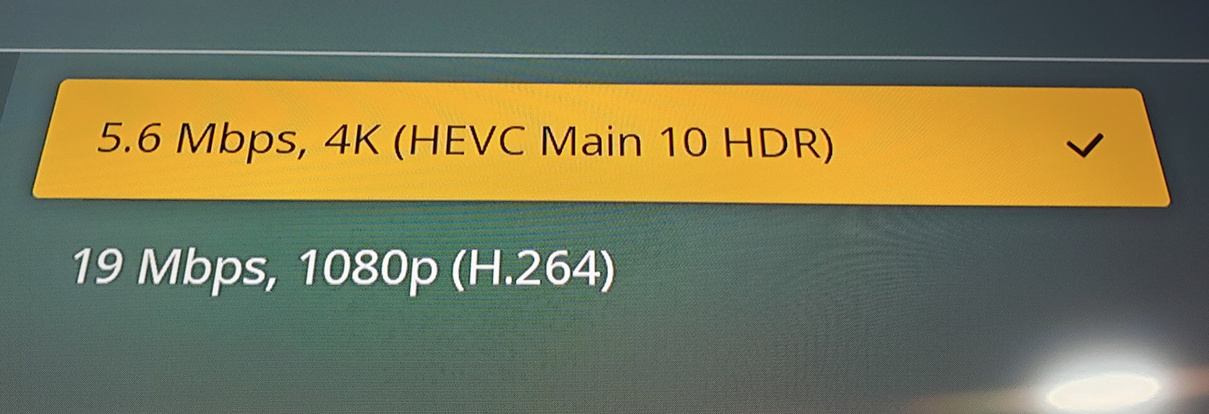
You’d still need to retain the other info in the list, so you’d end up with something like, 19Mpbs, 1080p (H.264), Director's Cut, which might fit, but something like 5.6Mbps, 4K (HEVC Main HDR), Director's Cut absolutely would not:

Of course, the web client has plenty of room:

But, those are only two devices and a fairly common Cut name. The only way they could safely implement your solution would be to create a list of approved Cut names, and then try to work the additional text into as many screen sizes as possible.


I suspect a relational implementation (like the one I suggested) would be much easier to implement throughout Plex’s supported device ecosystem. You wouldn’t need to worry about screen width, because the functionality to scroll right or left already exists for Featurettes. I think there are even some screenshots above of what it might look like.

Actually; the format was for the file names…

what Plex would display would be whats after the ‘-’ Like Directors Cut
so you can choose what one you want to play

The green competitor handles it just like that. Let me say that I like the feature a lot. It works like a charm.

The purple competitor (Synology DS Video) simply displays filenames in the selector and it works perfectly. On some TVs the filenames are too long, so I always put the info the beginning of the filename.

Different language versions HAVE to be addressed as well.

This is how I think it should be realized:

1.) The user needs to set a name that differs only in words he wants to be displayed in the version selection:

movies/Moviename (2019)/Moviename (2019).mkv
movies/Moviename (2019)/Moviename (2019).Special Edition.mkv

It shouldn’t be Moviename (2019)-SpecialEdition.mkv as this will it make harder to use Whitespaces and it would collide with the Extras name scheme.

2.) Plex should extract those words (Special Edition) and use it in the “Play version”-popup:
2019-11-25 18_19_17
Read here if you like to know how I reached that.

3.) If a movie has multiple versions the “Play version”-popup is displayed by default. This could be of course an optional Plex server setting.

Additional possibilities:

  • Too much text could be displayed in multiple lines. Their could be a total char limit and a word based char limit (so its not possible to produce a weird output)
  • The resolution is nothing we need to display if all versions have the same resolution (as the resolution is displayed on the movie page itself)
  • The bitrate is nothing we need to display if it differs only <10% percent across all versions
  • Several words could be used as tag to display icons instead of texts. This means “4K HDR” could be used to display a graphic that fits into the line like 2019-11-26 00_28_35 instead of displaying the words as text.

2 Likes

Parsing simple periods might conflict with language codes.
For example: Moviename (2019).Special Edition.mp4
With subtitle: Moviename (2019).Special Edition.eng.srt

Alternatively they could maybe use braces (are those used anywhere else in Plex?) such as:
Moviename (2019) {Special Edition} - 4k.mkv
Moviename (2019) {Special Edition} - 4k.eng.srt

Moviename (2019) {Special Edition} - SD.mkv
Moviename (2019) {Special Edition} - SD.eng.srt

No, as they are only used with .srt extensions. And if a Movie Filename is Moviename (2019).eng.mp4 the turkish Subtitle name would be Moviename (2019).eng.tur.forced.srt and Plex ignores the first code. But I do not think anyone adds Language Codes like that to a Moviefile.

But I do not think anyone adds Language Codes like that to a Moviefile.

On the contrary! We add language codes to the movie files quite often! Different members of my household prefer to watch movies in different languages. Sometimes I can’t find all those languages combined into the same video file, so I have multiple video files.

Also I can’t burn the audio tracks together into one movie, because sometimes the video tracks differ as well, since some countries decide to cut scenes out for cultural or political reasons.

TL;DR We need language versions managed as well. They also different “cuts” of the movie.

1 Like

Interestingly, MKVTooNix lets you combine multiple video tracks just like you might with audio tracks. I have no idea how Plex handles such a file, but it can be created.

1.) @kamhouse was talking about people that use the exact format “[Moviename].[language_code].mp4” only and I said that (ok, nearly) nobody uses exactly a naming scheme like this.
2.) The only possible collision would be if you name your movie files “[Moviename].[language_code].srt”. But as this exension is not a video extension it won’t collide with my idea.
3.) Its even better. If you would use the naming scheme “[Moviename].[language_code].mp4” with my idea and all your different movie files are in the same movie folder, than this would display the version selection like that:

Play version          x
ENG - 40 Mbps, 4K
GER - 40 Mbps, 4K
TUR - 40 Mbps, 4K

And why don’t you combine them with MKVToolnix? You only need to add the second file to the first one and remove everything except of the needed audio track. and remux it into a third multi-language MKV. Of course this works only as long the videos have the same length in all languages.

I tested that. Plex does not display a video track selection. Only for audio tracks.

Nice! Thanks for the info, I didn’t know that.

Too bad.

In my opinion the suggested naming conventions by kamhouse and mgutt are totally doable, it is up to the developers to choose one. Programmatically speaking brackets, braces are pretty safe for parsing.

100% full-proof, although not very pleasing visually:

  • Moviename (2019) {version=Special Edition}.mkv
  • Moviename (2019) [version=Special Edition].mkv

Just to state the obvious: In my opinion there is only two ways this can go:

  1. Establish a naming convention for a single “version parameter” that can be any text to represent anything and include that information in version selector with the currently displayed info.
  2. Show the filenames in the version selector
1 Like