You can always merge language tracks from multiple files, just make sure you are start with the original language one, because you might have slight sync issues if they came from different places.
Thanks for the tip. Unfortunately more often than not, certain countries cut out entire scenes (due to cultural, religious or political reasons), thus making it impossible to merge audio.
Also all this has to be applied to TV Shows as well.
1 Like
Yeah, that makes it difficult
That’s a really cool, simple and easy idea. I still think it could be interesting to add extras inside a specific cut, sometimes a special feature is linked directly with it, like Blade Runner that has a different introduction for each of the 5 cuts, and trailers for some. But I guess this complicate things as it would show this extra only for the selected cut, although shouldn’t be that hard.
Movie ‘Extras’ don’t enjoy:
Video Preview Thumbnails
Watched History or Progress
That might fly at your house, but at my house it’s grounded for not filing a proper flight plan.
When I go to pick up Ben-Hur (1959) - @ 3hrs and 42mins - somewhere after the big chariot race without progress or VPTs —> back to the drawing board we go.
2 Likes
I was in no way saying it should be an extra, in fact I’ve said exactly the opposite, using the same system for it as for extras would mean they’d have to be handled by the same system. That comment was about how the idea of having the ability to name the cuts whatever we want goes against the PLEXopian way & will never happen. I’ve also tried to make it clear that we don’t really WANT that because the one place where we have some freedom like that is Movie special features (Folder or tag) which is hinky at best.
Also of note, no subtitles for special features, even if they’re embedded.
I’ll have to take your word for it, but I wouldn’t be surprised. I think the last time I looked for an extra with subs I wasted an hour and gave up.
I just know because I have Professor Marsden & The Wonder Women as a Featurette for Wonder Woman because I like it there, I feel like (though it’s it’s own movie) it’s a long special feature to the movie. Having it as an extra means I can’t turn on the subtitles, even though they are embedded & worked fine when it was listed as it’s own movie.
Oh, & the Special Features do remember play position.
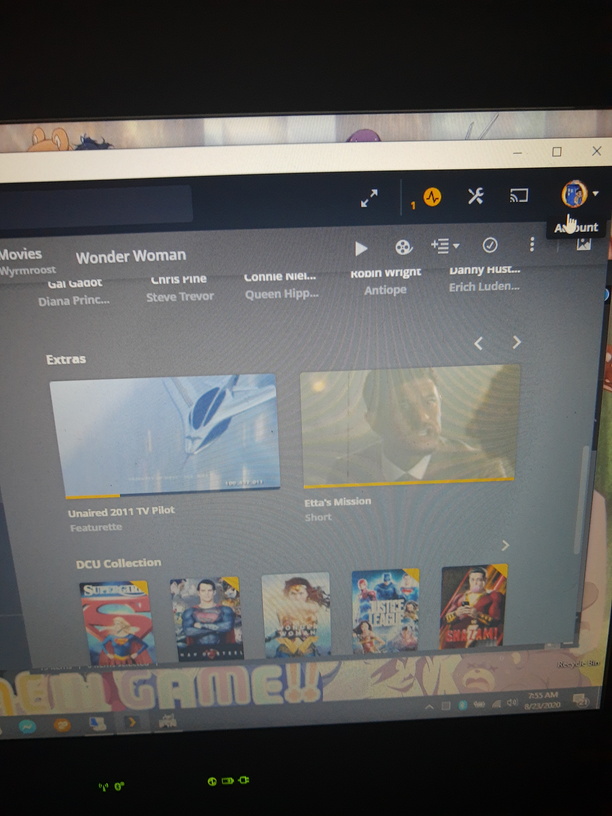

My fear was about the challenge of presenting that in the interface. You’d basically have to present each movie cut as a separate page with it’s own extras, which would then require an extra step to start playback, or alternatively you’d need a separate page for the extras with groupings by cut. Ether way seems like it’s starting to get clunky.
That sounds a LOT like the current scenario: multiple movies, each with extras. Maybe grouped into a collection for convenience.


Yeah, that was my thought as well, if you are going to want different features on different cuts then having them as different titles is pretty much exactly what you want, so having the multiple cuts seems silly in that scenario
Firstly I’ll admit that I am new to this thread and also admit that I have not read ALL of the 392 posts so far, however I do not believe anyone has yet come up with this idea… (apologies if someone has)
I noticed recently that the hosted web app is now reading in “Track Name” information for both subtitle tracks and audio tracks, when multiple tracks exist…

The above screenshot is showing the Track Name information that I have put against each Audio track in my MKV movie.
So surely this would be the quickest and easiest thing to do to resolve this issue?
Keep all copies / cuts of the movie in the same folder, obviously with appropriate names, but then when you select the “Play Version” button, display the Track Name information for the video track of each given file and display back much like @kamhouse suggested…
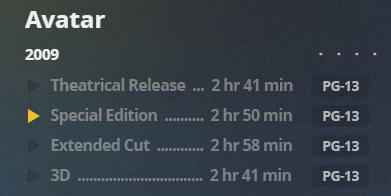
But from a technical standpoint, as long as a Track Name has been applied to the video track, read it in and display it appropriately…
EDIT: Oh, and +1 vote here as well
But the problem still exists, all those solutions require making things that work now not anymore, the 1000 PLEXians here are a small percentage of the Plex users. Make life difficult for more of the 14 Million people who use Plex than the 1,000 it helps
1,000 Helped
vs
13,999,000 Hurt
That doesn’t sound like a win
I wonder how many of those 13,999,000 hurt users actually have their movies named with a -cut suffix (just to go for one of those proposals).
That’s not the problem, the problem is that 1st, the -Short tag already is very problematic. It doesn’t work properly in my case more often than it does. But as it NOW stands those tags all work the same way. So changing how that works to include multiple types of sorting would cause some of those with libraries that are working fine to loose their extras & have to get them to work again
So your argument is that if they’re not doing it right, it’ll be bad? Why not aiming for for doing it right in the first place – this feature suggestion is not about “breaking things” for a silent majority but adding functionality for a specific use case that is currently not covered by Plex.
Don’t get me wrong… I appreciate you’re worried things might get messed up. But shouldn’t we aim for how to make things better?
PS: if you have trouble with local extras it might be worth opening a separate thread to verify how this can be fixed for you (if you already have one you could point me to it)
Plex already have filename, filepath in database.
Why apps cannot use it ?
Thanks for
That help for web version

1 Like
tom80H - I completely agree that the “fix” is not to engage in work-rounds, but actually get to the Plex developers to actually IMPLEMENT a viable/none confusing way to select multiple versions of the same movie. Doing a work-round that addresses the issue, but jacks up other things is not my idea of a “fix” or resolved solution. Its just amazing to me that this request has gone on for so long without Plex lifting a finger.
1 Like


Now that is weird!
I have just checked again and it still is the case for me. Here is a movie I have just added…


I wonder if this is regional??
I see I am on Version 4.41.1, and am in the UK…
EDIT: @tom80H - Is this feature regional?
