I’m on 4.41.1 also, but based in the USA
no – at least not that I’m aware of.
@gregor.smith: have you tried triggering a manual “analyze” of your videos?
If it’s still not working, let’s move that side-track to a separate thread.
1 Like
It’s based on the Metadata encoded into the video file. You could use MKVToolNix to give the audio track & subtitle track embedded in the video a “Track Name” but I think it only shows in the PlexWeb, which is useless to me because I never watch things in a browser.
Oh, & if you don’t want to or think you can’t use MKVToolNix because it’s not an mkv file you can use any file, it’ll just switch the wrapper to mkv in the output. Which is easy to switch back with XMedia Recode, just make sure you use the MP4 (Stream Copy) option if you’re going for MP4, it’ll take 2 seconds & doesn’t do anything but swap the wrapper. If you’re going for a different wrapper most have a Copy option for both Audio & Video & it’ll do the same
Thanks @tom80H…
I yelped the first time I saw that info!
Indeed it is still only in PlexWeb, and much like you I never use that for watching content, however in theory, as long as Plex is capturing the data, it can be used else where and hopefully will find itself coming to other clients in the future.
Anyways, not to get off topic… I still thing this would be a reasonable way to approach the Multiple Cuts problem… Just display back the Track Name on the “Play Version” button drop down list…
1 Like
The problem would be you’d have to use Metadata fields in ways they aren’t intended. So even if Plex ignores Metadata some of us actually label our Metadata so the title is the title of the movie, the date, cast, etc, etc. There isn’t a “version” field. & while you could add one, that’s not the easiest thing to do for most people. & not all ID3 editors will even allow it, & different wrappers have different possible fields.
Eventually those things will come to device players. But eventually in Plex time can be years.
So sadly that wouldn’t work. Plus it has to be Scanner-level because it’s determining how the files are going to be grouped. But thinking of ways it might work hopefully will lend to a developer figuring out a way, so the effort is greatly appreciated
If you think about it, there are a number of different ways this could be approached…
Someone early on in the topic suggested…
That’s great and all… But this lends the question… HOW do you get that data into Plex?
A few people suggested file name tagging…
Again, a good idea, however that would mean that the devs would need to predefine all of the allowed tags, which lends to the possibility of limitations. Before you know it, someone will want a tag of “Super-duper IMAX version”, and so on…
But to be truly adaptable and without limitation, simply read in data that is contained within the file itself.
That way, a user could have dozens of different versions, all with their own unique description.
I guess there would have to be some kind of limit perhaps, or the drop down list would be huge!
So the way I see it, there are basically 2 questions here…
- How best do you get the data in / differentiate the versions - File name tags / Track Name info?
- How best do you utilize that - Extra buttons, or use / expand on an existing feature, such as the Play Version button?
I’d prefer something in the movie tag, but I don’t know if an appropriate field is going to be there for it in the various supported container formats.
If we’re going to use file name tagging to identify movie cuts, we should do it properly. Rather than -theatrical or -extended, use a tag that requires additional parsing. Example:
-videocut[Extended] = Extended
-videocut[Director's Cut] = Director's Cut
-videocut[Theatrical Release] = Theatrical Release
-videocut[Super Rare Post Apocalyptic Version] = Super Rare Post Apocalyptic Version
with the condition that untagged movies are treated like unspecified cuts (-videocut[Unspecified]). Extras should work in a similar fashion:
-extra[Trailer]
-extra[Interview]
-extra[NCOP]
In addition, if people don’t want to mangle their file names, we should support external metadata files that would handle matching (by specifying agent IDs and match parameters) stream naming (for Audio and Subtitle streams/files), extras (names and types), Cast info, related titles (by some type of tag data like IMDB, TVDB, or AniDB IDs), collection and tag information, air dates and episode ordering (via both TV/Disc), etc. With something like that, I could default everything to the standard TV/Movie agents and specify in files what the movie is, how to match it, and how to name it. I could even have one library that contains both Movies and TV video, but matches differently depending on whether I’ve got metadata files declaring this folder as TV or Movie.
But we should start simple and just allow for different cuts. And it shouldn’t be movie libraries only, because some TV episodes have been rereleased with stealth edits and censoring before.
We all know PR companies love to play around with the different cuts. And they’ll always give it a weird name if they think it’ll help sales.
But there’s a reason Plex doesn’t allow mixed libraries. The scanners handle things differently. & that makes sense, even if I would like to be able to combine some things, I understand why that’s not possible. If that’s what you want you’re going to have to just settle for using a custom scanner. Absolute Series Scanner does some of that. I’m actually trying to learn about the Scanner’s coding so I can make a few tweaks, but man is it a lot. & I don’t think it’s even possible to get what I want, but I’m going to keep trying until I’m sure. & all I want is to be able to separate the episodes in a season into different seasons, but use the absolute ordering on TVdb. Essentially to use folders to group by season & take the file numbers by the name & ignore the season in the name or use a TVdb.id file (something Absolute Series Scanner already uses so you can have 2 shows in the same show as different seasons) We THINK these things are simple, but they’re much more complex. & setting a sort condition makes it infinitely more likely to have errors
I don’t think they need to define anything…
Just make it anything at the end of the file name preceded with the - dash is a version.
Then you could make up your own…
And they just need to display that portion of the file name less the dash and you have covered all you options on possible cuts… Since the file doesn’t really need any extra processing. Plex just needs to know it’s there.
Unfortunately this would not work. People use dashes in file names all over the place.
If you are to use File Name Tagging, then there would have to be specifics involved to ensure that Plex understands what to look for, much like they have already done with extras etc…
https://support.plex.tv/articles/local-files-for-trailers-and-extras/
But they already do that in a few places like for music if it’s a video -video etc…
live concert -live and a bunch of others…
Doesn’t matter, search from the end of the file name to the first dash reached…
And check out;
https://support.plex.tv/articles/local-files-for-trailers-and-extras/?_ga=2.4645813.780887037.1599152643-2038261424.1584618164
and the note…
Note : The filename must end in the -Extra_Type value exactly. The hyphen is important and you cannot have spaces after it.
Yes exactly, however they are using ONLY specific tags…

If I was to tag on the end of my movie… -whatever it would not be recognized. This is because only a predefined set of tags are supported, and each of them had to be added in by the devs.
If I have a movie called… Some.Movie.2005.1080p.DTS-HD-MA_5.1.x264-MyName.mkv what should Plex search for within that file name? The hyphen appears 3 times!
The reason the current filename tagging works is because Plex specifically look for a very specific string, such as -behindthescenes or -deleted …
So, once again… In order to use File Name Tagging for the purpose of dealing with Multiple Cuts, the devs would need to add a predefined set, and although that would work, it would ultimately be restrictive simply because it would ONLY work with a predefined set of tags.
Hence we come back to the notion of reading in the Track Name info in order to be truly flexible.
Actually just reread your post, and indeed they could search for the first dash from the end of the file. So you are right, this would work  …However…
This is the bit that would make it restrictive…

As you would have to use the exact predefined value.
The problem is there’s already a -TagAtTheEnd system. It sorts into a handful of different categories but, & here’s the important part, they are the same sorting. Everything with a -TagAtTheEnd is put under the movie in the pretty horrible Special Feature row. The different tags just determine what words are under it & what order they appear in the list. That’s why I was suggesting a different sort function. One that’s employed elsewhere is plex, but not anywhere it’d have a conflict. The .ENG.srt system. Now it would have to be limited to predefined tags at the end of the file, before the extension.
Also note that the -TagAtTheEnd sorting is one of the least consistent things in Plex.
That’s something that will never happen. Plex hates embedded Metadata. It was a fight to get them to add it back years ago after they initially removed our ability to use it. Then it was a fight to get them to use it for track names for subtitles & audio tracks, which isn’t fully Metadata, it’s something that is actually a field that has to exist in a video file. You’re NEVER going to get them to implement a system that requires the users to use Metadata in a way it isn’t intended to be used for. I mean the attempts to think outside the box are great. But that’s a non-starter
1 Like
I’m thinking that if it isn’t a pre-defined tag then it’s a user tag and display it…
or let the developers figure it out (may be ready in 2031)
If what isn’t a predefined tag?
read up a few posts…
Then what is this in the hosted Plex Web?

The line that says “4.2 Mbps DTS-HD MA 5.1 Surround” is the exact text I placed in the Track Name field within my movie…

And…

That is data that I chose to place in my MKV file, and Plex are reading it in and utilizing it on the Audio Track selection drop down.
They are also doing it with Subtitles…

And again, the data I placed into the Name field, shown in MediaInfo…
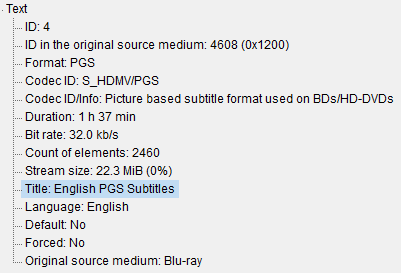
So if they are already doing it, they should just keep doing it!
The developers basically will code something that someone has dreamed up the idea of.
And so as a user, if you can dream up a truly useful idea, any developer worth their salary would take that idea, discuss with their team, and if people agree it’s a good idea, it gets implemented.
But if that idea was something that you thought up, something that was both useful and tasteful, just imagine how it would feel if that idea was to get carried into the product
1 Like
Yes, and this thread was started in August 2012…
