Thank God. Although to be fair, I was discontented with Plex for a while, but they’ve recently (over a couple of years) fixed most of the things that irritated me and I’m a really happy user these days.
This and being able to edit date added to library (for example when adding an old show or re-adding something that was lost in a data crash) are pretty much my only annoyances now really.
I think the approach here is the best. However, I would prefer the term “cut” instead of “edition”.
It’s critical that “versions” are not conflated with different “cuts”:
Versions: different video/audio encodes of the same “cut”. e.g. 4K v.s. 1080p or ATMOS v.s. AC3
Cuts: different edits of the film. e.g. “final cut”, “extended edition” “theatrical release”, etc.
Versions
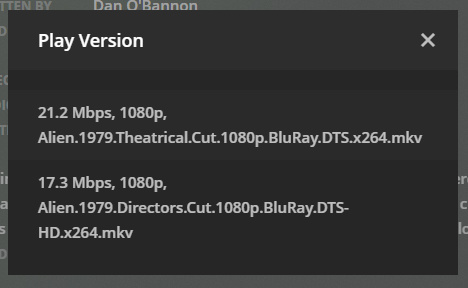
@the_hotmann’s solution would be good. However, it’s potentially overkill and unnecessarily complex. A simpler alternative is More Info in "Play Version" - #5 by xanderstrike which simply includes the full filename in the “Play version” dialouge. (Note in this mockup “version” is being used to present different “cuts” too. This is not what I am suggesting):
A point to note re @the_hotmann’s mockup above is that as the director (and other details) can (and often do) change with a cut, the “cut” (or “Edition” as in the mockup) needs to be moved above these details.
Essentially a “cut” needs to be “top level” selection.
A “version” should thus be a “child” of a “cut”. i.e. it doesn’t make sense to show a 1080p encode of the “theatrical release” as “version” option when the “final cut” has been selected as the “cut”
Actually, on further reflection I’m not sure this approach makes sense: Video, Sound and Subtitles are all elements of the same encode. They can NOT be independently set. Given this, it doesn’t make sense to show them as 3 independently selectable drop downs.
As I noted in my previous post, as the director, encode details, (and other details) can (and often do) change with a cut, the “cut” needs to be moved above these details. @kamhouse’s mockup does this for the web app, but not the 10 foot UI. However, even in the webapp one, items like year, rating, etc. are above. It’s possible these may vary with different cuts. Furthermore, while the web app mockup has the “cut” above most details, it presents them all at the same time which implies the details below will not change based on the “cut” that is selected.
A Proposal
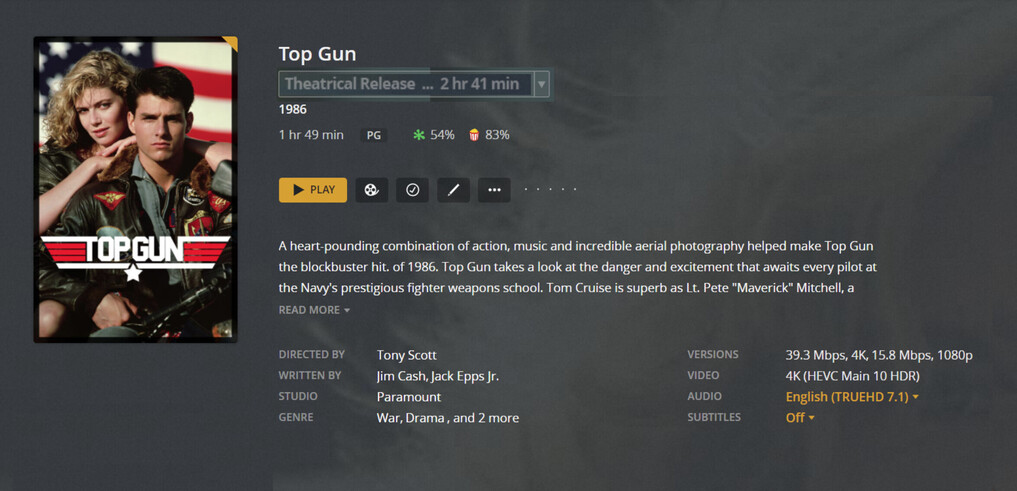
Given the above, I think the best option is a drop down. Two possible options that bear the above semantics in mind:
I’ve included the run time in the drop down as I think this is often a key attribute of the “cut.” But there’s nothing essential about this. (Also, obviously the run time should be accurate )
I’m sure the Plex team would be able to make it look far far prettier than I have. At least I hope so
With regards to “versions,” as per my previous post, I think the simplest option is to include the full filename in the “Play version” dialogue. Importantly, a “version” should be a “child” of a “cut”. i.e. it doesn’t make sense to show a 1080p encode of the “theatrical release” as “version” option when the “final cut” has been selected as the “cut.”
Audio and subtitles can be independently set. You just have different options based on which tracks are embedded in the chosen “cut”. Technically the video could have multiple tracks too in an mkv container, if the Plex player could understand multiple video tracks.
I meant cut, but overall it would be cascading. So whatever cut you choose would affect the selection of versions available. And then which version you chose would affect the selection of audio tracks and subtitles that are available.
I suppose the interface could step in with each sub-selection to indicate they were children of the choice above. I don’t know if that would really be necessary though.
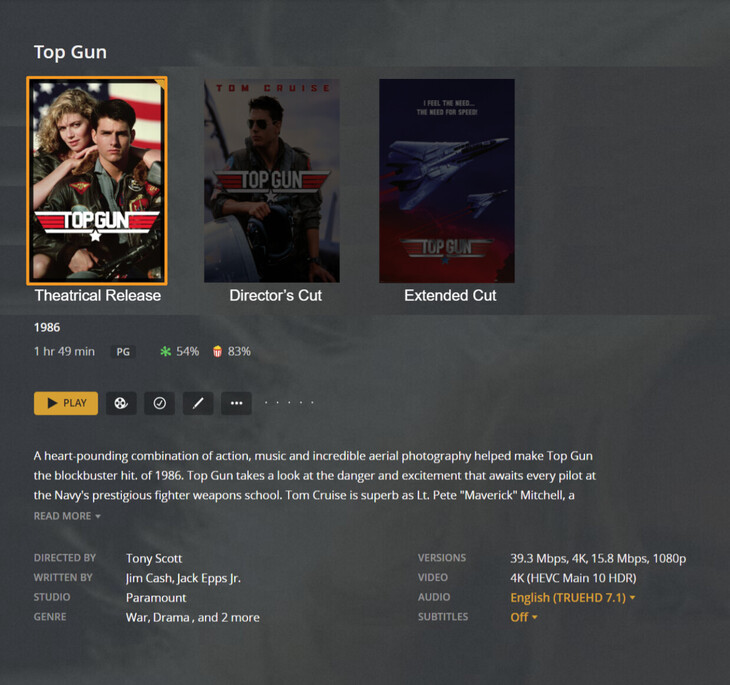
What I would like to see is the multiple cuts being presented all at once, like a mini display of different movies, rather than hidden under a drop menu. That way you can tell quickly this movie has multiple story options to choose from and see which one is picked. I look at the cuts as being different in that they are artistic choices, while the video version, and audio/subtitles are more of a technical choice.
Apologies, but I don’t think I’m following. The way I understand this, you’re essentially rephrasing what I detailed in my previous post, so it seems like we’re agreeing with each other:
However, the way I read the following, I understand you to be stating that: Video, Audio, and Subtitles are attributes/children of a Cut. This would then imply that you could choose video from one version, audio from a second version and subtitles from a third version (which you can’t)
Like I said though, it seems like we mostly agree, so apologies for the confusion!
Yeah, I think this makes a lot of sense. So almost like a special type of “collection” for this specific use case?
This is certainly a workable solution for most. However, currently Plex uses IMDb ID’s for a movie, meaning if you watch one cut, say 1 hour into Theatrical, then all other cuts also shows 1 hour into that movie. That in turn can result in fx the Theatrical being -30 min left because the Extended is 50 min longer. It also registers all cuts as watched, even if just 1 is watched. So for this to work, we need to get Plex to use a unique ID for a movie, not just the IMDb ID.
This, as a consequence, is also a suggestion to add the progress bar for the mockup, I’d suggest 1 movie watched, 1 movie mid-way, 1 movie unwatched, just to emphasize the point
I was thinking a more simple list (like in my mockup), but having separate posters looks pretty good. I guess the downside there is Plex would have to come up with a way to manage the various posters. Or alternatively they would need to create a way to group separate movies in the database (almost like merging) into a “cut collection” and define which is the default for the main library view.
The cut collection would probably give the most flexibility overall because you could completely edit all the details of each movie, if things like ratings changed, and it would be more obvious that you are switching to completely separate movies.
The only downside is you can’t see at a glance the lengths of each cut.
The frustration here, personally, is that the music scanner does a very good job of recognising different realeases from the same release group as distinct releases when in seperate directories. I don’t mind editing the title for different cuts/editions of movies, but when they’re in seperate directories, being treated as the same item, especially when resuming when they differ in run time, just doesn’t make sense. I understand the source metadata for movies likely doesn’t make this as easy as MusicBrainz does for music, but I reckon there’s a way to make it work.
I’ve noticed that Plex has removed the 2 that used to appear in the corner of a movie that had multiple versions, making it harder to see what movies have multiple cuts as the “play version” button is buried in the overflow menu on most clients
Thanks Like I said in my previous post ([Implemented] - Multiple Cuts Of Movie - #591 by yozza0), I liked your mockup too, but my issue with the simple list approach is that it presents all the cuts at the same time without any clear visual indicator that a particular cut is selected. This implies all the details (run time, director, year, etc, etc.) below will not change based on the “cut” that is selected - and is thus unintuitive and unclear.
Also, as you note below, the different posters and larger selection make it clearer that you’re selecting from completely separate cuts (which, as you note, in many ways are seperate movies).
I mean, I think that’s an implementation detail that the plex team should be able to handle. But as you say, they already have the framework/pieces to put this together from their “collection” functionality. Obviously there are important semantic/functional differences between Multiple Cuts and Collections, but the framework is there.
I agree runtime is an important attribute of a cut, but i’m not sure it’s any more important than other attributes like director, year, rating, etc. Given that all the movie info/details are updated as you switch between the different cut posters, this doesn’t seem like an issue to me. In fact, I think it’s an advantage.
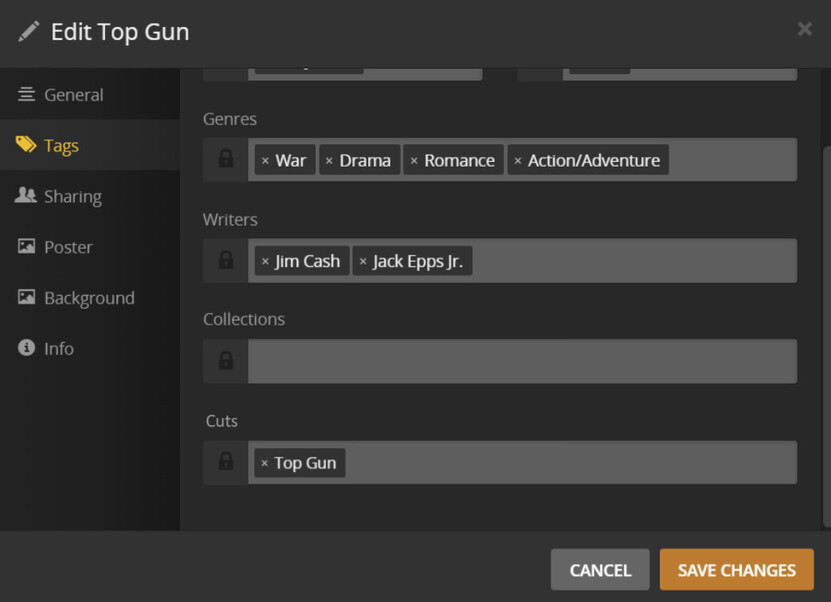
All movies with a “Cuts” label that matches the “Cuts” label of at least one other movie will be presented using a special “Multiple Cuts” info/preplay screen. For example, the mockup I created above:
One of the special options available in this “Multiple Cuts” info/preplay screen would be “Manage Cuts”. This would allow you to choose the display order of the cuts, choose the default cut, select whether the poster for the movie is of the default cut or a mashup of all the cuts, etc.
It probably doesn’t make sense to allow a movie to have multiple “Cuts” labels (I don’t think a single cut could be of more than one movie), so this should be limited to a single tag.
This would be both simple for Plex to implement (by leveraging the existing collections functionality), and easy for users to manage.

 )
)

 Like I said in my previous post (