mir0of
December 18, 2021, 8:02am
1
Server Version#: 1.25.2.5319
curl -vvvv https://plex.tv/api/v2/user/privacy?X-Plex-Token=xxxxxxxxxxxxxxxxxxxxt
Hostname was NOT found in DNS cache
Trying 52.18.69.157…
connect to 52.18.69.157 port 443 failed: Connexion refusée
Failed to connect to plex.tv port 443: Connexion refusée
Closing connection 0
LOG :https://plex.tv/api/claim/exchange?token=xxxxxxxxxxxxxxxxxxxx1ib https://plex.tv/api/claim/exchange?token=xxxxxxxxxxxxxxxxxx https://plex.tv/api/v2/user/privacy?X-Plex-Token= https://plex.tv/api/v2/user/privacy?X-Plex-Token=xxxxxxxxxxx https://plex.tv/api/v2/release_channels?X-Plex-Token= https://plex.tv/api/v2/release_channels?X-Plex-Token=xxxxxxx https://plex.tv/api/v2/features?X-Plex-Token= https://plex.tv/api/v2/features?X-Plex-Token=xxxxxxxxxxxxxxx
Could you help me ??
Thx !
:
ChuckPa
December 18, 2021, 8:14am
2
Is your server on a remote VPS or local to your home ?
If the server is your workstation, use http://127.0.0.1:32400/web to claim it.http://LAN.IP.of.Server:32400/web
mir0of
December 18, 2021, 8:46am
4
mir0of
1m
My server is on remote server.
ssh root@remotPlex -L 8080:localhost:32400
I have no proxy ans no firewall in my server
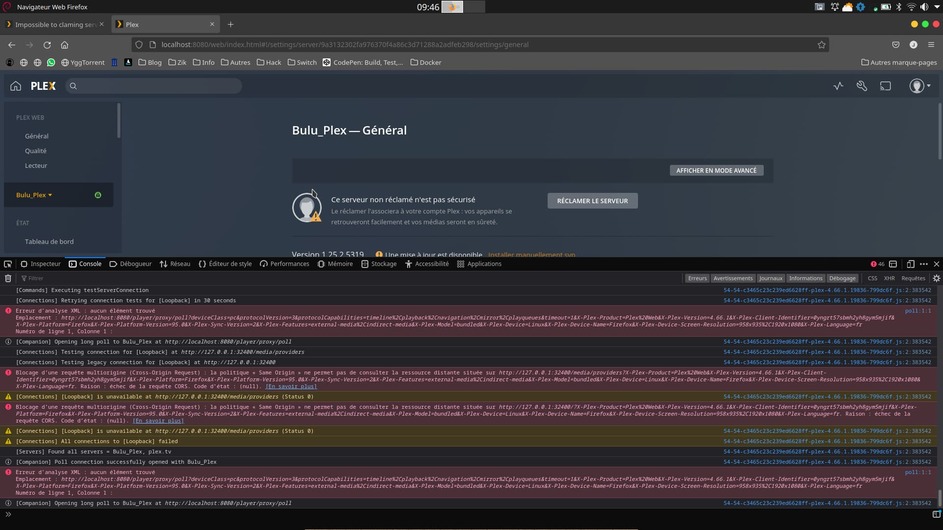
I joined you a screenshot in my workstation with console activate.
Hi,
We are using this server with Miroof (OP) for a while now. As we can see in the log, the server got a connection refused by plex.tv but the DNS resolution is okay and the Internet access is working aswell.
If I run a curl from a different public IP :
curl -vvvv https://plex.tv/api/v2/user/
Trying 52.18.69.157:443…
Connected to plex.tv (52.18.69.157) port 443 (#0 )
ALPN, offering h2
ALPN, offering http/1.1
successfully set certificate verify locations:
CAfile: /etc/ssl/cert.pem
CApath: none
TLSv1.2 (OUT), TLS handshake, Client hello (1):
TLSv1.2 (IN), TLS handshake, Server hello (2):
TLSv1.2 (IN), TLS handshake, Certificate (11):
TLSv1.2 (IN), TLS handshake, Server key exchange (12):
TLSv1.2 (IN), TLS handshake, Server finished (14):
TLSv1.2 (OUT), TLS handshake, Client key exchange (16):
TLSv1.2 (OUT), TLS change cipher, Change cipher spec (1):
TLSv1.2 (OUT), TLS handshake, Finished (20):
TLSv1.2 (IN), TLS change cipher, Change cipher spec (1):
TLSv1.2 (IN), TLS handshake, Finished (20):
SSL connection using TLSv1.2 / ECDHE-RSA-AES128-GCM-SHA256
ALPN, server accepted to use h2
Server certificate:
subject: C=CH; ST=Nidwalden; L=Stans; O=Plex GmbH; CN=*.plex.tv
start date: Sep 22 00:00:00 2021 GMT
expire date: Sep 22 23:59:59 2022 GMT
subjectAltName: host “plex.tv” matched cert’s “plex.tv”
issuer: C=US; O=DigiCert Inc; CN=DigiCert TLS RSA SHA256 2020 CA1
SSL certificate verify ok.
Using HTTP2, server supports multi-use
Connection state changed (HTTP/2 confirmed)
Copying HTTP/2 data in stream buffer to connection buffer after upgrade: len=0
Using Stream ID: 1 (easy handle 0x7f860b00c800)
GET /api/v2/user/ HTTP/2/
Connection state changed (MAX_CONCURRENT_STREAMS == 250)!
<?xml version="1.0" encoding="UTF-8"?>
* Connection #0 to host plex.tv left intact
Please advice
Also, it looks like the same issue related in that post SSL Certificate error
Could you reset the Miroof’s certificate ?
Thank you
ChuckPa
December 18, 2021, 3:42pm
7
@brunobruno
Certificate is valid:
Valid Tue, 16 Nov 2021 11:11:32 +0000 Tue, 16 Nov 2021 11:11:47 +0000
Server certificate:
subject: C=CH; ST=Nidwalden; L=Stans; O=Plex GmbH; CN=*.plex.tv
start date: Sep 22 00:00:00 2021 GMT
expire date: Sep 22 23:59:59 2022 GMT
subjectAltName: host “plex.tv” matched cert’s “plex.tv”
issuer: C=US; O=DigiCert Inc; CN=DigiCert TLS RSA SHA256 2020 CA1
SSL certificate verify ok.
Actual error: HTTP 401 - Account authentication error
HTTP/2 401
Step 1 -
Stop Plex
Open file “Preferences.xml”
Inspect value for PlexOnlineToken="value"
If the value is null – PlexOnlineToken="" – then local error caused the failure.
Carefully edit (remove) PlexOnlineToken="" from file and save.
Verify file owned as plex:plex (or username being run as)
If Token value was null, restart plex and reclaim.
Step 2 -
Are you using your own certificate on the host before claiming ?
Are you using a proxy with certificate ?
mir0of
December 19, 2021, 9:07am
8
Hi,
@ChuckPa , the curl’s test of @brunobruno is made on his PC, not in PMS server.
In the PMS server when i do a curl command. The connexion is refused by plex.tv !
curl -v https://plex.tv
Rebuilt URL to: https://plex.tv/
Hostname was NOT found in DNS cache
Trying 52.48.253.46…
connect to 52.48.253.46 port 443 failed: Connexion refused
Trying 52.18.69.157…
connect to 52.18.69.157 port 443 failed: Connexion refused
Failed to connect to plex.tv port 443: Connexion refused
Closing connection 0