I’ve been pulling my hair out for an issue, when I’m trying to watch a show using direct stream, on chrome based browsers.
What I have found is if I force Direct stream on the Windows store Plex app that video plays, but it won’t play when watching it from web client.
Also when it’s not working dashboard reports +500Mbps bandwidth being used when this issue occurs.
I’m thinking it’s something to do with transcoding but I’m lost… Help 
This can sometimes happen when the file is poorly muxed (the video and audio tracks are poorly aligned). A high burst of traffic is normal, as Plex Media Server fills the buffer on the client. However, sustained, abnormally high bandwidth can indicate the file is poorly muxed.
Try remuxing the file using MKVToolNix or similar tools. It will copy the tracks into a new MKV container and also ensure the video and audio tracks are properly aligned.
Also, take the opportunity to remove any unnecessary audio or subtitle tracks. That reduces the amount of data sent to the client when direct playing.
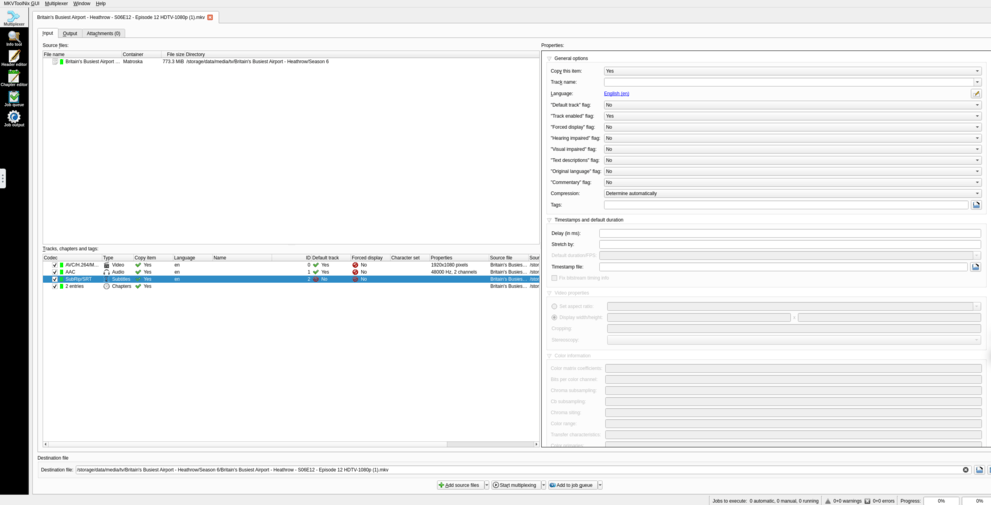
@FordGuy61 Thank you for your speedy reply. I have installed MKVToolNix on my unraid server, and added the file into it. Do you have any follow up instructions on what to do next?
@FordGuy61 So I believe I remuxed the file.
Added File > Pressed “Start multiplexing” > Created a copy of the file name but added a number to the end. Got it where plex can see it, but unfortunately it’s still happening; please let me know if there is something I need to adjust first?
MKVToolNix looks OK. Remuxing is pretty straightforward.
What you should see is a large initial burst, then periodic bursts when Plex refills the buffer. See screenshot below (the audio is transcoding, but that doesn’t matter).
Does this happen with all media, some media, or just this one episode?
Try this:
-
Check Plex Web settings. Use the same browser you use to play the video.
Select Show Advanced (to display Debug menu).
Quality: Home Streaming = Recommended. Do not enable auto adjust quality.
Debug: Enable both Direct Play and Direct Stream. Do not enable Use Alternate Streaming Protocol.
-
Stop/restart Plex Media Server (bumps the log files) and wait a couple of minutes for it to fully start and log the startup sequence.
-
Play the file with Plex Web, to recreate the problem.
-
Monitor the Dashboard to see if bandwidth is still abnormally high.
-
Then stop playback, pull the log files (settings → troubleshooting), and post the zip file to the thread.
Maybe the log files will show what is happening.
Does this happen with all media, some media, or just this one episode? <
Some media
Try this:
- Unchecked “Use Alternate Streaming Protocol”
- Restarted docker, and waited to see events start to appear in the console
- It’s playing now but the quality option is not visible
- Bandwidth seems fine now as main issue isn’t occurring
- Plex Media Server Logs_2024-12-12_23-16-36.zip (3.3 MB)
Btw this was all done on the original episode and season for the show displayed earlier.
Also it’s now transcoding, I don’t know why…
Now everything is transcoding and no option for changing the quality 
The “Use Alternate Streaming Protocol” looks to be causing the high Bandwidth. Will continue this tomorrow.
Glad the restart fixed things.
Please re-enable debug level logging (the default level). When disabled, the log files do not have enough info. Do not enable verbose logging, as it adds too much info to the log files.
Change the setting even if this problem is resolved. It will help with any future issues.
Settings → Server_Name → General + Show Advanced