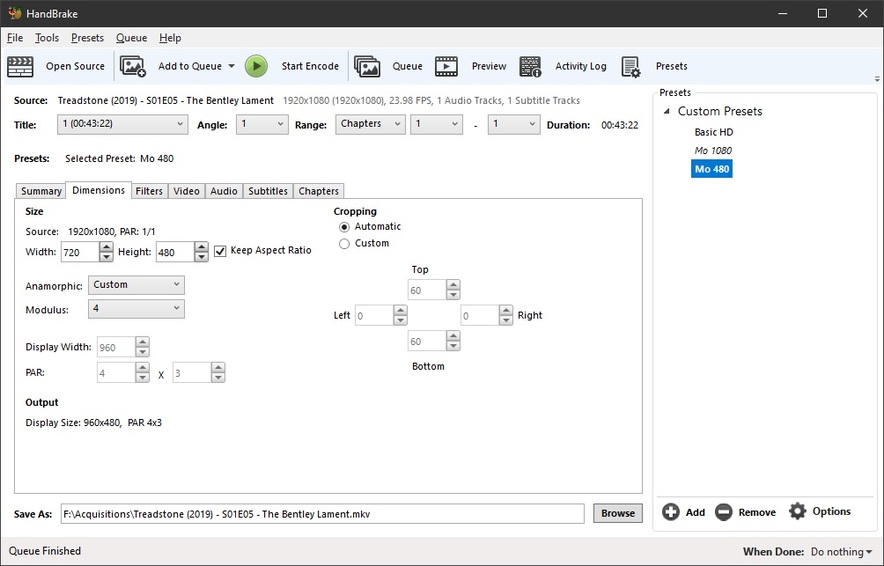
I came across a youtube video from Unkyjoe which I found useful, where he described using Handbrake to convert MKV’s to H264 for use with PMS, after first ripping a DVD to MPEG2. Not knowing much about this subject I gather it reduces the file size quite a lot, but I wasn’t sure if it would noticeably reduce the quality.
I started looking at this because last night I resumed watching 1080P of Train to Busan, and it was buffering very badly. I restarted my NAS (QNAP TVS-673) and gigabit network equipment and the problem continues. If I playback the same video through the web player I don’t have any issues. I normally play it back through my main TV which is an LG OLED55E6V.
It think it might be happening because of sub-titles (it’s a Korean movie so I need the english subtitles), but this wasn’t an issue before. I regularly update PMS, and have just updated to 1.18.2.2015 and haven’t had a chance to try it out again yet.
Is it worthwhile encoding my DVD and Blu-ray source MKV’s to H264? Would that help with buffering issues. I believe PMS software transcodes these to H264, so would this lighten the load on the PMS, and would it reduce network traffic?
I believe the answer to most of your questions is yes.
If you were using the web player on a desktop/laptop computer, it may be able to direct stream the MPEG2 video to the computer and let the computer handle it. If the device (client) you are viewing the video on does not support the video (or audio) codec, the server (your NAS) will convert to something the client can handle.
If I’m not mistaken, plex will always transcode if there are subtitles that are not burned into the frames of the video regardless of the source codec. So, even if the source is h264 and client wants h264 and subtitles, the server has to transcode to display the subtitles. If you don’t have issue with any other movie of similar quality without subtitles, then that is definitely the issue and I don’t think converting to h264 will help much.
That being said, if you use the right settings, transcoding your library to h264 will look the same as MPEG2, but if space isn’t an issue, I wouldn’t spend the time converting, especially since it seems like most things work fine for you.
Sub Titles cause issues when they’re image based subs - like PGS or VOB/DVD. UTF-8 text subs rarely cause issues because they can Direct Play on just about everything.
I curate ALL the material in my Plexiverse so it ALL Direct Plays. I am older so I don’t waste a lot bandwidth on quality I can’t see.
You just need to test a few files and make an informed decision about what you want to do. DVDs really won’t matter much. You’ll be able to draw them down pretty far before you ever start seeing ill effects.
The file that loaded above needed a bit of cropping. Handbrake automatically did the cropping and this time it was perfect. Sometimes it’s not perfect. It just needs to be checked before you hit the Go Button and corrected if necessary. HB will occasionally get confused if the material is dark enough to trigger it’s auto-crop.
These settings are what I use. My eyeballs stop seeing any improvement above about 3250kbps - so I give it 3750kbps and call it a day. The first thing you need to do is be honest with yourself. The next thing is to weigh the pain and suffering of throwing files with HUGE bit rates around on your network or internet as opposed to a smaller file, perhaps a little lower in quality - if you can even see a difference at all.
I use Average Bitrate. I enjoy knowing about how big my files are going to be. I don’t enjoy wildly erratic file sizes I can’t see any difference in. I use 2 Pass with Turbo because with Average Bitrate I want HB to have a pass to think about where it wants to put all the dots - and put them there on the next pass.
The bottom line is you encode for your eyeballs and displays. If you’re not happy, give it more bit rate until you are. Easy as that.
Audio that needs to be transcoded may cause the entire stream to transcode. Pick an audio format ALL your clients can deal with - at least for this test.
Do NOT use Handbrake to encode subs into it’s file. It will create ASS subs - that have to transcode on everything I own. I mux any subs into the file AFTER HB has done it’s thing. ALL my subs are UTF-8 Text subs. Forced subs are Burned in with HB during it’s encode. HB can’t mess that up.
Run a few files through, put them aboard an Other Videos Library and play 'em back on everything you own. Fiddle around until you get happy.
If you need to ‘de-interlace’ - use Yadif default with no detection. If your material is NOT interlaced - Turn OFF the filter. Keep the default LapSharp Filter on at all times for DVDs.
Using these settings, at that bitrate I can make DVD encodes that look BETTER than the source. Big Talk for a Blind Man, but you try it and see what you think…lol
Audio and subs don’t change from BluRay. Use what Direct Plays.
Again: IF you need, or think you need more bitrate, give it more. It’s just a number. Use one that makes YOU happy.
Make two users profiles, as I have. From there it’s usually Drag, Drop and Go.
I use MKV Files. It’s a more versatile container. If, for any reason you must use MP4 files, do so, but make SURE you don’t have any embedded tile fields within - or do this under all tabs for TV Shows and Movies - may as well do it now and get it over with:
Everytime you re-encode (that’s what handbrake does) you lose quality. Don’t ever do that unless you have a solid reason why. If your reason was only to avoid the buffering issue, I would suggest that you keep your origional, and use the plex Optimize feature to create a version that is highly compatible with many plex clients.
You are also confusing containers with video codecs. I use MKV containers for all my video files. Inside that container, sometimes the video stream is encoded with h264, sometimes AVC, sometimes HEVC, and sometimes others (like MPEG-2)
I have found no reason to use any other container format than mkv, it works well for me.
you MAY want to re-encode the video stream inside it for performance / compatibility reasons, but as I mentioned about, the optimize feature tends to work well for that.
Another thing to remember is that changing the container can be done without losing quality, but changing a video codec can not.
I would point out that better is an opinion. you may like the look better, and I accept that, everyone is entitled to their opinion. But in no way are they more accurate, more authentic, or closer to the source material. Properly decoded source material will always be closer to what the director intended than ones processed through simple filters like this.
The times where they could be ojectively “more accurate” is when a digital resoration is happening, correcting an aged damaged analog copy or digitally correcting a poorly chosen color balance etc.
I offered the solution of creating files that can Direct Play on @dillspooch 's NAS.
You’re suggesting he keeps throwing money at the problem until it goes away and he can play raw MakeMKV rips untouched by “Handbrake - The Destroyer of Worlds”.
Wanna give the above settings a try in the New Destroyer of Worlds, with the New Filter? No? Care to wait and see what @dillspooch does before you have him start arranging the second mortgage on his house to feed his Plex Quality Jones?
@dillspooch can run a few files through ‘The Destroyer of Worlds’ and see what they look like - then he can comment, and possibly look for another solution if what he’s seeing makes his eyes bleed and his head explode.
A Lot of people look at the bitrate before they look at the encode - then they already know it sucks without having to actually look at it. I’m suggesting @dillspooch evaluates a bit differently.
Epilogue:
I can tell ya right now - 10 thousand TV Show Episodes at 500M each take up way less space and are easier on the equipment than 10K Episodes at 5G (DVD). Let’s not even talk about BluRays - I don’t want my head to explode.
PS:
I have no idea what the benchmark is on that Q-Nap, but my server has a benchmark of about 9000 - and I wouldn’t even consider allowing Plex to transcode ANYTHING!
The server can handle it, but my head explodes when Plex’s transcoder kicks in. If there are any mistakes to be made, I prefer making them myself - at least I can do something about it if I’m doing the encoding.
Well, Chuck - that works for you.
I rip everything - then run it through Handbrake - that works for me.
I’m an aged beast. There’s no need stressing out myself and my infrastructure on quality I, nor any of my ‘Guests’ can see any difference in. Is there? What plays from Juicetown to anything that can connect to it satisfies adequately on everything from my wristwatch to a 60" Plasma, proceeds almost instantly and Direct Plays on everything.
Any perceived or imagined quality shortcomings just don’t matter that much to us - considering when Play is clicked, it Plays, without a lot of drama.
thx for the QNap Score. Armed with more info is a good thing, I suppose. If you’d like to tackle the buffering suffering, please… do so.
The reality of the situation, is that almost NOBODY is going to curate material the way I do with Handbrake. I’m retired, have the time, and need something to do. Almost everyone else is going to find it a huge, time consuming PITA.
Odds are we’re gonna need you pretty soon anyway…lol
PMS-1.18 has a new transcoder that has caused a number of issues with people, especially lately with hw acceleration. Don’t go making major changes to your media at this time.
Good film, good NAS, and a good TV that were working well before.
Do you want a workaround? If so, zip and upload the XML Media information for your film.
Thanks
Many thanks for everyone’s contributions. I’ve learnt a lot, hopefully some of it will sink in!
When I get the chance I will dabble with handbrake, just to see if I notice difference in quality. I still have a fair bit of storage on my NAS. The drives are all past their warranties now, one failed recently and I swapped in a spare. I will probably get higher capacity drives and replace the NAS with an Intel Core i3/5/7 model that does hardware transcoding with Plex, as the TVS-673 is AMD based. I’m not too worried about how much space it the mkv’s take up. I tend not to have much spare time so the thought of re-encoding is putting me off. I will fiddle!
Back to the issue of sub-titles, is there anything I can do to resolve the performance problem? This was never an issue before. I’ve been using the same hardware now for 2 years. All that’s changed is the firmware on the NAS (regular updates), and the PMS software (also regular updates). I’m streaming 4K HDR content from the NAS using PMS to my LG TV without issue (I guess it’s using direct play), so I’m sure it’s not a network capacity issue. I think PMS is working differently than it did a few weeks ago when I was on an earlier version of PMS as that title (Train to Busan) played without issue. Unfortunately I don’t remember which PMS version was in use before.