Hi, I recently got a Synology NAS (218+) for data back up and media centralization. Plex on the surface seems to be perfect for the later part of that.
So I downloaded the free version and got it running and I guess I have the following comments/questions:
Movies/TV (ie professional video) seems be exactly what I want, but I haven’t been able test beyond this it can’t read my iTunes files (I think DRM protected?) so I guess my only question here is how do I get media to put in it? I have a bunch of DVD/BluRays that I’d like to rip can plex do that or do I do it elsewhere?
Home videos seems to works like above and isn’t terribly useful IMO. As the organization method would be completely different for these. Am I missing something?
Photos seem ok for browsing, terrible for organizing. Not what I was hoping for, to the best of my knowledge and rating and tagging I do stays with plex and not the files, and its not possible to write the info back? I’ve done all my organizing with playmemories for a number of years (used Adobe photoshop elements before that). The interface is significantly more cumbersome for tagging/rating (and then filtering) the only upshot is I can still browser occasionally with Plex if I want and use the other to do my organizing.
Music: looking at this: Synology FAQ’s ... Read This First! first off I have iTunes working on the NAS (and it works reasonably well if I log in at the same time from multiple places I may have issues but otherwise so far so good), so the premise of the question is wrong. 2nd I can’t get it to import any data I have in iTunes (I’d been meticulously fixing errors in it over the last 1.5 years or so, so I do not want to start over - 5k+ songs) There is no “Plex Settings>servers” menu, but I did find the option somewhere else. but it still didn’t work. Also I edited the xml file just replacing M: (since I mapped network drive in windows) with /volume1/Music I think that should be correct, unless I had a dumb typo (not at home now) maybe missing a /. God forbid apple use relative paths. Assuming I can get this to work I need to ask before I fork over $ because I can’t test the app in my phone without spending money either:
i. does it shuffle music properly? since iOS 8.4 I think apple’s ability to do so has been an abject disaster, and its even worse in iOS 12 (something I would not have thought possible) can it take really long playlist and play through everything once over a few weeks before repeating songs?
ii. is it easy to download said large playlist to the phone? I have no desire to needlessly chew up data (or worry about having a signal). The bit of the app I can access currently I think I found the button but it appears I have to access each song individually rather than just copying over an entire playlist.
There seems to some core functionality I like but at this point I can’t yet justify buying the pass as there seems to be too many gaps (or simply unknowns) for me to move forward so I’m curious. If the music works I’d likely spring for the pass so I can at least divorce myself my itunes.
Use MakeMKV to rip your DVDs & BluRays. This will leave the video & audio in the same format as it existed on the disc (i.e. MPEG2 video for DVDs).
Use Handbrake if you need to convert the rips to another format.
Use “Other Videos” libraries for home movies.
See Plex’s Media Preparation guidelines. There are sections for movies, tv shows, home movies, etc. The naming & organization guidelines are not arduous, and Plex works best when you follow them.
Can’t comment on photos / music. I don’t use that part of Plex.
Regarding the Synology FAQ, “Servers → Settings,” etc. Some of the GUI layout has changed recently. When you’re at the main PMS page, https://app.plex.tv/desktop, you’ll see a Manage section and Settings listed underneath. If you had multiple PMS servers, you would pick the desired server at the top, then select Settings. You may see similar issues in other documentation as well.
See Plex Free vs Paid for info on what a Plex Pass gets you. You may not need it. If you do want to try, you can start with the $4.99 USD/mo subscription. It is a low cost way to test drive a Plex Pass and you can unsubscribe if you don’t need the functionality.
Read the announcements about what is happening at Plex before buying the Pass; the key direction at Plex today seems to primarily be about monetization and readying the whole thing to be sold to someone else. Most of the recent additions to ‘features’ plus the mothballing of some of the things you’re asking about are a direct result of that focus; all you have to do to see it in action is to check out the latest apps on Android, Roku, etc…
Best of luck in your search. After many years of using Plex, I’m now taking a long look at Emby as an alternative, and really regretting the purchase of a Plex Pass.
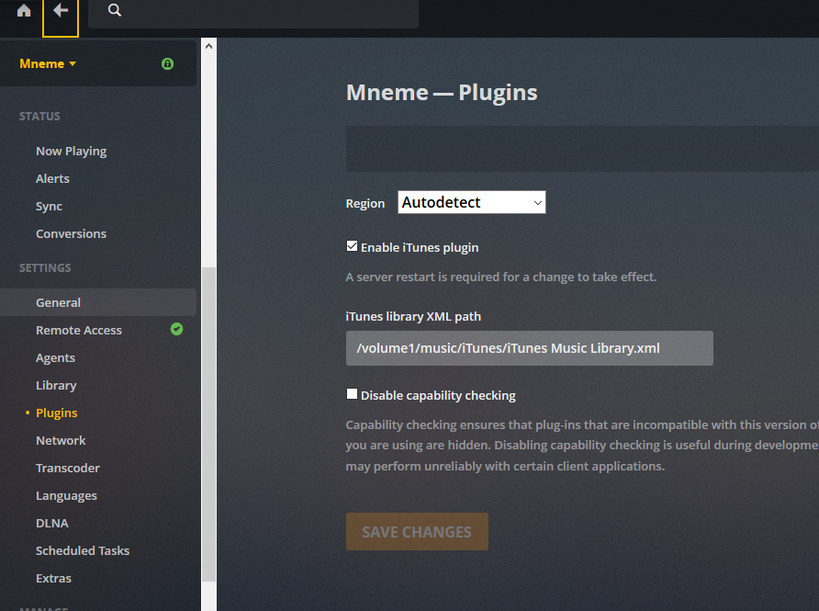
Thank you for the replies, i’ll dig into some of those links in the next couple days. Still trying to get iTunes import to work, below is a snap shot of the xml and a rather obtuse way to show that the path is correct to the file:
I appreciate your help but I still can’t make it work I’ve deleted the library a couple times and tried to regenerate it, nothing seems to work. I definitely fixed the paths as described and removed all the smart playlists. The path wants the fully qualified path to the file right? Or just the directory?
After that’s set do I need to do anything to get it to import? It just doesn’t seem to work.
Success, it was step 6 I some how missed or ignored because I wasn’t interested in the playlists per se, I just wanted play counts/history or other metadata I may have added.
Errr… its got plays and date played but no year (blank for everything) or rating. These are populated in my iTunes does it not import that? (or does it refresh it later in the process I’d assume it would grab everything for 1 track at a time)