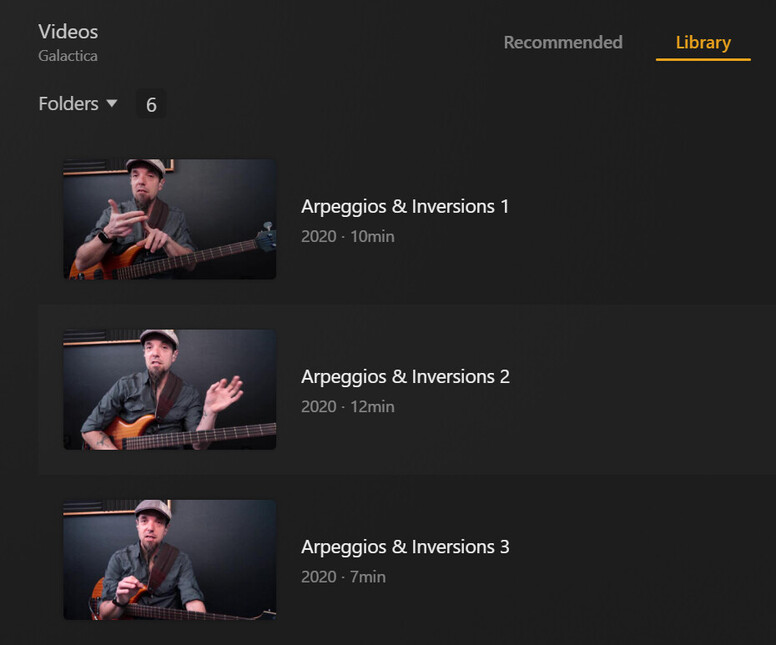
Is there a way to unmatch metadata from ALL media in a particular library? Alternately, or in addition, is there a way to set a Library up to ONLY scan for Local (never online)? I do have “Prefer Local” flagged, but that doesn’t appear to be a “global” setting - I assume because, as I do have Cover images for all of the meda, I do NOT have a NFO (metadata) file.
I have a Library with solely personal videos, tutorials and or tutorials I’ve created which will never have online Metadata, but Plex is matching a large percentage of them using poorly translated “names” extracted from the media filename. For instance, “Extracting Hydrogen through Partial Oxidation” is being matched to “Elemental: Hydrogen vs. Hindenburg.” Don’t even get me started on the Physics related material! Those are so creatively mismatched it boggles the mind! LOL
But, I digress… sometimes the incorrect matched names are close enough that it’s not readily apparent that there’s a mismatch. And, as this is being done for a huge percentage of the media in the Library, I’m always finding another mismatch an hour, day or week after resolving others
In some cases (I do have paired Cover Images for all the media), even if the name is mismatched, the Cover Image is sometimes correct - so, even that doesn’t clue you into a mismatch.
If I can unmatch everything en-masse, then the cover images (at least for those I’ve manually unmatched) will attach to it’s partner, and the filename is used as the Title.
Yeah, the “Movies” and “TV Shows” libraries will automatically attempt to match your content against online databases. Do as shark2k said and make an “Other Videos” library instead.
I had tried that. Unfortunately, that doesn’t display the list the same was as TV and Movies. It shows wide (Landscape) “screen snap” images, at 3 per line, rather than the 7 per line “typical” DVD Cover Image size (Portrait).
There are enough of the files that, even tagged into about 87 different groups, that makes the Library less appealing. Stupid, I know, but I’m a hobgoblin for standardization.
I had also tried filtering, but even if you set UNMATCHED to False, it shows ALL media - matched, or unmatched (True count is the same as False count, and if True, clicking on three dot’s doesn’t show “Unmatch” option).
It might not be possible do do what I want, but if not, it would be a nice feature update (or correction on Filtering) for a future release.
I did check there. At a minimum, it would really help for the “True”/“False” condition in Unmatched filter worked.
I’ve still got at least 3 files which are apparently nowhere. I cannot find them using “Date Added” and for some reason Plex isn’t showing anything added in the last 119 minutes - it did earlier, so it’s not as if that filter doesn’t (hasn’t) worked :(.
I moved the missing files out of Plex, re-scanned, waited an hour, copied back, and … still not appearing anywhere and not in the Date Added filtered list. I even deleted trash, optimized DB and cleaned Bundles. Still missing. I’ve moved out again and will wait to put it back until tomorrow.
You can create a “TV Shows” type library with the “Plex Series Scanner” scanner and the “Personal Media Shows” agent. This will have the show/season/episode structure without any matching. I think your folders/files still need to be named as if they are TV shows per Plex’s guidelines.
Explanation:
“Other Videos” type libraries are just a shortcut to create a “Movies” type library with the personal media scanner/agent preselected. In other words you can create a “Movies” type library and manually select the personal media scanner/agent and it would be identical. There just isn’t a shortcut to create a “Other TV Shows” type library, so you have to create a “TV Shows” type library and manually select the personal media scanner/agent.
I’d thought of that - and, all of my Libraries are setup with “Personal Scanner” as the other types keep screwing up the Match, in TV, Movies or my “custom” media. UPDATE: My mistake, I have them as “Personal Media,” not “Personal Scanner.” I’ll investigate that.
Personally, I wish they’d add a “None” option to just shut auto-match off (for a particular library). With that said, media matching has really taken a huge hit on accuracy in the last 4 or 5 months. I usually had 97 or 98 out of 100 perfect matches. Now I’m getting maybe 70-80% accuracy, even after the “upgrade library type”.
I’m not sure what Banzailnstitute means by “swimming upstream.” Color me a pain, but 3 per line vs 7 per line is a huge drawback to using any other Library type from the get-go, so I’ll stick with the two main categories.
Back to the original problem, though, as matching is so much poorer than it was, filtering should be enhanced/corrected so we can easily fix what Plex misses in it’s automatic processing. Don’t get me wrong; that it does anything automatically is great. It just shouldn’t be so difficult to find and correct mistakes. I just discovered 13 “missing” files which were evidently combined with other similarly named items. That took almost 10 days to figure out; and only because I decided to do a manual file vs Plex count comparison.
Thanks to everyone for all the help and comments. It take a Village, eh?
So for something like The Closer where there is a series name but no picture, what’s the actual match problem? Did it not pull in the picture? Did it not pull in anything and you had to manually select “The Closer?” The picture of missing thumbnails doesn’t really explain what a bad match actually means in your case.
If you followed the file naming rules and you are not matching easy things like Columbo then that is pretty weird.
It has been a long time since I have seen Plex fail to pick up an easy match so there must be a way to improve your situation. However, if you are using an older agent, then I dunno.
The “actual” match problem, as with every one with no poster, is that it DID NOT MATCH. Right click on it, and there’s no “Fix Match” or “Unmatch.” There’s just a match. Internally (pencil click), all of the metadata is blank.
It not match anything, even incorrectly.
That’s what I meant by 50%+ match failure.
No need to continue this. I gave up and manually matched all of them. The ultimate point is that, while just about every series matched before last week matched without a problem. Maybe 2 or 3 had to be tweaked because the automatic match selected either a remake (more recent) version, or mistakenly used a twist of the filename (Hustler instead of “The Hustle.”
I’ve got TV locked as tightly as I can to (fingers crossed) prevent Plex from un-matching these in the future.
I’m not sure a DB repair would do much as the DB isn’t that old - maybe 4 weeks. It was 7 or 8 years old prior to the restore, but I had to start from scratch after the NAS restore. I’m also not comfortable running scripts from public portals, even though I do trust Plex and Chuck. I’m highly virus-phobic and my system is locked so tightly even I have to go through major hurdles to run my scripts.
As I’ve got settings (I hope) set to minimize online data pulls now, once I finally get everything downloaded to “pretify” the Plex media, hopefully it will remain that way. I’m not doing any further server updates, and hopefully once I’ve got everything saved to local storage, my audio will remain stable as well (referencing another conversation on audio).
Thank everyone for their suggestions and help with this.

 I had tried that. Unfortunately, that doesn’t display the list the same was as TV and Movies. It shows wide (Landscape) “screen snap” images, at 3 per line, rather than the 7 per line “typical” DVD Cover Image size (Portrait).