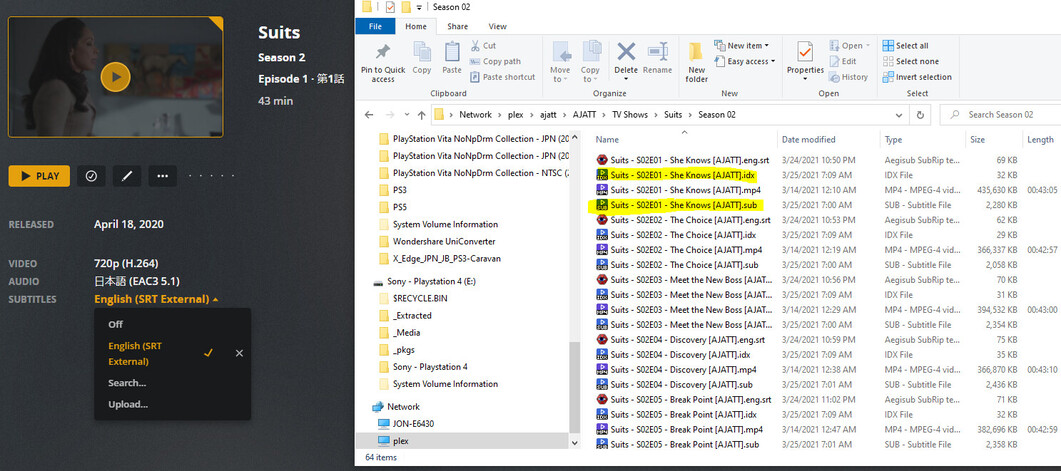
Good morning, I know that Plex has always had an issue with idx/subs to a certain degree, but I was wondering if anyone knew a fix to my specific issue.
I have TV Shows that are in Japanese that use Japanese subtitles, and the subtitles where converted from .xml/png to .idx/.sub. The subtitles play perfectly fine in PotPlayer/VLC, and interestingly enough, SOME of the videos in plex show the subtitles and play without issue, while the others wont see the subtitle file.

As you can see from that image, the subtitles are named correctly (the same as the mp4) and plex is showing that there are Japanese subtitles, which is correct. In the picture I also included the size, as you can see, the total size of the idx/sub is about 2mb. I am only stating this because I remember there being an issue with sub/idx files bigger then 25mbs.
Now if I go to another show, Homeland, in this instance, the subtitle is named the correct way, and has the same relative size, but plex does not see it at all:

It makes no sense to me. If I try to manually upload the sub/idx file it tells me it exceeds the 1mb limit, so I can’t, but that still doesn’t explain why one show sees the subtitles and another doesnt.
Now to make things even more weird, I thought, okay maybe there is something different about the way I converted the The Blacklist subtitles as opposed to the Homeland subtitles. So I moved the Homeland E01 subtitles to a different folder, and copied The Blacklist S1 subtitles to the Homeland folder and renamed it…
So just so we on the same page, now Homeland E1, has the working subtitles of The Blacklist S1, and now plex shows that Homeland has subtitles. Of course they are the wrong subtitles, but subtitles non-the-less.
So then, I deleted the subtitles and put the original Homeland E1 subtitles back, and guess what? The subtitles are still seen, and WORK. So now the correct subtitles are playing and plex sees a subtitle file… what in the world?
I am running Plex on a Windows 10 box, with the newest Plex Media Server 1.22.1.4228.
Tested Subtitlest.zip (1.8 MB)
Above are the tested subtitles from the test.
Any help would be greatly appreciated!