it just gives up. what the hell
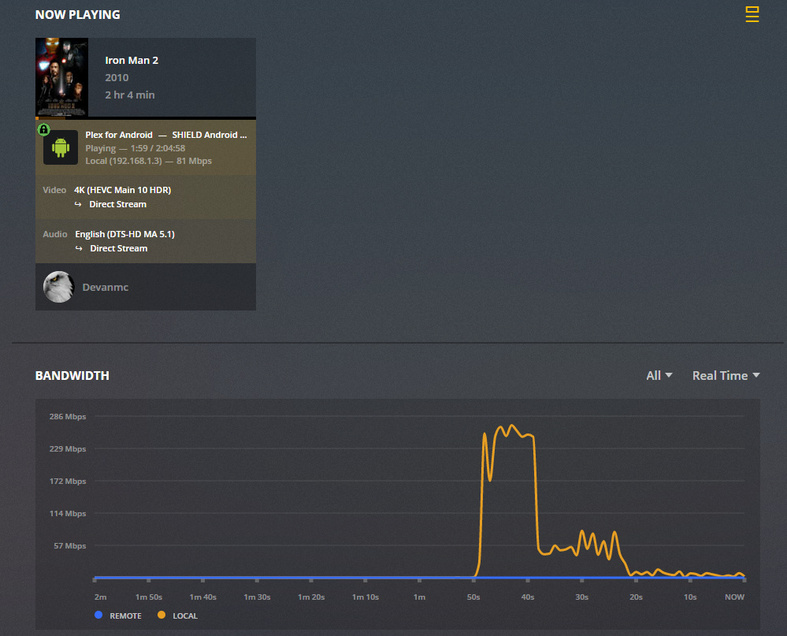
problem continues, non-trueHD audio. just stops streaming. guess ill find something else i need ■■■■ to actually play. thats the whole point of this.
funny how Emby works fine
Not sure if it has been requested, but for issues of this nature what would be required to look into a problem - in addition to the logs from the plex media server and the plex client app, is a short clip that would show the problem - perhaps a 5 minute / 10 minute clip
See
Server Logs
https://support.plex.tv/articles/201643703-reporting-issues-with-plex-media-server/
https://support.plex.tv/articles/200250417-plex-media-server-log-files/
Plex Client App Logs
For android / shield app see
https://support.plex.tv/articles/201573117-android-android-tv-fire-tv-logs/
For other clients - see https://support.plex.tv/articles/201869908-log-files/
For creating a clip - see https://support.plex.tv/articles/201035968-generating-sample-files-from-media/
Again, in your stereo-only setup, and even though it says direct stream of a DTS-HD MA 5.1 stream, there is extremely likely a hitch in your electronic giddyup forcing an audio transcode. Your Ghost in the Shell 4K played OK because it was a stereo-only audio soundtrack, and even though it was DTS-MA it maxed at ~1500 kbps (5.1 DTS-MA is about ~4000 kbps) which your TV could handle, is my guess. If you go get a cheap TrueHD receiver it will “transcode” 5.1 and 7.1 soundtracks to stereo and you could just pre-out RCA jacks to your setup. This might be your only option. Without a TrueHD and DTS-MA capable device in your chain (the Shield won’t overcome that your TV is not), I still think you’re going to be banging your head against the wall for a long time to come. My two cents. Plex is great at 4K. Just takes right setup.
Except, as I said, it happens on files that dont even have trueHD or where I select a different audio track entirely. Eitherway, plex doesnt work and this clearly isnt going to get fixed.
my TV doesnt even see audio as I use a USB DAC on the shield. TV literally only gets video.
Jellyfin/emby work fine. So i just use that now. I gave up here. Plex would rather make new plug-ins and advertise tidal than fix this.
“Except, as I said, it happens on files that dont even have trueHD or where I select a different audio track entirely. Eitherway, plex doesnt work and this clearly isnt going to get fixed.”
(In all of your screen shots, I still have yet to see a posting of a screen shot of 4K HDR video playing with JUST an AC3 track and that track direct playing. If you try this I have you high odds it will always work in your setup. I sense your frustration. You’re options in meantime 1) use EMby, 2) mux your mkv files with the low-res track as the “default” track by setting them as default in mkvmuxer, or 3) transcoding the high res audio files into lower res audio files, prob stereo AAC in your setup, using something like handbrake or media coder and muxing that audio track in as default, 4) getting high res audio capable client equipment beyond the Shield.)
This topic was automatically closed 90 days after the last reply. New replies are no longer allowed.
