For someone that is just semi computer nerd these scripts are fantastic. But is there a way to get rid of or change my username on the message posted on the screen. It’s not much and I don’t know how much coffee costs but hopefully the $3 I sent will buy a descent cup of joe.

Unfortunately, that cannot be changed unless you change your username. That is hardcoded in the players.
thanks for reply. I haven’t tried it but in the script what is userid referring to: --jbop allStreams --userId {user_id}
No I mean changing your username on your account. Meaning that is not something controlled by the script but again, by the player itself.
To be clear, you would have to change your account name from Wpcrumbley to something else.
@Wpcrumbley -
Additionally, that ‘userid’ is referring to the person currently watching.
Even if you were NOT using any scripts, and clicked the “x” from within the PMS “activity” screen to stop someone’s session, the person’s session you were ending would still see your name “Server_admin_name asked to stop your playback from this server”, hence why the Plex account change would be necessary.
There is already an issue/request for this. Feel free to add on to it. I have a Trakt account but haven’t really messed with it much. It might be something I tackle, maybe…
ok what about killing streams either at a certain time (not an entire hour) or after x number of back to back streams. I have a few people that has auto play turned on and they start a stream at night and fall asleep and it keeps playing all day. But i don’t want to block for an entire hour incase they truly are up at 4:00 am wanting to watch. So i was thinking of killing all streams at 4:00 am but they can start back at 4:01 am if they want
Check the killstream section. There is limiterr.py and it’s readme with instructions. The first example would you help with autoplay sleepers. It’s what I use for myself. Although, with playlists with multiple shows on random you might miss a few if you don’t set the time range long enough.
Awesome that is exactly what I’m looking for. What does the 22 or 23 or 24 or 1 stand for. Reason I’m asking is if it’s time I want to change, but if it’s something else don’t know.
@Wpcrumbley - military time. hour of day. 22 = 10p, 23 = 11p, … (and, @Blacktwin , is that right? 24?? I thought midnight was 00)
So what happens? Does it stop playing on each hour
@JamminR you might be right there.
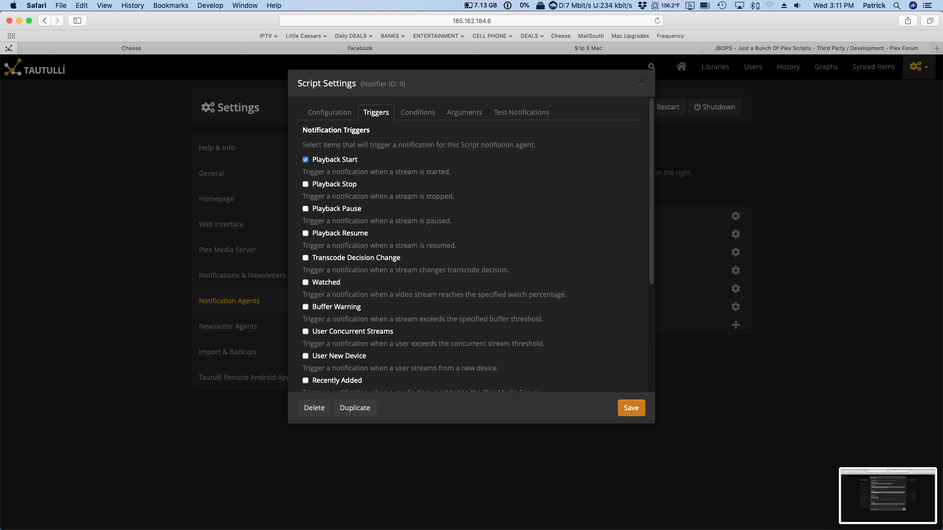
@Wpcrumbley it’ll check if the user has watched more than the limit of the show. Checks are triggered by Playback Start and will only run within the hours defined. Once the limit is hit the user’s stream will be killed. To allow further playing the user will need to follow the instructions in the message. That being, they need to wait 60 seconds (default but you can change it to whatever, defined by argument) before starting the stream again should they chose to continue watching. This will continue on stop each stream forcing the user to wait each time afterwards. Until it’s outside the hours defined.
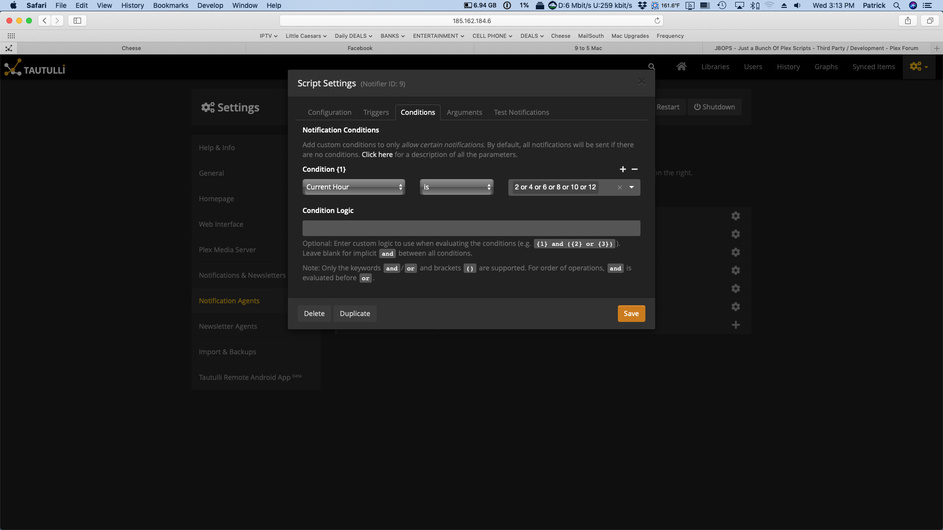
thanks. My problem is I’m using a VPS somewhere in europe so there is a 6 hour time difference. So to make sure there is no confusion with the time whether its local time or server time i was going to set the condition to 2 or 4 or 6 or 8 or 10 or 12. So would that make it if they have had 3 autoplay starts at either 2:00, 4:00, 6:00, 8:00, 10:00, or 12:00 (i understand its military time) the server will kill the stream for 60 sec until they manually start back
@Wpcrumbley - pretty sure it’s going to be time local to Tautulli server running the script.
I’m pretty sure Plex API doesn’t provide client time and therefore Tautulli couldn’t/wouldn’t know.
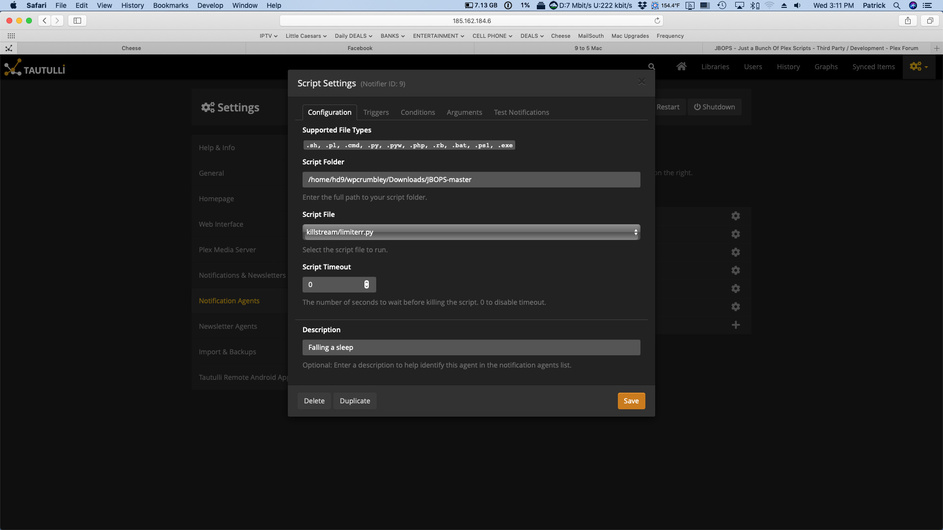
I don’t think the limiter.py script is working. Someone played @ 12 episodes of the same show and it was obvious it was autoplayed. what does the grandparent rating key part in the script talking about: --jbop limit --username {username} --sessionId {session_id} --grandparent_rating_key {grandparent_rating_key} --limit plays=3 --delay 60 --killMessage ‘You sleeping? If not wait 60 seconds and start again’. also i included photos of what i set up to make sure i did it correctly!

That is the show level rating key. For shows is Show/Series (grandparent) > Season (parent) > Episode (rating_key).
Everything looks right. Best to check the logs to see where the script ran and if it failed or what was the result of running it. Don’t post your logs here. Instead post to gist and link to the gist if you’re looking for help with your logs.
Remember the user can continue watching if they just wait the 60 seconds. They’ll be prompted again with a kill message when they start watching again within the time windows.
@Blacktwin a feature request for your consideration. It would nice if we could generate a holiday based theme playlist. Like for example using logic similar to the this day in history functionality it can compare your library to some external top Christmas movies list and if there are any that are in your library build a playlist with them. Similar for Holloween and Thanksgiving. Thanks in advance for the consideration.
Yeah that would be neat. It’d have to pull from IMDB or Trakt or somewhere else to figure out what is a “Holiday” themed movie. Plex doesn’t have Holiday genre or any way to determine if its a Holiday movie. Obviously you can create your own Holiday themed playlists and share them.
Your playlist idea reminds me -
Every year I add, then later remove so I don’t have to see them all year long, holiday libraries for Halloween and Christmas.
Unfortunately, Tautulli now sees 3-4 ‘duplicate but not really’ libraries.
Could a script be written to combine past library watch statistics with a current ‘active’ one?
I figure we’d hold our mouse over each old non-active library to get it’s session ID from the URL in Tautulli, then run something like
JBOPS-libmerge.py <old1,old2> <current>
Example, I have 3 libraries listed named “Christmas” in my libraries list. One is active
Session IDs are 13, 26, 27
I’d run JBOPS-LibMerge.py 13,26 27
13 and 26 data/watch history/etc would be merged into 27.
I could see this being more a challenge if Tautulli’s DB format changed significantly.
I’m more than willing to zip/share with you my current DB to break test this on.
I’ve butchered something together to create a Movie playlist based on keywords for my own purposes, hopefully could work for you too?
https://github.com/mcqweb/plexScripts/blob/master/keywordPlaylist.py
