Nice! But is this functionality not something that could be done with Plex’s webUI?
If it is, I don’t know how 
I would assume that with a new library comes new rating keys for the same titles that exist in the other libraries. Swift already has a script to “fix” an old rating keys from an older Plex install to a new Plex install to be able to keep the history from the older Plex install. So it’d be something along the lines of that.
@Blacktwin - Indeed. I just went into the older ‘dead’ Christmas library link in Tautulli, picked one example video under Media Info, compared it’s link to the current working Christmas library and the rating_id is definitely different.
Do you think I’d be able to use the update metadata script as is? I presume it only grabs ‘active’ libraries though, then just updates data across them if a video is same title.
I think my original idea might be better to be able to specify which libraries one would want combined, but perhaps include some of that script?
Yeah, was thinking that an external list from one of the sources you mentioned could be pulled and some logic to check if any of those movies from the list exist in your library and create the playlist from that. In this way, it would not matter if Plex does not recognize them as being a “holiday” movies since it is just creating the playlist from the pulled list. Similar I suppose to how TodayinHistory function works in that it cross references your library with a known list and creates the playlist based on that.
Hey @Blacktwin
Not sure if I should be posting this here or in the Tautulli thread, but I seem to be having an issue with the kill_stream.py script in Tautulli and the stream not actually being killed on the client. The logs make it look like it’s working but after the 60 seconds are up, the stream is still up on my TV paused and I never get the kill message.
I’ve pasted my log for the test in below.
Here are my arguments under the Playback Pause section (I’m using 60 seconds for the test but it will be 10 minutes [600 seconds] once I know it’s working):
--jbop paused --interval 10 --limit 60 --sessionId {session_id} --userId {user_id} --username {username} --killMessage 'Session paused for over 10 minutes, stream has been stopped. Please resume your viewing if you please.'
For the configuration tab I have script timeout set to 0 and my script is showing in the script file field.
I have Playback Pause checked in the Triggers tab and nothing in the conditions tab.
I basically copied what was in the example in the github page (except I added the userId and username to the arguments as username was initially coming up as none in the logs) so I’m not sure what I’m missing.
If I have to try to get @SwiftPanda16’s help, just let me know.
Thanks for any help you can give (logs below).
2018-12-15 21:21:53	DEBUG	Tautulli ActivityHandler :: Removing sessionKey 29 ratingKey 36206 from session queue
2018-12-15 21:21:53	DEBUG	Tautulli ActivityProcessor :: Play duration for session 29 ratingKey 36206 is 10 secs which is less than 120 seconds, so we're not logging it.
2018-12-15 21:21:53	DEBUG	Tautulli ActivityHandler :: Session 29 stopped.
2018-12-15 21:20:15	INFO	Tautulli Notifiers :: Script notification sent.
2018-12-15 21:20:15	DEBUG	Tautulli Notifiers :: Script returned:
    Session '898387343ffa08f-com-plexapp-android' from user 'shark2k' is no longer active on the server, stopping monitoring.
2018-12-15 21:20:15	DEBUG	Tautulli Notifiers :: Executing script in a new thread.
2018-12-15 21:20:15	DEBUG	Tautulli Notifiers :: Full script is: ['python', u'/config/scripts/kill_stream.py', '--jbop', 'paused', '--interval', '10', '--limit', '60', '--sessionId', '898387343ffa08f-com-plexapp-android', '--userId', '838038', '--username', 'shark2k', '--killMessage', 'Session paused for over 10 minutes, stream has been stopped. Please resume your viewing if you please.']
2018-12-15 21:20:15	DEBUG	Tautulli Notifiers :: Trying to run notify script, action: pause, arguments: [u'--jbop', u'paused', u'--interval', u'10', u'--limit', u'60', u'--sessionId', u'898387343ffa08f-com-plexapp-android', u'--userId', '838038', u'--username', u'shark2k', u'--killMessage', u'Session paused for over 10 minutes, stream has been stopped. Please resume your viewing if you please.']
2018-12-15 21:20:15	INFO	Tautulli NotificationHandler :: Preparing notification for notifier_id 1.
2018-12-15 21:20:15	DEBUG	Tautulli ActivityHandler :: Session 29 paused.
2018-12-15 21:20:05	DEBUG	Tautulli ActivityHandler :: Session 29 started by user 838038 (shark2k) with ratingKey 36206 (Star Trek - Shore Leave).
-Shark2k
The state of the stream changed. They are no longer active on the server. This message is not suggesting that the stream was killed. Just that the connection of the session ended.
Add --debug to your arguments for more detail.
If I have to try to get JonnyWong16’s help, just let me know
By @ing Jonny you are already asking him. Why ask me? 
Thanks for getting back to me.
I added the --debug to my arguments (only change I made so all the previous info is still the same) and tested again to get the additional information, log info is below.
That makes sense then as to why I didn’t see the kill message. Though it is weird that it reports that the stream is no longer active as the stream is still up on my screen and I can resume it with no issue.
I just checked my test server that was using the wait_kill_paused_notify.py script (I’m guessing the previous iteration of the kill_stream.py script) and the logs don’t show Tautulli considering the stream stopped… Though that isn’t necessarily going to be much help (especially considering Tautulli is 215 commits behind on that server) but just wanted to have something to compare to.
And I realize that but I am pretty sure Jonny said in his Tautulli thread that he turned off notifications from the forum so figured if I had to get him involved I’d either post in the Tautulli thread or maybe try one of the other support methods 
Let me know what else you need (as it doesn’t seem like the debug argument gave that much more detail, to me at least).
And since I should have originally given this in my first post, I’m running Plex and Tautulli on a Centos 7 server both in docker containers from linuxserver.io. My test environment is a Debian server with Plex and Tautulli in docker containers with Plex from the official container and Tautulli from the linuxserver.io container. Only reason I looked at the logs from the test environment was because I wanted to see if there was any mention of the stream not being active but based on the logs it worked as expected because the logs show the stream was killed and message sent on the test server.
2018-12-16 02:08:12	DEBUG	Tautulli ActivityHandler :: Removing sessionKey 39 ratingKey 36206 from session queue
2018-12-16 02:08:12	DEBUG	Tautulli ActivityProcessor :: Play duration for session 39 ratingKey 36206 is 9 secs which is less than 120 seconds, so we're not logging it.
2018-12-16 02:08:12	DEBUG	Tautulli ActivityHandler :: Session 39 stopped.
2018-12-16 02:06:29	INFO	Tautulli Notifiers :: Script notification sent.
2018-12-16 02:06:29	DEBUG	Tautulli Notifiers :: Script returned:
    Tautulli URL - http://localhost:8181
    Tautulli Public URL - /
    Verify SSL - False
    Tautulli API key - xxxxxxxxxxxxxxxxxxxxxxxxxxxx70e8
    Successfully called Tautulli API cmd 'get_activity'
    Session '898387343ffa08f-com-plexapp-android' from user 'shark2k' is no longer active on the server, stopping monitoring.
2018-12-16 02:06:28	DEBUG	Tautulli Notifiers :: Executing script in a new thread.
2018-12-16 02:06:28	DEBUG	Tautulli Notifiers :: Full script is: ['python', u'/config/scripts/kill_stream.py', '--jbop', 'paused', '--debug', '--interval', '10', '--limit', '60', '--sessionId', '898387343ffa08f-com-plexapp-android', '--userId', '838038', '--username', 'shark2k', '--killMessage', 'Session paused for over 10 minutes, stream has been stopped. Please resume your viewing if you please.']
2018-12-16 02:06:28	DEBUG	Tautulli Notifiers :: Trying to run notify script, action: pause, arguments: [u'--jbop', u'paused', u'--debug', u'--interval', u'10', u'--limit', u'60', u'--sessionId', u'898387343ffa08f-com-plexapp-android', u'--userId', '838038', u'--username', u'shark2k', u'--killMessage', u'Session paused for over 10 minutes, stream has been stopped. Please resume your viewing if you please.']
2018-12-16 02:06:28	INFO	Tautulli NotificationHandler :: Preparing notification for notifier_id 1.
2018-12-16 02:06:28	DEBUG	Tautulli ActivityHandler :: Session 39 paused.
2018-12-16 02:06:19	DEBUG	Tautulli ActivityHandler :: Session 39 started by user 838038 (shark2k) with ratingKey 36206 (Star Trek - Shore Leave).
-Shark2k
The session no longer active is what Tautulli is reporting. It maybe helpful to provide the full logs to see if there is anything reporting why it’s disconnecting. Maybe the initial sessionKey is what you have above but by the time the script checks Tautulli again the sessionKey has changed?
While testing, check Tautulli’s homepage to see if the stream is still active. If it is still active then triple click the ACTIVITY header on the homepage to open a new tab displaying the detailed session information. Check the sessionKey of your stream against what was reported to the script.
wait_kill_paused_notify.py was rolled into the kill_stream.py script. Kill_stream.py has additional improvements in reporting what it’s doing.
Hey @Blacktwin,
Thanks for all your help .
I actually feel a bit silly being in IT and not trying what I did today first.
After reading your reply I was looking at the logs and testing some more. I wasn’t really seeing anything that looked particularly helpful and triple clicking the ACTIVITY header was still showing the stream as active and everything pointed to it should work. I did an additional test and killed the stream from Tautulli and that worked.
After doing that, I decided to restart Tautulli to see if that made any difference and lo and behold the script killed the stream after a little over a minute (taking into account the interval). So I put the limit to what I actually wanted it to be and tested again and it worked as I wanted.
I should’ve done the old reboot to begin with but that’s what happens when you work on something at night after a full day and then resume working after you go out again after a full day and get home really late  .
.
Thanks again for your help in troubleshooting and making this script.
Much appreciated!
-Shark2k
@Blacktwin - 2 requests for IP to Maps.
I’d like to automate the publish of the map to my hobby web server, probably monthly.
-
Add option for cumulative play time, perhaps with a ‘date range’, instead of play count?
I’ve always hated Tautulli’s play count - Plex is odd about sessions, pauses, plays, etc. I understand Tautulli has to count those individually as Plex reports them, but I don’t like Plex reporting 7 plays of one video just because a single person paused, stopped, restarted, a movie a few times in one day. -
Add an ’ anonymize ’ option?
I don’t really want the usernames or IP addresses showing in the legend, basically, only the hours of each player, and the city. In my mind’s eye I imagine options for each of the items in the current display
--snouser = Show no username
--snoip = Show no IP.
--snocity = Show no city name.
--snoplay = Show no play(count/time)
--snodevice = Show not device
(Or perhaps on the device, merge all from same ip, ignoring device - I've not actually run your script yet to see if it shows 3-4 dots for different devices from same IP/user - that seems it would get messy on the map)
 nice. Yeah, when you’ve spent too long trying to find an issue just to restart it everything works. oof. I know that feeling.
Nice ideas. ips_to_maps.py is one of my favorites.
Once you do run it, would you PM me it? There is a --no-legend arg. I’d just like to see the map. I like map. Especially with lots of history and users. It can look pretty cool.
I am new to Linux… Using Ubuntu 18.10
And I am getting stuck on installing… I am attempting to install the requirements.txt stuff, and getting lots of errors… Are you still on plex forums?
@jwaltrip4 -
Requirements stuff for what? JBOPS has several different things to run. Any number of which might have different requirements.
@Blacktwin - I use https for Tautulli.
Getting this error in trying to map. Can you quickly write in a way to skip validation? (Or make it work for Let’s Encrypt certs?)
>python ips_to_maps.py
Tautulli API 'get_users_tables' request failed: HTTPSConnectionPool(host='jamminr.punked.us', port=8182): Max retries exceeded with url: /api/v2?cmd=get_users_table&apikey=xxxxxxxxxxxxxxxxxxxxxxxxx (Caused by SSLError(SSLError("bad handshake: Error([('SSL routines', 'ssl3_get_server_certificate', 'certificate verify failed')],)",),)).Tautulli API 'get_users_tables' request failed: HTTPSConnectionPool(host='jamminr.punked.us', port=8182): Max retries exceeded with url: /api/v2?cmd=get_users_table&apikey=xxxxxxxxxxxxxxxxxxxx (Caused by SSLError(SSLError("bad handshake: Error([('SSL routines', 'ssl3_get_server_certificate', 'certificate verify failed')],)",),)).Traceback (most recent call last):
  File "ips_to_maps.py", line 377, in <module>
    user_lst = sorted(get_users_tables('friendly_name', user_count))
TypeError: 'NoneType' object is not iterable
It would probably work similar to the other newer scripts. Add this block above the defs
sess = requests.Session()
# Ignore verifying the SSL certificate
sess.verify = False  # '/path/to/certfile'
# If verify is set to a path to a directory,
# the directory must have been processed using the c_rehash utility supplied
# with OpenSSL.
if sess.verify is False:
    # Disable the warning that the request is insecure, we know that...
    import urllib3
    urllib3.disable_warnings(urllib3.exceptions.InsecureRequestWarning)
Then replace the existing calls to requests.get(TAUTULLI_URL.rstrip('/') + '/api/v2', params=payload) to sess.get(TAUTULLI_URL.rstrip('/') + '/api/v2', params=payload)
@jwaltrip4 You got it going? It’s probably better to pick one place to post an issue or ask for help. The best place would be the Tautulli discord’s #scripts. If it doesn’t seem activate at the time just post your question someone will respond eventually.
@blacktwin - thanks - got maps working, but, ouch, getting basemap and it’s requirements installed on a Win system running Python 2.7 took me 2-3 hours of various searching and trying different things.
pip install basemap wouldn’t work.
Found a link to some archive from github, pip install https //github.com/blah, it started to work, then choked on the fact GEOS wasn’t installed. tried pip install geos - well, it WAS on my system, but, apparently not in the way or version basemap wants.
So, this ended up being what I did.
Found - https://stackoverflow.com/a/31713592
Which links to files at https://www.lfd.uci.edu/~gohlke/pythonlibs/#basemap
I used cp27m-win-amd64 as my python exe is 64, but, yeah, finally up and running.
Now - extra suggestion for maps - in addition to myprevious ones
It’s kind of an improvement to my original suggesion #1 - in addition to allowing time range OR play count, allow for a minimum of either. I just ran maps. My legend went way beyond what it could show because I’ve got ~3 years of data. Though I’ve only got about 10 active users over the course of 2-3 months (of 20 total), some of those only had 2 play counts at one IP in the same city.
I’d like to set a minimum play count (or, my preferred method, minimum time played, as suggested)
@Blacktwin 's “To-Do” list from JamminR ips for maps 
1-2) Suggestions -
1a) Add minimum play count or time played before being even placed on map
3) Improve “AI” - A single user filled my legend due to many IPs from same city. Have script combine same city/same user, at least, add a --combine option to do so.
4) Add option to draw single markers instead of lines going from user to the server. I might want to post publicly somewhere and not have it known where my server/I live.
Add more player defaults (so we users don’t have to). (I even alphabetized them for you!)
Platform: Firefox is missing from PLATFORM_COLORS. Using DEFAULT_COLOR.
Platform: Microsoft Edge is missing from PLATFORM_COLORS. Using DEFAULT_COLOR.
Platform: Opera is missing from PLATFORM_COLORS. Using DEFAULT_COLOR.
Platform: Opera TV Store is missing from PLATFORM_COLORS. Using DEFAULT_COLOR.
Platform: Safari is missing from PLATFORM_COLORS. Using DEFAULT_COLOR.
Platform: Tizen is missing from PLATFORM_COLORS. Using DEFAULT_COLOR.
Platform: tvOS is missing from PLATFORM_COLORS. Using DEFAULT_COLOR.
Platform: webOS is missing from PLATFORM_COLORS. Using DEFAULT_COLOR.
Platform: Xbox 360 is missing from PLATFORM_COLORS. Using DEFAULT_COLOR.
EDIT - Also Blacktwin - you wanted to see, here ya go. (It’s vague enough to only show my general location on the continent - south east US.
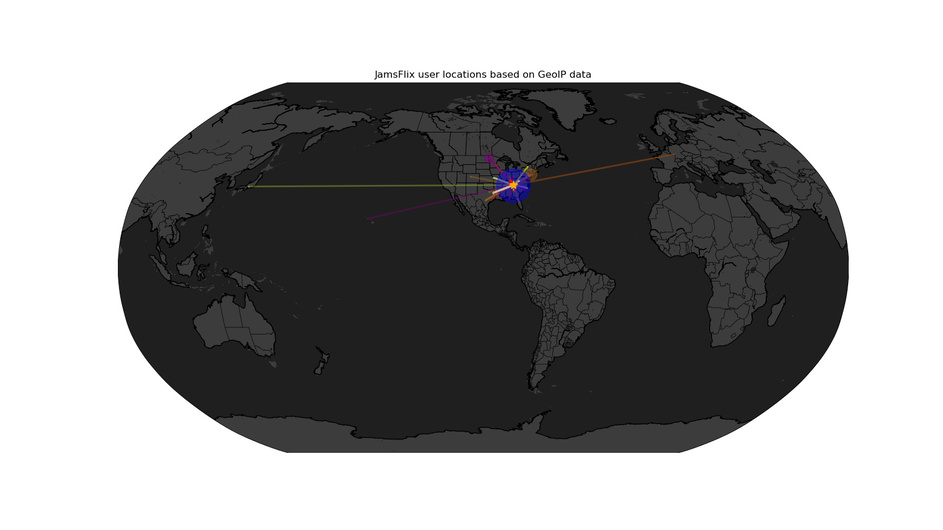
Is there a way to make the maps fill more of the full resolution of the image? I hate the huge white frame and would much rather have the globe ends go edge to edge of the resolution.
OK… I am still stuck… it is not clear what I need to do to set up ips_to_maps…
I did find settings in the ips_to_maps.py file such as the ip f the plex server and the tautulli api key…
Now I get even ore errors 
Here is what I get now
Tautulli API ‘get_geoip_lookup’ request failed: The address 192.168.1.135 is not in the database..Successfully retrieved geolocation data.Successfully retrieved geolocation data.User: jwaltrip4 IP: 192.168.1.135 caused error in geo_dict.
Tautulli API ‘get_geoip_lookup’ request failed: The address 192.168.1.175 is not in the database..User: jwaltrip4 IP: 192.168.1.175 caused error in geo_dict.
Tautulli API ‘get_geoip_lookup’ request failed: The address 192.168.1.125 is not in the database..Successfully retrieved geolocation data.User: jwaltrip4 IP: 192.168.1.125 caused error in geo_dict.
Tautulli API ‘get_geoip_lookup’ request failed: The address 127.0.0.1 is not in the database..User: jwaltrip4 IP: 127.0.0.1 caused error in geo_dict.
Tautulli API ‘get_geoip_lookup’ request failed: The address 192.168.1.90 is not in the database..Successfully retrieved geolocation data.User: jwaltrip4 IP: 192.168.1.90 caused error in geo_dict.
Tautulli API ‘get_geoip_lookup’ request failed: The address 192.168.1.75 is not in the database..Successfully retrieved geolocation data.User: jwaltrip4 IP: 192.168.1.75 caused error in geo_dict.
Tautulli API ‘get_geoip_lookup’ request failed: The address 192.168.1.86 is not in the database..User: jwaltrip4 IP: 192.168.1.86 caused error in geo_dict.
Tautulli API ‘get_geoip_lookup’ request failed: The address 192.168.1.145 is not in the database..Successfully retrieved geolocation data.User: jwaltrip4 IP: 192.168.1.145 caused error in geo_dict.
Tautulli API ‘get_geoip_lookup’ request failed: expected string or buffer.Successfully retrieved geolocation data.User: jwaltrip4 IP: 63.123.140.115 caused error in geo_dict.
Tautulli API ‘get_geoip_lookup’ request failed: The address 192.168.1.85 is not in the database..User: jwaltrip4 IP: 192.168.1.85 caused error in geo_dict.
Tautulli API ‘get_geoip_lookup’ request failed: The address 192.168.1.91 is not in the database..Successfully retrieved geolocation data.Successfully retrieved geolocation data.Successfully retrieved geolocation data.Successfully retrieved geolocation data.User: Jon Waltrip IP: 192.168.1.91 caused error in geo_dict.
Successfully retrieved geolocation data.Traceback (most recent call last):
File “ips_to_maps.py”, line 449, in
draw_map(opts.map, geo_json, filename, opts.headless, opts.legend)
File “ips_to_maps.py”, line 263, in draw_map
plt.figure(figsize=(16, 9), dpi=100, frameon=False)
File “/home/jwaltrip/.local/lib/python2.7/site-packages/matplotlib/pyplot.py”, line 533, in figure
**kwargs)
File “/home/jwaltrip/.local/lib/python2.7/site-packages/matplotlib/backend_bases.py”, line 161, in new_figure_manager
return cls.new_figure_manager_given_figure(num, fig)
File “/home/jwaltrip/.local/lib/python2.7/site-packages/matplotlib/backends/_backend_tk.py”, line 1046, in new_figure_manager_given_figure
window = Tk.Tk(className=“matplotlib”)
File “/usr/lib/python2.7/lib-tk/Tkinter.py”, line 1828, in init
self.tk = _tkinter.create(screenName, baseName, className, interactive, wantobjects, useTk, sync, use)
_tkinter.TclError: no display name and no $DISPLAY environment variable
@jwaltrip4 - Have you ever streamed outside your network?
From the errors, it would seem “no”.
You can’t map LAN addresses. It might be failing because of that.
Also, when posting errors/logs/etc, for smaller errors like yours. use the “preformatted text” forum format button. It looks like </>, above the post area. (For larger, attach a text file of the log)
EDIT - That error may also be due to an odd “your Linux doesn’t know how to find/open the map PNG file” - try adding --headless to your command line when running ip_to_maps. If it works, that will create a Map_date_time.png file in your folder where you are running ip_to_maps from.
Still, if you’ve not streamed outside your network, then it’s still likely going to fail.
