I’m looking at making the jump from iTunes to Plex. I’ve added my library, created collections, created playlist, and everything seems to be working well.
The only feature I can’t seem to be able to replicate (probably just my understanding of how the playlists work) is the iTunes/Apple TV playlist ‘Least Recently played’ sorting.
If you’re unfamiliar with the feature, you select whatever content you want, then sort by ‘least recently played’, which ensures that the the episode is the one you watch that longest time ago (essentially ‘sort by last played date’). I find this great for background TV I’ve already watched at least once.
Is this something that’s possible in Plex, if so, could somebody point me at a page please.
Here is a way to achieve something comparable:
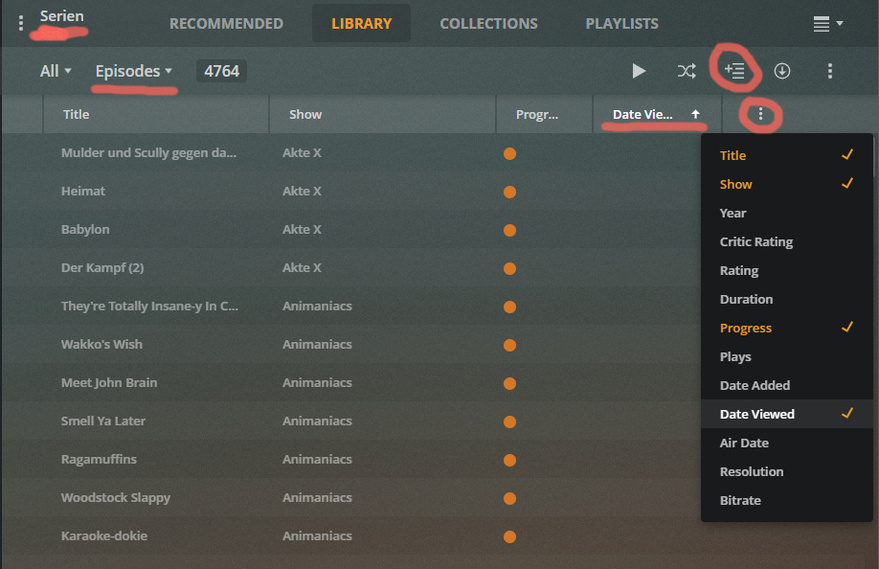
Enter your TV Shows library.
Switch it to ‘Episode’ view mode.
You are now automatically in the ‘List’ view mode, where you can add or remove columns manually. Add the column ‘Date Viewed’.
Click on the header of this column once(!), which sorts all episodes with the one played the furthest in the past, at the top.
Now click on the ‘Add to Playlist’ icon and give this playlist a descriptive name.
You now have a ‘smart’ playlist that holds all episodes in your library, always sorted with the most recently viewed episodes at the very end of it.
And the ones you are actually after at the very top, natch.
It has a flaw, in that is will also contain “never-played” episodes before all other episodes.
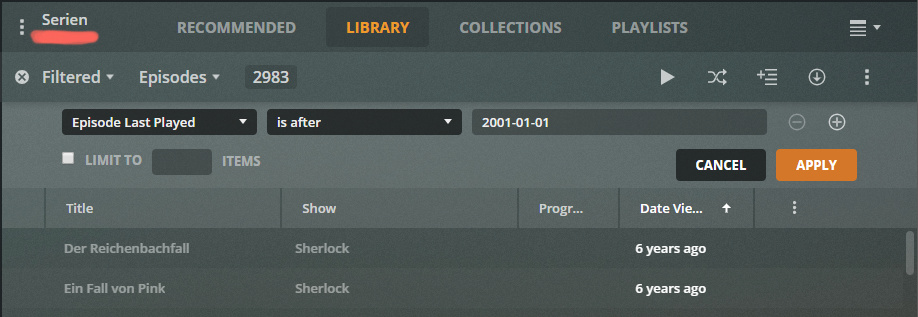
If you want to filter those ‘unplayed’ episodes out and only want episodes in the list which you have been playing at least once, you need to add a ‘custom filter’ rule.
‘Episode last played’ ‘is after’ ‘2001-01-01’ (simply a date which lies before the Plex server was set up)
This custom filter gives you also the opportunity to limit the number of items in this playlist.
Excellent. Thank you. It was the ‘Episode view’ I was missing, I’ve now managed to sort into ‘last viewed’ order, and store as a smart playlist.
I guess one other query (and this may be a push).
In iTunes, I have 4 x playlists like the above for 4 different shows.
I then have another playlist that pulls from each of the 4 (limited to 4 items), giving me the oldest episode from the 4 playlist to give a little variety. This will update automatically meaning I get show 1, show 2, show 3, show 4, repeat.
I know I can use the collection feature to group the 4 TV shows, however (from testing) it looks like it will pull through the 4 oldest from the collection, and not 1 of each show.
As I said, it may be a push, so happy to use the collections if that’s the only way I can do it.
Thanks. I did look at that before posting. Unfortunately with the shows having vastly different air dates (some of the shows have 20+ seasons, some have 7) then I’d get a group of the same TV show in chunks.
Not to worry, it’s only background TV, so happy to have different playlists per show.