Server Version#: 1.21.2.3943
Player Version#: 4.51.1
For some reason, as of today, when looking at music albums in “List View” on Plex Web, there is no longer the “3 dot” option menu to the right of each album - there is only the selection circle, and the edit pen. See screenshot for what I’m talking about. I used to use the 3-dot menu to fix matches from the list view. Now the only way to do that is to click on the album first and do it from the album’s page. Any ideas what’s going on here?
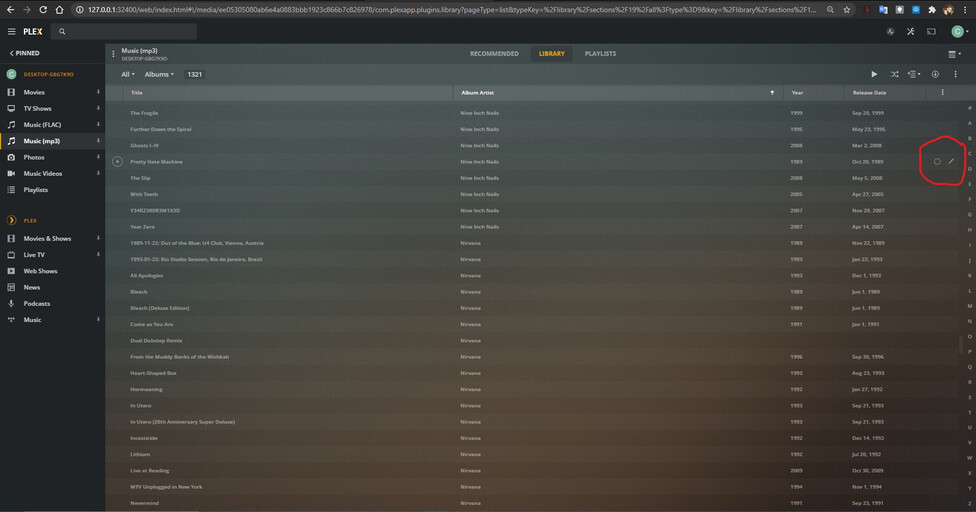
It has actually been there for a while. It seems to just be a layout issue. The “3 dot” menu is there, it’s just hidden behind the Jump Letter sidebar.
I have a relatively small music library, and Plex hides the jump letters if they aren’t needed. When they aren’t there, the 3 dot menu is.
Interesting I’ll have to see if the “ghost clicking” truck works next time I’m at my computer.
I’ve determined that this is definitely some kind of scaling problem on Plex’s side though. I see the 3 dots when projecting to my 4k laptop, and I also managed to see them on my 1080p display when I zoomed Chrome out to a ridiculous amount like 15% out something. No other apps have any scaling problems on PC, and before yesterday I saw the dots for extra options (on all displays) with no problems, so this seems like it must be part of a recent update.
