Really like the repository of information and I don’t really need to post much.
I have a Samsung 7000 series HDTV
Synology DS718+ (2X 4TB stripe) Runs my plex server and streams movies no problem!
SiliconDust HDHR5-4US (Quatro)
Roku… (It’s a bit old but runs plex well for movies)
Can watch OTA on the TV (natively) no problem without plex.
SiliconDust HDHR5-4US (Quatro) - records OTA TV - no problem. (can stream post recording to TV)
Can stream movies through plex no problem.
Here’s my issue: Seems that the DS718+ continues to buffer OTA “LIVE” TV signal from Quatro and I don’t know why other than the DS718+ is not strong enough for OTA TV? OR I don’t have it setup properly to create a bigger buffer?
Has anyone had a similar issue and found a solution? Thanks in advance for any and all help, direction to other posts…
Depending on what model of Roku you have two options:
Enable mpeg2 on the Roku, make sure it is set to original quality and auto.
or
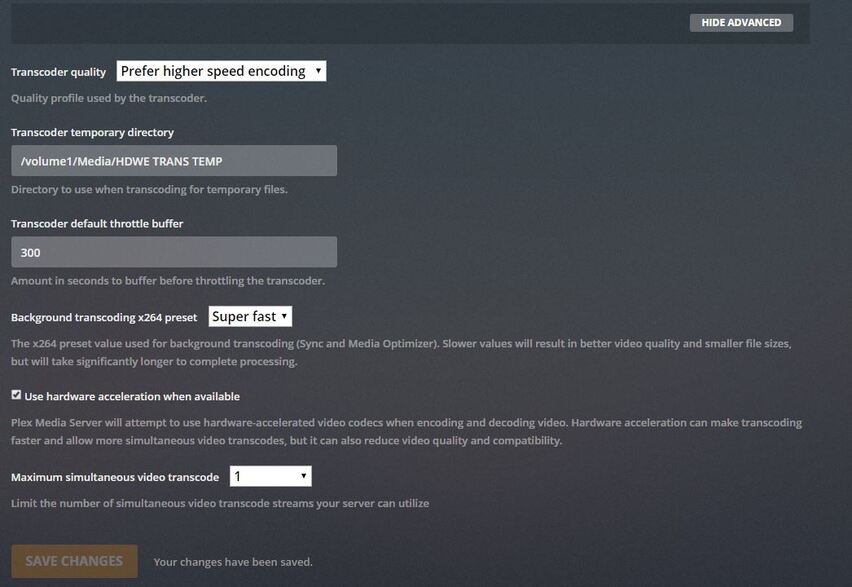
Enable HW transcoding on the server
General info is that Plex ecosystem is h.264 and OTA is mpeg2, if the Roku isn’t set to play mpeg2 then it will transcode to h.264. The way your Synology is setup can also factor into it pertaining to the transcoder directory. Live TV uses this area to temporarily store the stream in case you want to pause, FF, RW. It uses 6-10GB per hour and shouldn’t be on the Cache disk.
Thanks Tiebierius - Here’s what I setup and yet I’m still getting buffering every 25-30 seconds - watchin OTA “LIVE” TV through plex browser. I can see that Plex is using the folder on my DS718+ for transcoding. Any other insights or changes? I’d prefer to get this working “without” the ROKU as I have different devices that we use.
Unfortunately if the client cannot direct stream/play mpeg2 , the J3455 processor in that NAS just isn’t up to the task of even 1 stream. The browser is asking for audio and video to be transcoded at the same time it is writing to disk and relaying out to the client which is probably pegging CPU.
You could create a second server on a NUC with an i3 or better to handle Live TV and use the NAS for storage.
Hi, just wanted to chime in since I’m seeing the same issue with similar hardware (HDHomeRun Connect Duo, QNAP TS-451+, all wired w/ gigabit, Plex web client running on gigabit wired Windows 10 machine). First I’d like to point out the commonly repeated error that “your CPU can’t handle transcoding”, as it has been proven time and time again that these and even slower NAS CPUs can handle transcoding 1, 2, and often even more streams - as long as hardware transcoding in turned on. In my use case, I have 2 VMs running on the NAS and nearly every day I have 2 transcoding streams running simultaneously, and still don’t reach full CPU load.
Now that that is out of the way, I do have some additional information to add to this. When streaming Live TV, I usually get 1-2 minutes of uninterrupted streaming before buffering begins. Regardless of the status, my NAS CPU remains at ~40%, with only ~20% being Plex. Memory is also at only ~4GB of 8 total, most of which is the aforementioned VMs. Disk usage remains low as well.
The strangest thing that I noticed is that as watching Live TV, the “buffer” bar continues to increase, even when streaming is working correctly. It almost seems as though Plex is slowing the stream down by a percentage that is imperceptible by me. I never have any of these issues while streaming recorded content.
My first thought is that the Transcode Directory may be on a drive that is too slow (currently on a 3-drive RAID-5 array), so I will be adding an SSD and checking performance. Will report back.
How did it go? I have a HDHR quatro, and run PMS on a DS918+. CPU never goes above 20-30%, memory usage is low (maybe 1-2gb of 8 is in use), and yet trying to watch live TV in Firefox on my Windows 10 machine (all devices involved are on gigabit ethernet) results in buffering every few seconds. I’m seeing similar reports from folks here with similar setups, but haven’t seen any with a happy ending. I may try to capture logs and post them here later tonight after seeing if I get the same results trying to watch from the Plex app on my PS4.