Server Version#: 1.19.4.2902
Player Version#: 4.30.2
Hello,
My question is rather simple. Is there any way to control the amount of memory Plex Media Server uses? I run it with an external network attached HDHomeRun Quad Tuner so it has DVR enabled. Besides this there are at most 2-3 active sessions/streams at any given time, but often many recordings.
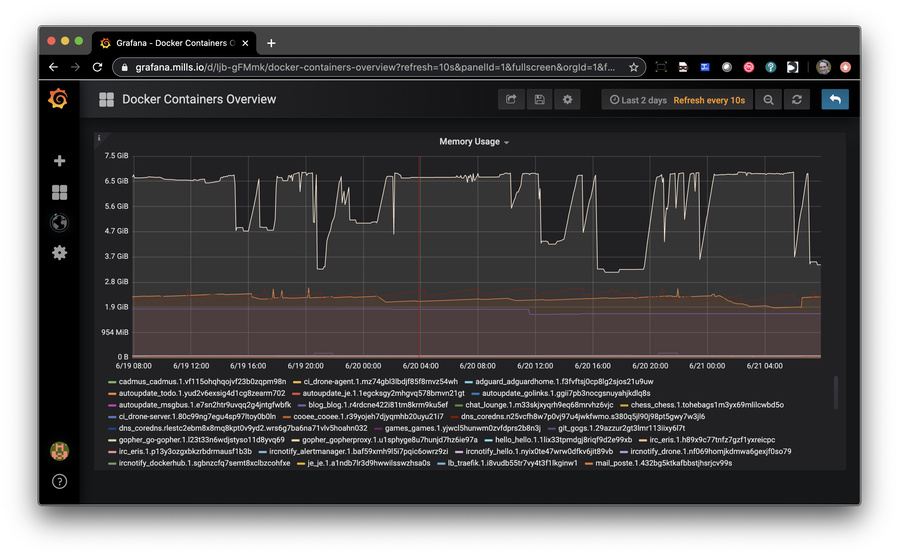
See attached memory graph over past 7d.
cheers
James
Your Docker controls allow specifying maximum memory when you build the container.
Most of the vendors allow you to customize the configuration between download and final creation. You would limit memory usage there.
I see. You’re saying that by specifying a memory limit for the cgroup container that the container sees only the configured limited as “available memory” and therefore controls how much memory Plex Media Server uses?
It won’t control how much Plex actually uses in the virtual sense. It will limit physical memory utilization.
I am curious as to what’s taking it so high. XMLTV? (certain stream sources are a known problem being worked on).
Also, care must be exercised in Virtual Size vs Physical Size. PMS virtual size will grow while its physical usage remains small.
A good example of this is PMS appearing to use 4GB of RAM in a 1GB NAS (ARMv8) without swapping.
Is the chart you’re looking at the virtual memory utilization or physical?
top will also show you these values as will vmstat and free -m .
free -m will show you global system memory status.
The chart is in fact measuring RSS of the container as seen/observed by cAdviser.
Also yes I also use XMLTV to stream TV guide data from IceTV (AU).
I’m not sure where all the memory is going either  But it is something I’d like to spend time solving.
cheers
James
If I look at the container right now this is what I see:
(obviously things change all the time):
$ dke -t 3b174fec389d /bin/sh
# ps aux
USER       PID %CPU %MEM    VSZ   RSS TTY      STAT START   TIME COMMAND
root         1  0.0  0.0    196     4 ?        Ss   Jun03   0:00 s6-svscan -t0 /var/run/s6/services
root        24  0.0  0.0    196     4 ?        S    Jun03   0:00 s6-supervise s6-fdholderd
root       290  0.0  0.0    196     4 ?        S    Jun03   0:00 s6-supervise plex
plex       292  0.0  0.0   4504    68 ?        Ss   Jun03   0:00 /bin/sh -c LD_LIBRARY_PATH=/usr/lib/plexmediaserver:/usr/lib/plexmediaserver/lib /usr/lib/plexm
plex       299  1.2 28.0 3046444 2293800 ?     Sl   Jun03 335:08 /usr/lib/plexmediaserver/Plex Media Server
plex       318  0.1  4.9 1881796 402796 ?      SNl  Jun03  33:43 Plex Plug-in [com.plexapp.system] /usr/lib/plexmediaserver/Resources/Plug-ins-69560ce1e/Framewo
plex       365  0.0  0.0 435504  5556 ?        Sl   Jun03   0:44 /usr/lib/plexmediaserver/Plex Tuner Service /usr/lib/plexmediaserver/Resources/Tuner/Private /u
plex       453  0.0  0.2 945612 23988 ?        Sl   Jun03   6:40 Plex Plug-in [tv.plex.agents.movie] /usr/lib/plexmediaserver/Resources/Plug-ins-69560ce1e/Frame
plex     23965  2.1  0.4 131292 39040 ?        S    16:00   0:01 /usr/lib/plexmediaserver/Plex Transcoder -noaccurate_seek -ignore_unknown -scan_all_pmts -1 -rw
plex     23966  0.4  0.5 136468 44132 ?        S    16:00   0:00 /usr/lib/plexmediaserver/Plex Transcoder -codec:0 h264 -noaccurate_seek -live_start_index 0 -pr
root     24070  0.5  0.0   4504   748 pts/0    Ss   16:00   0:00 /bin/sh
root     24077  0.0  0.0  36128  3000 pts/0    R+   16:00   0:00 ps aux
#
Seeing a 2GB memory utilization, at this instant, not knowing what it’s actually doing, is pretty reasonable.
Seeing a VSZ of 3, compared to the 2 of resident, tells me it’s working pretty nicely.
My server is currently running (native), 3.4G virtual - 2.3 physical.