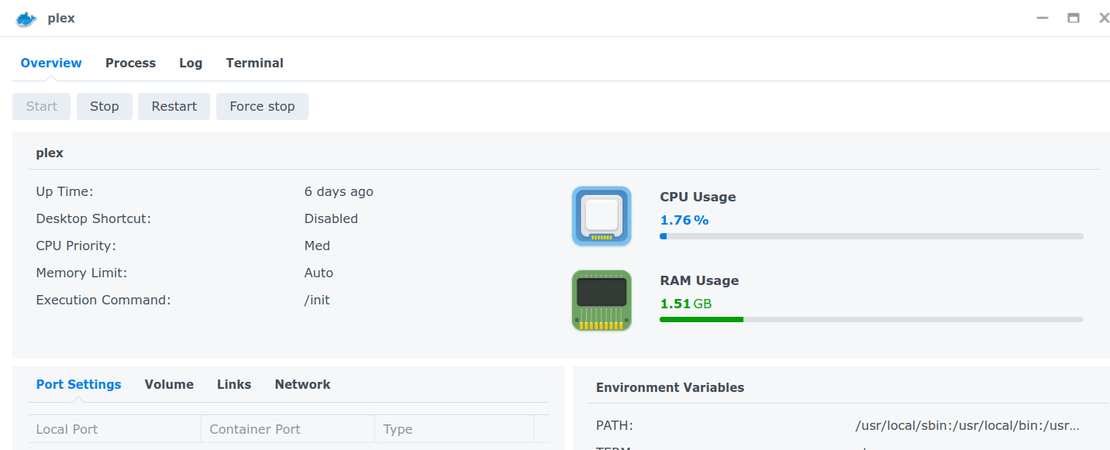
I am running latest Plex Docker Container on an HP Proliant DL380 GEN 10 w/ 384 GIG RAM and 32 Cores.
I am utilizing my nvidia P400 as a 1 user Transcoder.
When running idle, nothing transcoding or anything, I noticed Plex Server was running 314G / 384G. That clearly was not good. I reinstalled and after a day it was the same thing.
I then brought it to a mem limit in the container to 8G and now it runs nonstop @ 8/8G. I moved it to 32G and even now, nothing streaming or Plex even being used (but it is still "running) is at 32G/32G w/ 0 CPU Usage.
I am unsure what to do or if this is normal, which does not seem right to me!
Strange. I changed to that image you mentioned and by itself it ran at about 300-500 MB. Awesome. I loaded a visually and audibly (?) intense new movie and even transcoded it and it went slowwwlly to like 8GIG RAM and then eventually topped out at 32G. I then closed all and any streaming, but left plext server running, and it seems to not release any of the 32 gig ram.
I have about 16 other containers running of various specifics and they are sitting at a legitimate consumption.
This is my Plex container;
If you forget to map the /tmp folder of the container to a disk/folder on a real drive, Docker will use RAM instead.
Or so I’ve heard (no Linux user here)
Plex uses the general tmp folder mainly for all of its analysis features, which sometimes involve creating temporary files of significant size.
Well indeed I did not have a /transcode (/tmp) map so I modified that and restarted Plex.
1/3 into this movie being transcoded I am at 26G/32G allotted and the /transcode directory is as at 6.7GB.
I wonder, does it use up to the 32G I gave it cause I gave it? or is there a leak or something wrong? I mean, if I were to set it at 16G and it gets to 16/16 is that just using what I told it to use, and it diverts from /transcode?
/tmp and the transcoder temporary folder are separate things. Don’t mix them up, don’t direct them to use the same physical location. It won’t end well.
The size of the transcoder temporary folder needs to be estimated like this:
multiply
the largest file size of a video
the maximum expected number of concurrent playback sessions
If your folder has a lower storage quota, Plex is forced to clear the folder during playback. Which
can lead to interruptions or stalling of playback – depending on the speed of the storage volume
prevents you from easily jumping back to an already transcoded/remuxed/played part of the current movie
I create my Plex Docker container with a script that uses docker run. I don’t set a mem_limit, have several users of my PMS and I don’t think it’s ever grown like that though I don’t watch it like a hawk. Just played a 4k video and the Plex docker container is using only 2.16 Gig.
Here’s my script:
#!/bin/bash
docker_image=plexinc/pms-docker:plexpass

if [ "$1" = "-u" ]; then
  # Remove old image if exists and pull a new one
  image="$(docker images | grep -i plex | awk '{print $3}')"

  if [ "$image" != "" ]; then
    docker stop plex
    docker container rm plex
    docker image rm -f $image
    docker pull $docker_image
  fi

  # Recreate docker container for Plex
  #
  # Note: Getting the right UID/GID for Plex is important. Effectively you
  # want to run as the "plex" user.
  #
  # Also it's important to properly map volumes to your media. On my Plex
  # server media is kept in simply /Videos, /Pictures and Music. IOW that's
  # what you see as the beginning of you path when you do Get Info on a
  # media file in Plex. You may use something different.
  #
  # On Synology these file systems are under /volume1/Media. So the volume
  # mapping for me are to map /volume1/Media/Videos -> /Videos as that's
  # how Plex sees them. I also symlink /Videos -> /volume1/Media/Videos
  # when I access my Plex server through the command line using ssh.
  #
  # If you have hardware transcode capabilities you need the --device thing.
  # I don't know if this is similar on UnRAID.
  docker run \
    -d \
    --name plex \
    --network=host \
    -e TZ="America/Los_Angeles" \
    -e LANG="en_US.UTF-8" \
    -e PLEX_UID=297536 \
    -e PLEX_GID=297536 \
    -h Jupiter \
    -v /volume1/PlexMediaServer/AppData:"/config/Library/Application Support" \
    -v /volume1/PlexMediaServer/AppData/tmp:/tmp \
    -v /volume1/PlexMediaServer/AppData/tmp:/transcode \
    -v /volume1/Media/Videos:/Videos \
    -v /volume1/Media/Pictures:/Pictures \
    -v /volume1/Media/Music:/Music \
    -v /volume1/Media/Audiobooks:/Audiobooks \
    --device=/dev/dri:/dev/dri \
    $docker_image

  # With the container created start plex
  docker start plex

  # This is needed to set the restart option
  docker update --restart=unless-stopped plex
fi
Alright so I set up both those temp and transcode directories as you did and so far, hitting about 2G RAM. That is with the transcode cause my PC monitor can not do 4k so dropping to 1080p.
Also, removed the mem_limit. The drive that temp and transcode are on are over 1TB so space is not an issue.
So far transcoding/playing it has stabilized @ 7G Memory. But where now it took half the movie to get to 7 and before it got to 32G in less time into the movie, it seems like this has fixed it.
Side question, is there any reason to add GPU to Portainer then in Plex Container add the GPU? Or does the code embedded into the container stack already do that?
Also, I really appreciate the help. It really appears to have capped out +/- 7G