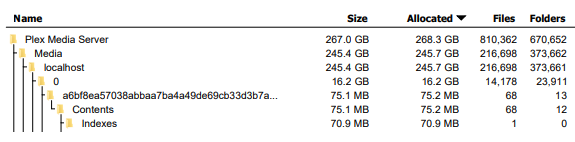
But it seems like since the addition of the intro skipping feature, the size plex takes up on my drive is absolutely ridiculous. I’ve run out of room on my 300GB bootdrive. So is this a bug that needs to be fixed or does plex just take an absurd amount of space now? If so how much do i need to allocate over. Cause i’m not buying plex it’s own 10TB drive just for the metadata. If the intro skipping is the cause then that feature is absolutely not worth it, so let me know and i’ll turn that ■■■■ off.
Server Version#: 1.19.4.2935
Player Version#:4.29.2
the cache/transcode/detection folder is empty. i turned on verbose logging, ill update when i see an intro log start, not sure how to force it to start, or if i can.
Can you see how much space used up here C:\Users\cardr\AppData\Local\Plex Media Server\Cache\Transcode\Sessions\
and as the intro detection that you started was still running when you took the log, you can see what else is below this directory and how much space is used C:\Users\cardr\AppData\Local\Plex Media Server\Cache\Transcode\
Find out where the space is used up and then can investigate
Might need a download of your Plex Media Server database to establish how big the library is - how many movies / TV episodes etc…
I asked for the logs to check / eliminate intro detection which at the moment does not appear to be relevant to the problem
I just noticed you have already said it was the metadata folder. Could you get a Treesize export of all files into excel to see sizes and files. Also download of the database through the troubleshooting plex web page
May be the excel export is not in the free version
Anyway the pdf is ok and shows the big files being the indexes directories which relate to video preview thumbnailing. I do not believe intro detection uses the media\localhost\x\xxxxxxxx\Contents\indexes directory
Could you expand one of the Indexes directories and see what files are in there.
Assuming it is Video Preview Thumbnailing, please see this article for how to disable it and remove existing thumbnails
Well, I had the exact same problem but solved it in another way.
The BIF files kept on increasing until it took over 300M of space and filled the C: of the Windows machine Plex is running on.
I was not feasible to switch to another machine nor replace the C: drive. So, I used a Windows function that has proven quite useful over the years…Junction.
1 - I did have a space USB drive hanging around. I added that to my Windows machine as the D: drive.
2 - I copied the localhost folder from the Plex structure on the C: drive to D:\Plex on the D:. This took hours! I did this while Plex is running to minimize downtime later. I ended up with D:\Plex\localhost with a folders 0-9 and a-f.
3 - I shutdown Plex. I realized I can do this by selecting Plex in the Windows Notification area (bottom right with date/time) and selecting Exit.
4 - I did another copy of localhost from C: to D:, same as above, but told it to skip duplicates. I did this a second time to to ensure the files on D: are up to date. This goes much faster because the bulk of the files are not coped as they were not changed.
5 - Went to a DOS box, (type CMD in the Windows “Type here to search” area). Typed in - cd “C:\Users<username>\AppData\Local\Plex Media Server\Media” to go to the Media folder.
of course will be unique to your system.
6 - Rename the “localhost” folder to “localhost - old”, we will create a new localhost folder/junction next and we need to use that name
7 - Type in the following command -
mklink /D /J “C:\Users<username>\AppData\Local\Plex Media Server\Media\localhost” D:\Plex\localhost
…remember, is unique to your system, it is your username
notice that the local host folder magically reappears, it is really the junction pointing to the D: drive and your folders are there
8- reboot
9 - be amazed that it works perfectly and the folder “localhost” in the the folder structure on the on the C: drive is really on the D: drive
10 - After you feel comfortable, a couple days, you can delete the “localhost - old” folder as it is no longer being used and it is using up space on the C: drive
The mklink command creates a pointer in the file system. Any requests for files in that folder get redirected to the destination which is the “D:\Plex\localhost” folder in my example. The D: drive is 8 GB so there is plenty of room.