Migration Failure - Lost My Server due to NUC crash - SSD drive with Plex saved

Server Version#: 1.23.4.4805
Player Version#:
<If providing server logs please do NOT turn on verbose logging, only debug logging should be enabled>

My NUC Desktop crashed and CPU board has become unrecoverable, The SSD with the Plex installation was saved and now trying to recover PMS through migration (Linux to Linux w/o Docker).

Original equipment was NUC i7-8850 now on Beelink N100 (this machine only dedicated to PMS purpose)

I setup a new server (with same old-version as original one) in Beelink, linked to my account but:

1.- My Original Server has dissapeared from my account (???)

2.- After installation, and moving Prefererences.xml and the rest of Folders (Media, Metadata, Plug-ins and Plug-in Support) to the new one but it doesn’t launch (!)

What not doing properly? Please, help, advice, support more than welcomed …

Tnx in advance

Which distribution did you use?

Make sure ownership and permissions of the Plex Data Folder is correct.

As root:

# chown -R plex:plex "/var/lib/plexmediaserver"

# find /var/lib/plexmediaserver -type d -exec chmod 755 {} \;
# find /var/lib/plexmediaserver -type f -exec chmod 644 {} \;
# chmod +x /var/lib/plexmediaserver/Library/Application\ Support/Plex\ Media\ Server/Codecs/EasyAudioEncoder-8f4ca5ead7783c54a4930420-linux-x86_64/EasyAudioEncoder/EasyAudioEncoder

Thank you for your support :slight_smile:

Both on 24.04 LTS

Unfortunately Updating permissions as root didn’t got the server could be launched …

Is there anything that needs to be updated in preferences.xml ? (about machine or server name … ) ?

Why do you think that original server dissappeared from my Account??
(trying to fix the original machine and getting a new one took me 3-4 weeks)

Cheers and tnx for your time and patience …

@PoyPoy

I am looking at your account on Plex.tv

I see you got a new server installed and running about 3 hours ago (from time of this post)

If you still have the old SSD, I can show you how to copy info off of it and put into PMS – if you’re interested

Thank you ChuckPa,

I’ve built and removed several new-servers since Monday when I got the new machine and trying to follow procedure to perform migration …

Help more than welcomed :slight_smile:

For migration purposes I created a zip file from the original drive with Metadata,Media, Plugins and Plugin-in Support folders, besides preferences.xml …

As I didn’t success with PMS setup, finally I plugged the original drive to the new equipment (read only).

As you can see my account: any clue about what happened with “MINIPC” server? why it is not in the servers list?

Tnx!

@PoyPoy

Which path did you use to mount the original SSD ?
Did you mount it as /mnt ?

What I’m looking for is where the original /var/lib directory is now located

Once I know the path, I’ll help you with the commands to use

@PoyPoy

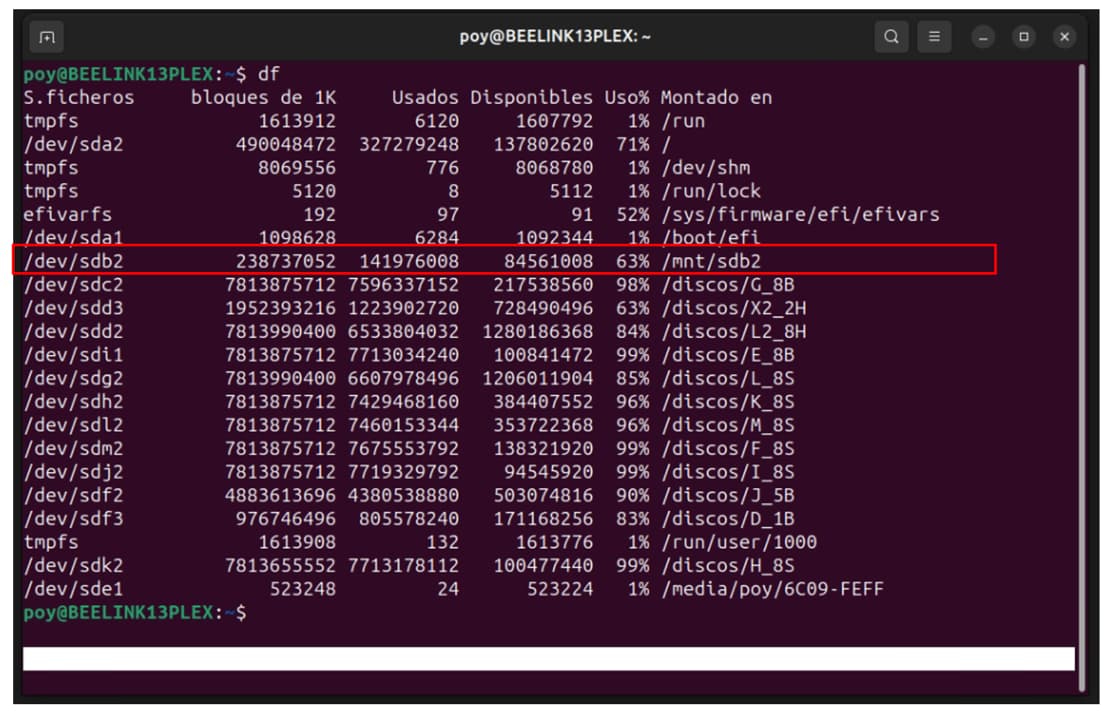
the df command should give enough information about where the SSD is currently mounted.

oopps … same configuration for both (old and new one): /var/lib on root … no external drives for installations/installed files

/var/lib/plexmediaserver/ …

I understand the configuration will be the same — BUT ----

The old SSD will have a var/lib on it.

When you mount that SSD, it will mount as something like

sudo bash
mount -o ro /dev/sdxx /mnt

When you do this, you’ll see a /mnt/var/lib/plexmediaserver

This is what I’m looking for. Where is the original PMS directory you want to migrate from ?

understood… you wanna know where the original SSD has been mounted in current machine. It’s /dev/sdb2

Yes please

Which directory is it mounted on?

Look at my machine.

The /dev (device) entries are in the left column and the mount directories are in the right column (mount path). Knowing the device node doesn’t help at this point.

I need to know that mount path

[chuck@lizum ~.2004]$ df
Filesystem      Size  Used Avail Use% Mounted on
efivarfs        192K  116K   72K  63% /sys/firmware/efi/efivars
/dev/nvme0n1p2  122G   57G   66G  47% /
/dev/nvme0n1p4  1.0T  561G  464G  55% /home
/dev/nvme0n1p1  499M   65M  434M  13% /boot/efi
/dev/nvme2n1p2  932G  263G  669G  29% /usb
/dev/nvme2n1p1  931G  144G  788G  16% /sata

… and Mount directory is /mnt/sdb2

Thanks.

I’m going to write this so you can keep safe that which you’ve already done.

I am concerned there is not enough room to perform the copy AND keep both PMS instances safe.

Your current root partition has 134 GB free.
I do not know how big the old PMS is.

Please check it: sudo du -hs /mnt/sdb2/var/lib/plexmediaserver

It it returns a value less than 134 GB then it’s OK to proceed.

# Elevate to root privileges
sudo bash

# Stop Plex
systemctl stop plexmediaserver

# Rename the existing PMS to keep it safe
cd /var/lib/plexmediaserver
mv Library Library-SAVE

# Go to the original PMS directory
cd /mnt/sdb2/var/lib/plexmediaserver

# Transfer it
tar cf - ./Library | (cd /var/lib/plexmediaserver ; tar xf - )

# Change ownership and fix permissions
chown -R plex:plex /var/lib/plexmediaserver/Library
find /var/lib/plexmediaserver/Library -type d -exec chmod 755 {} \;
find /var/lib/plexmediaserver/Library -type f -exec chmod 644 {} \;

# Make certain there is still enough free space on `/` 
df -h /

If all this has transpired without error
sudo systemctl start plexmediaserver

If, at any point along the way, you get an error (most likely due to space), let me know immediately

Hi!

there were enough room and everything run smoothly!!!

Thank you so so so much…

Now that you’ve recovered the server,

cd /var/lib/plexmediaserver

sudo rm -rf Library-SAVE

This will recover that space.