I keep monitoring Intel’s release board.
That’s unfortunately all anyone can do.
I’m sorry to assert the need for this workaround and , maybe, on those impacted systems, I could implement the patch automatically so it’s not visible to anyone.
Might that be an option if I were to implement the workaround in the packaging?
Hi There. ChuckPa thanks for your fantastic workaround solution. It worked for my DS920+ and I finally started watching 4k videos without any problems on the web or on my SmartTV. Let’s hope that Intel should be able to release a proper fix sooner rather than later.
I have a DS920+ and your fix helped me a lot - thanks for that!
But suddenly it stopped working. 4k videos started to cause problems since about two weeks.
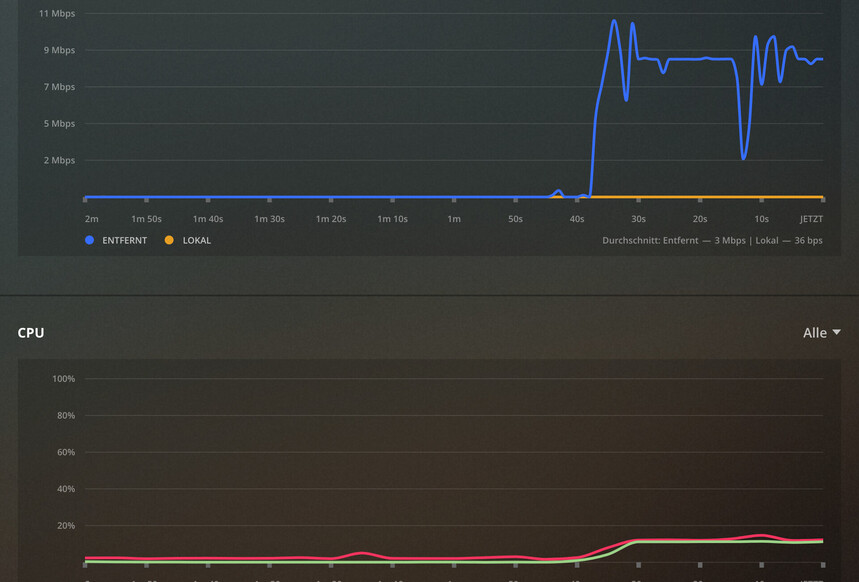
I have a 10MBit Upload line and when transcoding 4k the NAS only manages to upload 4Mbit. Also the CPU Usage is pushed to 60%.
I remember that a few weeks ago the CPU was 10-15% when transcoding 4k - now back to 60%.
I checked the Preferences.xml and the added string VaapiDriver="i965" is still in there.
Any ideas?
Try to turn off HDR tone mapping. Synology native app doesn’t support HW tone mapping yet and its done by CPU which in your case is not powerful enough.
I had same issues and switch to linuxsever.io docker image because it has full HW acceleration support.
As of 1.21.0, the VaapiDriver="i965" isn’t needed on any J4xxx CPU (DSx20+).
Native Synology apps do not yet have the HDR support. ( We are finishing that effort )
As @premikkoci points out, if you want it now, you’ll need to use Docker. The problem there is you will need to map the hardware in as well (which isn’t supported by the Synology GUI) . If it were not for that limitation, you could completely map your existing native Plex install into Docker without issue. In short, you don’t have HDR tone mapping on Synology systems unless you create the container by hand on the shell command line.
To speak to that 62% loading, that’s telling me you’re getting software HDR (without OpenCL). I’m not surprised and is because of the above.
HDR tone mapping requires additional runtime libraries that allow the GPU (not the transcoding ASIC) to perform the color mapping work.
VaapiDriver still needed here. Tried removing it, and a 4K HEVC was unwatchable when transcoding down to 720p, whilst the same file was perfect when VaapiDriver was reinstated.
I repeated exactly what I did before, that is, stop PMS, remove VaapiDriver from preferences and restart PMS so I could transcode the same file and generate some logs for you.
And it worked perfectly. Thanks anyway for the offer of help!
You are a Champion!
Thank you. After unticking the HDR tone mapping everything smooth again.
I also removed the i965 driver fron the file - so all smooth sailing from now on!