BETA:
- [Mobile] Player: allow multi-channel AAC to direct play where supported.
This also works with files that are on the tablet! Yea! Well done Programmers!! This has likely been the greatest complaint I have see on the forums.
BETA:
This also works with files that are on the tablet! Yea! Well done Programmers!! This has likely been the greatest complaint I have see on the forums.
Hey all,
Am I the only one that’s having issues with the latest beta versions on Android 6? My issues are that the latest and greatest player keeps saying Server unreachable on both WiFi and 3G/4G, but when I rollback to 7.14.xxx it works as sweet as a nut…
Can someone from Plex or the community elaborate on my issues??
Dave
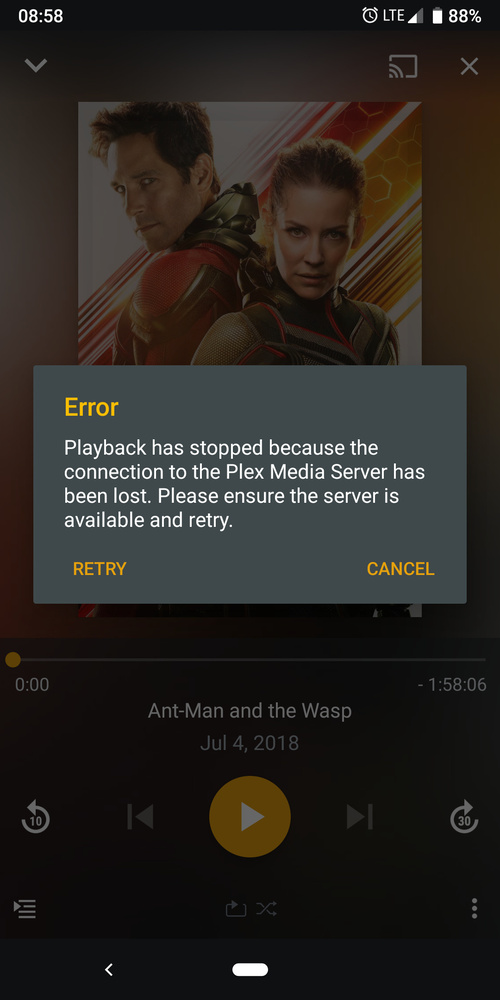
I am getting an error randomly when playing back certain movies or TV-Shows:
Often times, even when this error pops up the movie will start playing anyway, and you just have to click “retry” for the prompt to disappear. Hitting “cancel” ends the stream.
This has been only happening since the new player was introduced. Is this a known issue?
@marcjt This is the same issue I have, bit where your media will start to play, mine just won’t play at all. This issue I’ve been having for the change to the new player on my Android 6 device, but my Android 8 device it works fine.
I use my Android 6 device a lot, especially when on long bus journeys, my 3½ year old son will want to watch something, so at present I’ve downgraded to 7.14.xxx on Android 6 so he can keep happy!! I do hope the Devs fix this issue soon, but… Only be features will tell!!
Dave
Good to know. This is happening to me on Android 9 on a Pixel 3. Sometimes it will not start playing until I hit retry.
@sixones Do you need logs for this issue?
Some logs would be great @marcjt and we can take a look at the issue.
Hi,
My daughters Fire HD 8 tablets have updated plex and I see you have removed support for using the Android Media Player.
For most videos, using the standard player, the sound is so quiet that I have to hold the speaker up to my hear to figure out if it is even playing audio. Admittedly, this happened when I first got the Fire HD almost a year ago, but setting the player to Android Media Player fixed the issue, as described here:
After the update which removed the option for Android Media Player, the problem has returned.
The same videos play great on iOS (iphone, ipad) and Fire TV Stick, problem is only with Fire HD tablets.
thanks
Geoff
Logs sent. Let me know if you need more/others
I have the same issue after the update. It is impossible to watch anything on my Fire at the moment.
Argh!! After what seems weeks of Beta testing 7.16.xxx the issue with “Plex has lost connection to the server” on all my stored media on Android 6 on my Smartphone is still there… Are the Developers really paying attention to the group or just adding “Cool new features”?
I’m considering pulling myself out of the beta project altogether, it’s just crazy now, either they’re going to fix this issue with 7.16 which seems to be a regression because of the so called new player, or are we going to have to stick with 7.14.xxx on our devices??
We need some evidence that things are being fixed not just logs being looked at!!
@sixones This may help?? I doubt it though… Update - I’ve tried from 7.15.10030 and this is where the player issue started from, pre 7.15.xxx the player allows me to play my stored files without any complaints on my Android 6 device.
Dave
Could you grab some logs and send them to me so we can take a look at the issue?
Is this happening when your playing sync content or something via Open Video File?
@sixones The issue is with playing movies from the server using 7.15.10030 and above, the issue is known about, come on, check the forums as I’m not the only user with the same issue and it seems it’s not just happening on Android 6.
I’ve sent logs in from an earlier release, but it seems they fell on deaf eyes and blind ears, so forgive me if I’m a little apprehensive to send more logs in.
Once I’ve sorted a sleepless night out with my 5½ month old daughter and finally had some sleep I’ll get around to sending yet more logs in, but which version would you like the kids from? And would you like logs from the server to or just from the phone? Can you refresh my memory on how to get logs from Plex on Android?
Live TV doesn’t have the issue, it’s just with the player for handling playback of media stored on the server, where versions 7.14,xxx play without an issue and 7.15,XXX and 7.16.xxx fail totally but as I said live TV plays ok, so I know it’s not a server issue.
Dave
Did you have a chance to look at the logs I sent you?
While its always exciting and great to see new features, I REALLY REALLY need syncing to work properly. I’ve been a plex pass member for roughly 8 years now and in all that time, syncing has never really worked well. Its flakey as crap. PLEASE PLEASE PLEASE focus on fixing stuff like that! I don’t care how my icons are arranged if crucial features that I pay for don’t work!
I have some external SSA subs for my videos, they’re named the same as the video themselves. Plex detects it and used to show the subs without having to tweak any subtitle settings. Ever sincr exoplayer camenout, subs wont show when playing videos with it unless I change burn subtitle from Automatic to Always. Is this a known issue?
Is there a way to default it to a display mode? Also does the letterbox mode cut off any of the video? Hope this isn’t a feature in the new Android TV app I’d hate to have to constantly have to switch a movie from original to letterbox etc… I just need it to be whatever aspect ratio it should be like the old player.
The modes control the display not the video.
Original - display video at the actual resolution. I.e. if you have a 1080p screen and the video is 720p, it will only use 720 of the display so you get small image, if you have a 4k video, it will be zoomed in.
Letterbox - scale the video until it hits EITHER the top/bottom OR the left/right. This is what the old player did.
Stretch - force the video to fill the screen in BOTH the top/bottom AND left/right.
Zoom - scale the video so there are no black bars (unless the video has black bars embedded, which we don’t detect)
This is awesome stuff! It would have been more useful if there was an option to not care about system orientation and it would just detect orientation. For now I just set it to lock landscape since I don’t want to change system settings every time to have that mode. I’ve seen other players do this.
Really wish my first touch on the screen made the controls appear rather than actually pressing the control that I can’t see.
Lost count of the number of times I’ve accidentally scrubbed to halfway through a movie or show when all I wanted to do was touch the screen to show the controls so I could skip forward or back once.