Mounted Internal ext4 Drives Not Visble

Hi,

I seem to have a permission problem, I have followed various guides and tips, yet I must be missing something. Ignore the drive mounted to /disks/media/plex , I was planning on making an additional drive for completed downloads. Nothing uses it yet.

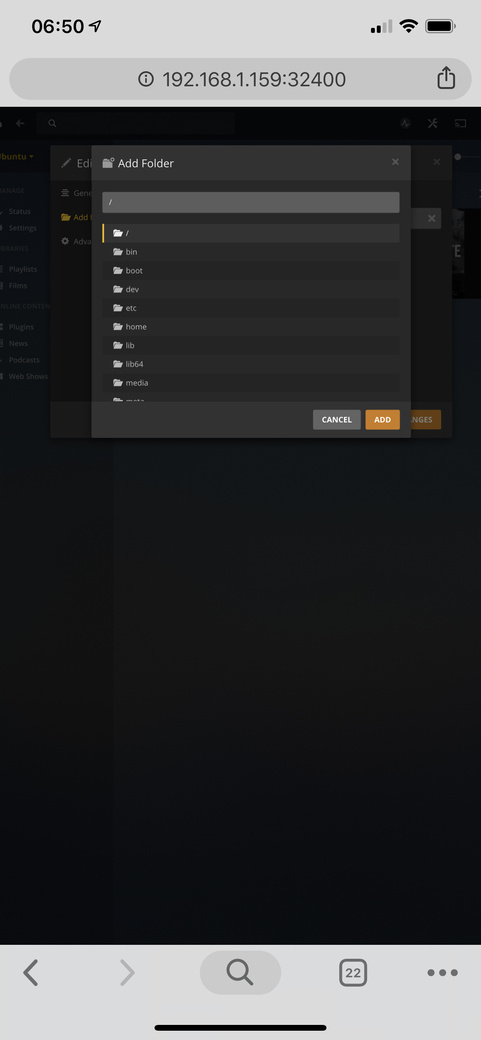
Edit: The folder /disks/ isn’t visible when selecting media for PMS.

Edit: when I make a symbolic link of the mounted drives, they’re greyed out when selecting in PMS.

df
max@server:~$ df
Filesystem 1K-blocks Used Available Use% Mounted on
udev 16429616 0 16429616 0% /dev
tmpfs 3292564 1908 3290656 1% /run
/dev/mapper/ubuntu–vg-ubuntu–lv 479617768 103142148 356924420 23% /
tmpfs 16462812 34784 16428028 1% /dev/shm
tmpfs 5120 0 5120 0% /run/lock
tmpfs 16462812 0 16462812 0% /sys/fs/cgroup
/dev/loop0 90752 90752 0 100% /snap/plexmediaserver/13
/dev/loop2 93184 93184 0 100% /snap/core/6350
/dev/loop1 90624 90624 0 100% /snap/core/6964
/dev/loop4 175488 175488 0 100% /snap/filebot/24
/dev/loop3 256 256 0 100% /snap/gtk2-common-themes/4
/dev/loop5 3968 3968 0 100% /snap/stress-ng/536
/dev/loop6 134016 134016 0 100% /snap/sabnzbd/316
/dev/loop7 36224 36224 0 100% /snap/gtk-common-themes/1198
/dev/loop8 99840 99840 0 100% /snap/docker/384
/dev/loop9 58368 58368 0 100% /snap/powershell/34
/dev/loop10 3968 3968 0 100% /snap/stress-ng/534
/dev/sdd2 999320 155060 775448 17% /boot
/dev/sde2 7569154348 3766575680 3424102932 53% /disks/media/TV1
/dev/sda1 3844639728 3307354668 341917844 91% /disks/media/films1
/dev/sdc2 3784500240 3225936224 369320984 90% /disks/media/TV2
/dev/sdb2 4730664680 488391984 4005721440 11% /disks/media/films2
/dev/sdf1 976489568 64 976489504 1% /disks/media/plex
tmpfs 3292560 24 3292536 1% /run/user/1000

blkids
max@server:~ blkid /dev/sde2 /dev/sde2: UUID="748cfd98-aa20-e77d-c9f8-c6d1eb6298bd" TYPE="ext4" PARTUUID="767b0ba7-f630-442c-aa95-ae8af43587b6" max@server:~ blkid /dev/sda1
/dev/sda1: LABEL=“FILMS1” UUID=“b9674367-fac1-44f1-9d69-15bab0502807” TYPE=“ext4” PARTLABEL=“HDD1” PARTUUID=“684d9b20-c71d-4b48-a27f-5b43261fd75d”
max@server:~ blkid /dev/sdc2 /dev/sdc2: LABEL="HDD2" UUID="0ed5383b-ec71-fcb1-f393-662034ede051" TYPE="ext4" PARTUUID="f8ba68c3-027b-403e-8df9-df7046df4e55" max@server:~ blkid /dev/sdb2
/dev/sdb2: LABEL=“FILMS” UUID=“3b58758f-b659-5cbd-96a4-7b24c3e6b61c” TYPE=“ext4” PARTUUID=“8b9aaee6-fe7e-4822-ae21-567d3aeed342”

fstab
UUID=b9674367-fac1-44f1-9d69-15bab0502807 /disks/media/films1 ext4 defaults,users,auto 0 2
UUID=3b58758f-b659-5cbd-96a4-7b24c3e6b61c /disks/media/films2 ext4 defaults,users,auto 0 2
UUID=0ed5383b-ec71-fcb1-f393-662034ede051 /disks/media/TV2 ext4 defaults,users,auto 0 2
UUID=748cfd98-aa20-e77d-c9f8-c6d1eb6298bd /disks/media/TV1 ext4 defaults,users,auto 0 2

ls -al
drwxrwxrwx+ 8 max max 4096 Jun 8 20:20 .
drwxrwxrwx+ 3 max max 4096 Jun 4 18:07 …
-rwxr-xr-x+ 1 max max 724 Jun 6 18:33 default.grsync
drwxrwxrwx+ 1375 max max 77824 Jun 8 18:52 films1
drwxrwxrwx+ 2 max max 4096 Jun 6 18:24 FILMS1
drwxrwxrwx+ 206 max max 12288 Jun 8 19:55 films2
drwxr-xr-x 3 root root 32768 Jan 1 1970 plex
drwxrwxrwx+ 275 max max 12288 Jun 8 19:21 TV1
drwxrwxrwx+ 163 max max 16384 Jun 8 19:21 TV2

Plex user is set to max and max is a member of groups max, sudo and plex.

Please help, I’ve been on this for 2 days and can’t sort it myself.

Thank you.

Ubuntu 16.04
Server Version#: 1.15.4.993
Max,

If I may make a suggestion or two there?

  1. Remove users from the mount options. You’re digging to deep there. defaults,auto,rw
  2. After remounting, do the below to clear the sticky bits and set perms correctly. You want nice, basic, normal, permissions. Nothing fancy.
sudo sh
find /disks -type d -exec chmod 0755 {} \;
find /disks -type f -exec chmod 0644 {} \;

Hi Chuck,

Thank you for the reply.

I’ve removed users and added rw to fstab, rebooted.

UUID=b9674367-fac1-44f1-9d69-15bab0502807 /disks/media/films1 ext4 defaults,auto,rw $
UUID=3b58758f-b659-5cbd-96a4-7b24c3e6b61c /disks/media/films2 ext4 defaults,auto,rw $
UUID=0ed5383b-ec71-fcb1-f393-662034ede051 /disks/media/TV2 ext4 defaults,auto,rw 0 2
UUID=748cfd98-aa20-e77d-c9f8-c6d1eb6298bd /disks/media/TV1 ext4 defaults,auto,rw 0 2

Ran the 2 find commands.

max@server:~$ ls -la /disks
total 12
drwxr-xr-x+ 3 max max 4096 Jun 4 18:07 .
drwxr-xr-x 24 root root 4096 Jun 9 00:09 ..
drwxr-xr-x+ 8 max max 4096 Jun 8 20:20 media

I ran late -la on the folder within, just in case.

max@server:~$ ls -la /disks/media
total 164
drwxr-xr-x+ 8 max max 4096 Jun 8 20:20 .
drwxr-xr-x+ 3 max max 4096 Jun 4 18:07 ..
-rw-r–r–+ 1 max max 724 Jun 6 18:33 default.grsync
drwxr-xr-x+ 1375 max max 77824 Jun 8 18:52 films1
drwxr-xr-x+ 2 max max 4096 Jun 6 18:24 FILMS1
drwxr-xr-x+ 212 max max 12288 Jun 9 01:21 films2
drwxr-xr-x 3 root root 32768 Jan 1 1970 plex
drwxr-xr-x+ 275 max max 12288 Jun 8 19:21 TV1
drwxr-xr-x+ 163 max max 16384 Jun 8 19:21 TV2

I still can’t see the folder disks in Plexs webui

Thanks again,

Max

which distro and version?
USB uses UUID mounts best. If fixed internal, use /dev/sdxx instead.

There is something VERY wrong with those mounts.

Type:

sudo mount | grep /disks

please show me how the system mounted them.

PS: Is this running on Ubuntu in a SNAP installation? If so, it’s a containerized mount.
You need to use the native host (non-SNAP) to get what you need or bring the external into the container (like docker)

Ubuntu Server 16.04.2 LTS
sde TV1 is connected to a pcie usb3 card.
sda b and c are all connected to internal sata. I just changed them to sd mounts.

Still not showing within the Plex UI.

fstab
UUID=748cfd98-aa20-e77d-c9f8-c6d1eb6298bd /disks/media/TV1 ext4 defaults,auto,rw 0 2
/dev/sda1 /disks/media/films1 ext4 defaults,auto,rw 0 2
/dev/sdb2 /disks/media/films2 ext4 defaults,auto,rw 0 2
/dev/sdc2 /disks/media/TV2 ext4 defaults,auto,rw 0 2

grep /disks
/dev/sdb2 on /disks/media/films2 type ext4 (rw,relatime,data=ordered)
/dev/sda1 on /disks/media/films1 type ext4 (rw,relatime,data=ordered)
/dev/sdc2 on /disks/media/TV2 type ext4 (rw,relatime,data=ordered)
/dev/sde2 on /disks/media/TV1 type ext4 (rw,relatime,data=ordered)

I dont know what SNAP is, I installed from the standard ISO from Ubutnu and installed all the packages myself. Not Docker.

Thank you again

It took some doing but I found it.

You have ACLs set on the files. There is no need for this.
Either remove them or add user plex to them.

In Linux, ACL’s are only of practical use in an enterprise environment or when the default OGW permission octets are insufficient (multiple groups or owners, etc)

This topic was automatically closed 90 days after the last reply. New replies are no longer allowed.
