I’m running Plex on a 2-bay QNAP NAS and also have a 4-bay enclosure hooked up for extra storage. I believe I am running into the issue where the metadata is eating up alot of space on my primary drive.
Can someone give some possible guidance on how to either a) move the metadata or b) clear some space in the Plex metadata directory? (I’m definately no Linux Guru)
Your question implies you want to put the Plex metadata on the QNAP. Putting the Plex “Library” on any NAS requires advanced skills and, it’s not something which can be supported. If, mostly when, the data becomes corrupted, it’ll likely require a full rebuild of it all which makes the entire purpose moot.
It is very easy to move the data out of /var/lib/plexmediaserver to another location on the Linux system where PMS is running.
Any internal or external, ext4 formatted, drive will do.
I don’t beleive that will help at this point. I have a 2-Bay QNAP (2x 6TB drives) and a USB expansion module hooked up to that that has !6TB free. The primary drive on the 2 Bay basically has nothing on it but apps including Plex. Even if I moved all the data off to the second drive, and migrated Plex to that drive with the steps above, I’d be running into the same situation eventually.
Is there a way to move the metadata itself to say the expansion module? Would that break Plex / metadata processing? If this could be done, I’d need some guidance on how to do that.
If QTS allows a “Volume” (CACHEDEVx_DATA) to be created on the device, you’re fine.
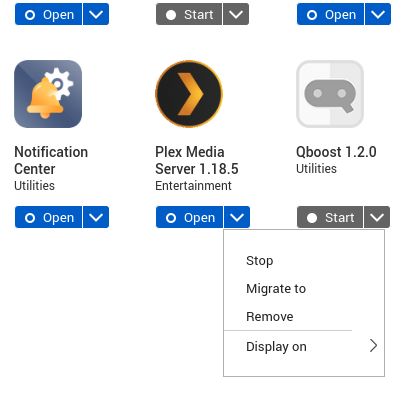
After creating a CACHEDEV (mounted volume), you can “Migrated to” in App Center.
I believe, but don’t have an expansion box to test with, they allow it for expansion unit (expansion units are for adding additional RAID sets so it makes sense you can) but don’t allow USB drives per se to have volumes created as they are ‘temporary’ by definition.
When I looked at that option previously, (before posting here), I didn’t see the expansion unit as an option to move it to, but now I do. I must not have scrolled down or something.
I would assume Plex should be shut down before doing this? I’m wondering also if there will be any performance iisues with Plex running on the expansion.
The QNAP “Migrate to” process does the shutdown and restart (state preservation) for you.
The performance “hit” will be 5 Gb/s (400 MB/sec) USB theoretical maximum + latency versus the performance of SATA-3. You can measure your SATA-3 performance using the QNAP tools.
qcli_storage -tT
It is best run when PMS and all other tasks are stopped/quiescent.
Yes, I’m saying it appears Plex metadata is eating up at least a few TBs of space. I agree that is excessive hence my post here haha. The primary drive in my 2 bay NAS is obviously the system drive and has other apps installed, but all other data has been moved off of there at this point.
That essentially is part of my original question: do I have to migrate Plex to my expansion or is there another way to clear space Plex may be utilizing?
I sincerely don’t understand how the use of QTS-supported “Migrate To” isn’t viable .
What about the supported method is not acceptable.
There are other options if one is willing to craft a solution by hand at the QTS level. Be advised, such a customization, although doable, cannot be supported.
I’m fine with the supported method of the “migrate to” option. However, I’m stuck on the fact that Plex is taking up TBs of space when my server isn’t even that big. If I migrate it to my expansion, down the line I’ll be in the same situation and nowhere else to migrate to. So, based on that, I’m looking for other options.
Thank you for explaining the problem you’re having.
I suspect that, by default, you’re having Chapter Thumbnail images created.
These are great for seeking and seeing images of each chapter but if you don’t want them, I recommend turning them off and not waste the space.
For each Library section with video:
Hover over the section
Manage Library
EDIT
Advanced tab.
You will see the red “Delete Preview Thumbnails”
Above it is the box which enables them.
Uncheck the box and delete the existing thumbnails.
Save your changes
Thanks for that. Odd that those were enabled by default.
I followed your instructions, however there is still only about 341 GB free. I’m unsure if those take awhile to be removed, but if it is immediate, any space that was regained wasn’t much.