One of the film types I occasionally collect include the 1930/40 Serials. What is the best way to organize them. I added each episode under the single title of the Serial but it ended up listing each one as if it were its own film. The episodes depend on each other if you know the serials.
E.g.
Movie Title (folder)
Episode 1
Episode 2
Episode 3
…
Maybe you can share a specific example.
You can group individual movies into collections if that’s the level of organization you’re missing / looking for. When using a movie library, there’s no need to group the different movie folders into a “serial”/parent folder.
Edit: if those “former serials” are still listed as series on the common repositories like TMDb / TVDb / IMDb, you might want to organize them as such
You could join the serials manually using a tool like mkvtoolnix and add one file to a movie library such as “Flash Gordon (1936)”
(Probably the least desirable)
Add all the serials to one movie folder and name them by parts
Flash Gordon (1936) – pt1.mp4
Flash Gordon (1936) – pt2.mp4
Or put them in a tv library with episodes listed like tom said according to the TVDB or TMDB
Flash Gordon (1936)
Season 01
Flash Gordon S01E01 – The Planet of Peril.mp4
https://support.plex.tv/articles/naming-and-organizing-your-tv-show-files/
https://support.plex.tv/articles/naming-and-organizing-your-movie-media-files/
I’ve been adding some movie serials to my server.
TMDB carries them as movies, not TV shows.
TheTVDB carries them as movies. They also have some with a dual listing as TV shows.
I initially started adding them as TV shows, adding listings at TheTVDB for ones not already on their system.
However, TheTVDB started deleting the listings I added. They did not reply when I pointed out the pre-existing duplicates and asked for clarification.
As a result, I’m now adding serials to my system as movies, mirroring how they are carried at TMDB.
All the episodes are in one file, with chapter markers and titles for each episode.
Most of my DVDs have all the episodes in one file already. This makes ripping with MakeMKV easy. I then add correct chapter titles with MKVToolNix (Chapter Editor).
Some of the DVDs have the episodes split across multiple discs or as individual files. When that happens I use MKVToolNix (Multiplexer) to combine them into one large file. It is a pain, but it works.
An example is Superman (1948).
The episodes are split across two discs. When I rip them with MakeMKV, I have two MKV files, each with half the episodes. Using MKVToolNix, I combine the two files and then rename the chapters with each episode title. The video is interlaced MPEG2, so I run it through Handbrake, converting it to H.265 and deinterlacing the video.
It is in a Plex movie library as: /movie_serials/Superman (1948) {tmdb-126712}/Superman (1948) {tmdb-126712}.mkv.
Chapters look like this (from MediaInfo):
00:00:00.067                             : :Credits.
00:00:47.114                             : :Superman Comes to Earth.
00:20:10.309                             : :Depths of the Earth.
00:35:25.190                             : :The Reducer Ray.
00:53:01.245                             : :Man of Steel.
01:10:08.271                             : :A Job for Superman!
01:24:53.155                             : :Superman in Danger!
01:40:39.100                             : :Into the Electric Furnace!
01:56:22.042                             : :Superman to the Rescue.
02:10:32.925                             : :Irresistible Force!
02:26:09.828                             : :Between Two Fires.
02:43:59.897                             : :Superman's Dilemma.
03:01:37.320                             : :Blast in the Depths.
03:18:05.807                             : :Hurled to Destruction.
03:34:01.762                             : :Superman at Bay.
03:50:36.756                             : :The Payoff.
I may be wrong but I believe I saw something recently regarding tvdb on their or some other forum, that going forward these sort of items have to be added as movies. (So yeah after all these years tvdb seem to now be saying tmdb have been doing it right all along.)
I’m pretty sure I also read that stuff that was TV and is now regarded as a Movie can stay for the time being as TV, even with duplicates. But going forward they are to be movies and and uploading as shows is strictly banned.
At work at the moment but will try and find what exactly it said when I get home.
Thanks for all the advice. Without combining them into one large file (I’ve yet to fully explore makemkv & mkvtoolnix), I have added them to the TV Shows which allows me to break down each chapter into its own video and list them all under the primary title. Putting them under a single title with individual episodes in Movies breaks each one into an individual display on the main movies page which I don’t want. My thinking is that this is a single production with individual chapters and that is how I want it to be treated.
I am a relative noobie to Plex and will continue to play with these serials to see if I can get it back under movies (where I think it should be) and get the “chapter” result I am looking for.
In this case the serial is “Brenda Starr, Reporter (1945)” with 13 Chapters. Under TV giving each chapter a title beginning with S01Exx literally breaks them out with the title of each episode intact. I can’t seem to get that under movies (within my current expertise) Once I get it, I’ll do the other serials the same way.
Any other suggestions are always welcome.
It all comes down to how such videos are organized in the named repositories. If they’re listed as movies, you should organize them as movies and add them to a movie library. If they’re listed as tv-shows, you should organize them as such inside a tv-show library.
That is if you want to get online metadata for the items.
You can kind of force some data into Plex by using embedded metadata – though that only works with mp4/m4v/mov files.
“Brenda Starr, Reporter” from 1945 seems to be a borderline case…
- according to The Movie Database it’s supposed to be a 4-hour movie → Brenda Starr, Reporter (1945) — The Movie Database (TMDB)
- according to TheTVDb it’s supposed to be a 13-episode series → Brenda Starr, Reporter - TheTVDB.com
- IMDb seems to agree with TMDb and have listed it as a movie → Brenda Starr, Reporter (1945) - IMDb
Odd enough, Plex itself doesn’t even seem to find the movie/show to start with (at least I couldn’t find it on https://watch.plex.tv or under More Ways to Watch using the Plex app’s search).
If you do end up using a TVDB listing as a TV show you might want to try this
You can rename an entire season or show in a few clicks
It’s free and pretty simple to use
You can use literal chapters.
MKVtoolnixGUI allows you to combine several single files into one large file. During this process, you can also let it insert a chapter marker at the boundary of the files.
In a second step you can then use the Chapter Editor of mkvtoolnix to name each of those chapters with the episode title.
The result will be something like this:
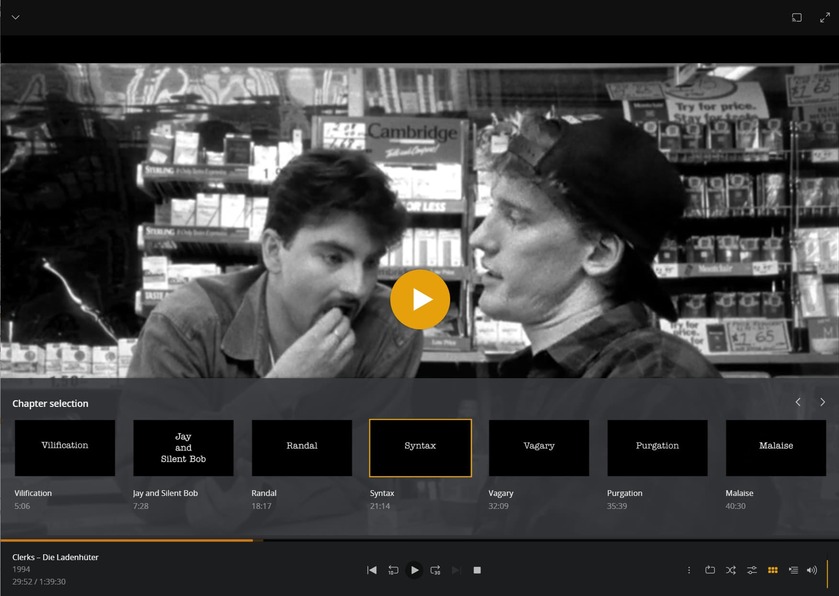
(Note that these are actual screenshots of the movie at the chapter time markers. This movie just happens to have those old-school chapter title cards in it.)
