I am doing some audiobooks and for some reason one folder will not show up in plex. It is using the same MP3 format that all the other audio book folders are using and they show up and play fine. Has anyone ever had this issue where one item will not show up in the library? Driving me crazy and any tips would be greatly appreciated.
I’ve seen this before, especially with audiobooks. I typically play with the naming of the folder/files. If I may ask, does Plex identify the audiobooks properly? If it is then try viewing the library from the folder view just to see if Plex even sees the folder.
On this particular one it won’t see anything, not even the folder. I tried moving it to my music MP3 location and nothing, tried renaming the folder and nothing. I edited the metadata on the mp3s and no go.
Does the folder name start with a dot (.)?
You should tell about what kind of server you are using and how the media files are accessed.
No the folder does not start with a dot. None of the folders start with a dot and 3 out of 4 are picked up and stream fine.
Running on Windows 10 and connect via many devices, android,ios and windows/mac web browsers.
Then please show your actual folder names and file names.


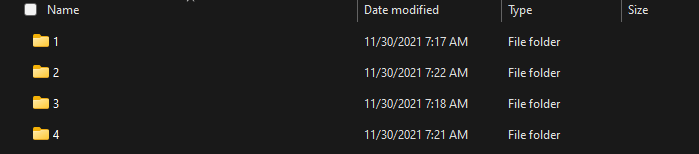
Folder with names which consist of a single number may be ignored by Plex.
Remember: Plex has no support for audio books in general.
You must make it so, that your audio books look like music to Plex.
Which means artist names or album titles which consist only of a number are highly likely to be ignored, as Plex tries to match your files to a known music album on musicbrainz.org
Which means:
create a folder structure which has
/Music <-- library root folder
   /Artist
      /Album
         1 - track title.mp3
         2 - track title.mp3
         3 - track title.mp3
         ...
The Artist level can be used for author or narrator, depending on your personal preference.
Album should be the book.
tracks should be the chapters.
All the informations in the folder structure should be also present in the embedded meta tags of your files.
Folder structure and meta tags should not contradict each other.
Enable “prefer local metadata” for a library of audio books.
My folders are actually fully named but I changed them to numbers as I don’t think you need to know what I am listening to. Again 3 of the 4 show up in plex. Maybe since the one that isn’t showing up is a custom lecture I could try changing the meta data to something that would be found on a search. Thanks for the idea!
That was it. Thanks so much for getting me on the right path. Had to change the folder name to something that could be found in the database and now it’s seen and playing! Had been driving me crazy so much thanks!
