clear the browser cache… might be stuck with some old data…
try different browsers
Firefox updated 2 weeks ago and I’ve had issue with other sites and processes, not with Plex but maybe something there since I see there is another browser update waiting to install.
So I’ll join the club.
As you all describe it.
If I have a LOCAL (PLEX) media server for my LOCAL network, why do I have to go ONLINE?
Back in the good old days, PLEX just served everything right into the LOCAL network - and that was fine.
Now it gets more and more bloated and compels users with forcing them to be online.
What’s if the internet is down?
Or we want to stay LOCAL for any other reason?
It’s like a Chinese webcam that has to stream its video over the Chinese server instead of right into the local network… Please, dear PLEX team, remember the good old days, listen to your (Plex Pass) members and ensure a LOCAL FIRST way!
Sorry for being that loud, but it’s so sad for me, seeing such a great thing going that bad… and as I read above, not only for me…
Me too, same message in my local network (ubuntu server with docker image) and now I m out of Plex Media Server.
I will try other media server software.
FYI - as of 8/14/2020 this issue is still occurring, however for me it seems to be only a Firefox issue.
I have successfully connected to browse my plex library on Chrome and Brave, while simultaneously failing on Firefox. There may be a browser setting or something. I just recently loaded Firefox, so I don’t know.
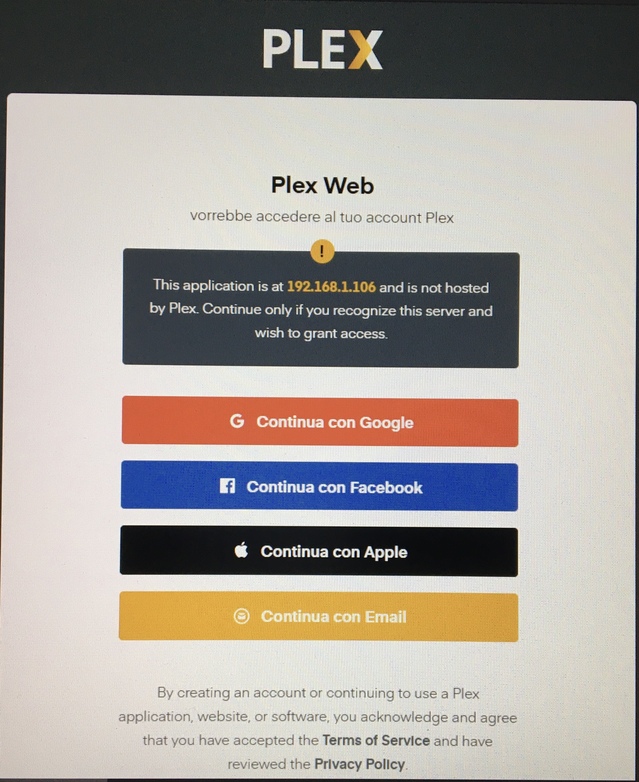
been getting this message after logging out of my server - This application is at 192.168.43.12 and is not hosted by Plex. Continue only if you recognize this server and wish to grant access.
not sure what this is. the server was working fine last week., i was doing an upgrade. my setup is openmediavault with docker support. the pms docker is running fine. however get the above message when trying to sign in.
this is ridiculous. tried on firefox and chrome. cannot access my plex server now.
I had this problem and did everything including restalling windows on my pc. But after finally backing up my cloud and doing a full factory reset. It finally worked…I worked on it for a week. It could not find my server.
Hello Plex Team, will one of you answer? You can see that a high number of users have the same problem. There are alternatives to Plex. Before I went into a browser war or restarted Windows, I had a look at Emby. Well, I see no reason to switch back to Plex … Only you, Plex team, have that in your hands
Same problem here for the last week. Using Synology DS918+, had been working perfectly. Have tried applying a few of the workarounds mentioned here, but nothing yet…
Make sure your Qfinder Pro is running and shows your server up and running.
Dump Firefox. Set a different ‘default browser’ in main Windows Settings - I chose Brave browser.
Double click the server displayed in the Qfinder Pro screen. Brave browser will start up (with a URL showing the relevant IP and Plex port you should have previously forwarded in your router settings).
You will be taken to the QNAP login page. Login to your QNAP server.
Double click the Plex app in the dashboard. The Plex app will start up.
The Plex app will ask you to login with your email and password. (That screen again!). Make sure login credentials are correct.
The app should start up within the Brave browser environment and take you straight into the Plex server settings.
Done, and logged in as normal.
If there is a loop at login, try continuously holding down the Ctrl key (on Windows) after you enter login credentials and press the login button. Keep holding the Ctrl key until it logs you into Plex.
Hi I’m unable to access my Plex Server as Im stuck in the same loop at login. I dont want to have to change my browser so what is Plex doing to fix this problem and how do I get into my server in the interim please
I’m the same as every one else, except it works fine on a windows 10 laptop with plex app, however a pc upstairs same version plex app wont work ip_address:32400 does not work off any device and LG tv app also not working, this must be an integration from the plex.tv web site at login i can only get web content which refreshes about every 5 seconds now, what ever update plex has done must be cascading down through there users.
I am getting the same error " This application is at 192.168.43.12 and is not hosted by Plex. Continue only if you recognize this server and wish to grant access." using Synology NAS DS918 (DSM 6.2.3-25426 Update 2), PLEX Server “PlexMediaServer-1.20.1.3252-a78fef9a9-x86_64”.
The past 3 versions also have the problem of not being able identify most movies with any Agent. Are the 2 related?
I am on a Synology DS415+ NAS DSM 6.2.3, using Windows 10 on Firefox version 80.0.1., Plex web is 4.42.1 and Plex server is version 1.20.1.3252. My ISP is in the UK.
I am having the same problem - When I try to log in trying to use ip adress:32400 it comes up with the message: This application is at xxx.xxx.x.x and is not hosted by Plex. Continue only if you recognize this server and wish to grant access.
When I then try to sign in with my plex credentials it comes back with an error signing in.
When I try to sign in on using https://app.plex.tv/desktop it loads plex content but does not load anything on my Synology NAS. Items on My NAS have a yellow exclamation mark. When select one of them it comes up with a message:
Unable to connect to “ServerName” securely. Its “Secure connections” setting may be set to disabled, or you may need to adjust some settings on your network. You can also allow insecure connections now, which will reload the app insecurely.
If I then click on ALLOW INSECURE CONNECTIONS and select ALLOW ONCE it reloads plex and when I sign in again it now shows my NAS contents. (Note - if I select ALLOW ALWAYS it only does it for that session - behaves the same as ALLOW ONCE)
Both of these behaviours seemed to happen at the same time on a plex a few months ago. I have uploaded new versions and brought everything up to date again but the problem persists.
Note if I enter via the Plex App on my Android phone or tablet then I have no problem going direct to my content. These have Allow insecure connections set to Never. However, on the windows 10 Plex App it will only only load my NAS content if I allow insecure connections on the the same network.
Given everything I have read above it would be good to have someone explain how to resolve this without having to switch to remote access mode or always having to go through the process of logging in twice to allow insecure connections on the same network.
I just started getting the same message today September 30, 2020, “This application is at app.plex.tv and is not hosted by Plex. Continue only if you recognize this server and wish to grant access.” I sign in using the app.plex.tv/desktop
I am also having another problem which just started 1 day ago. When I sign in, my libraries all have a red exclamation point, and when I click on them it says I am not using a secure connection. To be able to access my libraries, I have to allow it to use an unsecure access. Why did this start happening? Everything was great but now I’m not sure if I’m exposing myself to problems by allowing an unsecure connection.