Server Version#: 1.25.1.5286
Player Version#: 1.39.0.2753-d48b8c8b
I recently set up my server (running on Unraid 6.9.2) with a new gigabit ethernet connection. Testing on multiple devices outside my network I’m surprised to find that 2 of 3 PC’s are unable to play a single 4K stream without buffering every 5-10 seconds.
All three of these PC’s are running windows 10 with desktop player version 1.39.0.2753-d48b8c8b. Tested internet download speeds on all 3 exceed 400 mbps. Here are details on each and screenshots of the media playing:
i7-9750H/GTX 1660 ti, 1 4K file buffering every 4-8 seconds:
i7-9700K/Nvidia P2000, 4 different 4K files playing seamlessly on the same computer with zero buffering! I also forced all 4 to transcode and there was still no buffering:
If the issue causing buffering on the first two computers was bandwidth then it would make sense for Plex to automatically detect it and transcode to a lower bitrate but for some reason it continues to play the 4K files buffering every 5-10 seconds instead of transcoding. I’ve tried with lots of different 4K files (all remuxes) and the issue happens regardless.
Does anyone have any advice on why this is occurring? It isn’t clear to me why one device can play 4 4K movies no problem while other devices can’t even play one…
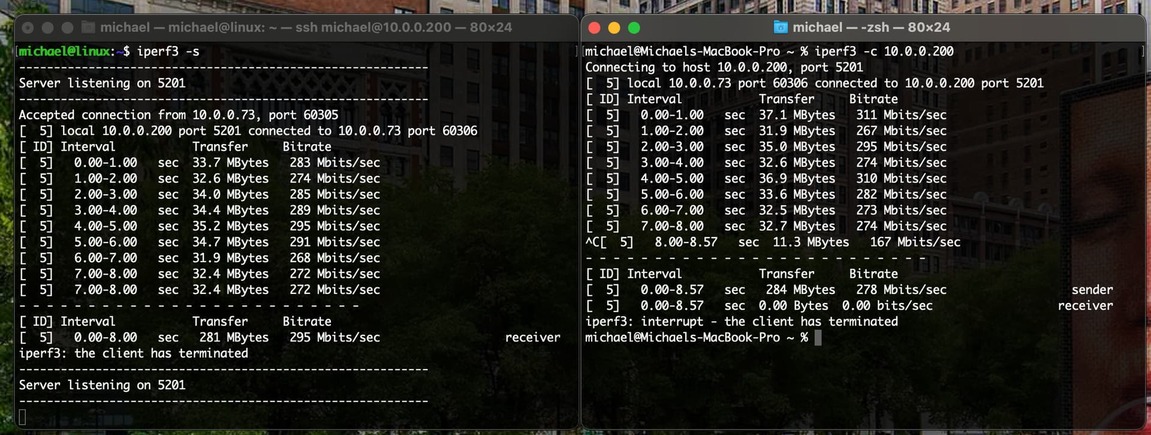
Have you tried running iperf3 between the server and the pc with the issue, just to rule out a network issue as that’s a better test than internet speed. This is from my Mac to my Ubuntu server over Wifi and 4K remuxes work fine (at least with Infuse)
Thank you for the response. I just downloaded iPerf 3.1.3 for Windows and tried to run it. Does this application have any sort of GUI? I only see a command prompt window flash for a second with no GUI appearing.
When did the issue pop up? It’s possible that unraid is running a parity check which can max out drives read/writes. Or maybe another application using bandwidth/drive speed. Could also be a faulty cache drive or faulty hard drive? There’s a ton of variables
I’m running the latest beta version of plex on unraid and my nvidia shield and have been direct playing without issue.
Ok I got iperf3 setup on both my server and computer #2 (i7-4770/GTX 970) and have been trying to get them to connect for the last hour. I have tried different ports as well as unblocking iperf3 through the windows firewall and I continue to get this error:
This issue began occurring as soon as I set up my server on its first gigabit connection a few weeks ago. Prior to this I had a pretty bad ISP and had not attempted streaming outside my network at a resolution higher than 1080p.
I have now been testing this for about a week and carefully watching my server array read/write speeds and can confirm that the issue is not related to a parity check or any other reads/writes to the array. 99% of the time my array drives are effectively idle.
On all 3 other computers I have tested I have run internet speed tests directly before and directly after streaming from my plex server to confirm that the bandwidth is not being limited or taken up by other devices on the network. The speed tests always result in download speeds of 400-900 mbps.
If any of the drives in my array (cache, RAID disks, etc.) was faulty then I would be seeing the same playback issues across all devices and would not be able to stream content locally which thankfully I have been able to do flawlessly.
There are a lot of variables which I am doing my best to narrow down. I can’t figure out what I’m missing at this point. Thought moving my server to gigabit was going to be a lot easier than its been.
Ok. This is starting to clear up a bit. My first question is, these devices that are having streaming issues, are they on your local network or computers across the internet?
Secondly what is your internet upload speed?
Edit* I’m going to go ahead and post some assumptions I’ve made from your post.
Assumption 1 is these are all clients over the internet
Assumption 2 is that you have a cable provider for gig service such as spectrum/charter/etc. Where your download speed is rated at max 940Mbps but your upload is only rated at 35Mbps
If both those assumptions are true that’s your issue. Your remote streaming is limited by your upload speed which is how much data can be sent to the internet. Would explain why transcoding those 4 streams resolves the issues as It would be extremely close to the max upload speed and not all clients would be pulling data at the same exact time.
I do have gigabit ethernet but I made sure to select a provider (Ziply) with synchronous upload and download speed, tested speeds on my server are about 700 mbps download and 700 mbps upload.
All these clients I am testing with are outside my LAN (notice the screenshots in my original post all show remote).
Transcoding those 4 streams on the 3rd PC (i7-9700K/Nvidia P2000) was just a test, I am able to successfully direct play those same 4 4K files simultaneously, resulting in a peak upload bitrate on my server of about 350 mbps. This is where something doesn’t add up. Why is that one PC able to direct play 4K with no issue while other PCs are not?
Sometimes local streams get flagged as remote, i can never be sure lol ok so fiber, you shouldnt have any bandwidth issues. Next thing I’m curious about is settings. Under server settings in plex, under the remote section. There is an area for you to enter in upload speed. By default it should be blank, whether it’s filled in or not, type in 700 and test the client’s. I had a weird bug with this a couple years back, since then I’ve always filled out this field with my max upload speed
Its also possible that the clients don’t have fast enough internet. Automatic transcoding/speed isn’t the best and often doesn’t work, at least for me, and not every device supports it. Also Keep in mind that in order for someone to stream those above files, they would need a solid 150-200Mbps connection even though for example the one file is only 97Mbps. Plex will exceed that 97Mbps buffering the file.
When I first set up my server I set the upload speed to 1000 mbps. I am able to upload 4 4K movies simultaneously as tested on the i7-9700K/Nvidia P2000 PC so it doesn’t appear that the upload speed of my server is the issue.
I have been running speed tests on the computers I am testing with to confirm they have the download capacity to stream the 4K media and it shouldn’t be an issue.
In addition I did some testing yesterday on different devices on these remote networks that are not PCs. One 4k Samsung TV on the 950 mbps remote network and one 4K google Chromecast on the 400 mbps network. Both of these devices were able to direct play 4K content from my server with no buffering. So I have isolated the issue to being specifically the plex desktop application running on these remote networks.
That’s some good diagnostic work there. I’m not super familiar with the desktop clients so I cant really provide any help there. The only potential issues I can see off the top of my head is that the gtx970 and p2000 don’t support nvenc decoding of 4k hdr content. At least from what I remember, but considering the 1660ti is also having issues it leads me to believe there may be an issue with the actual software. I would be curious to see the cpu/gpu utilizations. Specifically decoding usage on the gpus and also cpu usage+number of threads being used.
The 9700K/P2000 is the only PC that I can successfully direct play these 4K HEVC files so if it isn’t using the GPU to decode then I’m assuming the CPU is doing it. I just did some testing with the i7-4770/GTX 970 PC. I used the Plex desktop client to download one of the 4K HEVC movies to the client PC for local play, then shut off my Plex server to ensure that any streaming content is off. The same content that buffers horribly when streaming from my server plays smoothly with no repeated buffering when played locally! Here is a screenshot of the CPU/GPU usage on the i7-4770/GTX 970 PC when playing the 4K HEVC file locally:
There was a long initial period of buffering that occurred before the file played locally but after that the playback was perfect, Plex is even doing the HDR to SDR mapping correctly as this content is being played on a monitor that does not support HDR.
For comparison here is the same file streaming from my server (network is no longer zero):
This confirms that the 4K HEVC content can be natively played by this hardware. The issue has to be with Plex or something with the network that we don’t yet understand.
At this point I think I have exhausted my troubleshooting options. I hate to call people out but @ChuckPa and @TeknoJunky if you guys happen to have any suggestions please let me know, I’m considering pulling together logs to make a bug report.
without reading the entire thread, these are all clients playing back on plex for windows.
970 doesn’t support hw hevc decoding, and as far as I remember, the 4770 can’t do it on cpu alone. you are SOL on this one, IMO.
the 9750/1660 should be sufficient for playing or serving.
I’m not familiar enough with the plex windows app to describe how to check, but I would look to make sure that hw decoding is enabled somewhere in the plex for windows settings.
Thanks for replying! From testing I have confirmed that 1080p H.264 media with a bitrate higher than ~60 mbps has the same buffering issues as 4K HEVC movies >60 mbps. This means that the issue must be some sort of network limitation, plex setting etc. that I do not understand.
The fact that I am getting the same buffering issues on the 9750/1660 PC also indicates that this is not an HEVC only issue.
Oddly enough if I have my client with the 970 play the 4K HEVC movies after downloading to their local machine it removes the playback issues and the playback is smooth. The Nvidia table you linked says this shouldn’t be possible. I’ve also had them play the file from MPC-HC on the 970 PC and the playback was smooth with no interrupted buffering.
Edit: We double checked and hardware decoding is enabled in the plex desktop client settings.