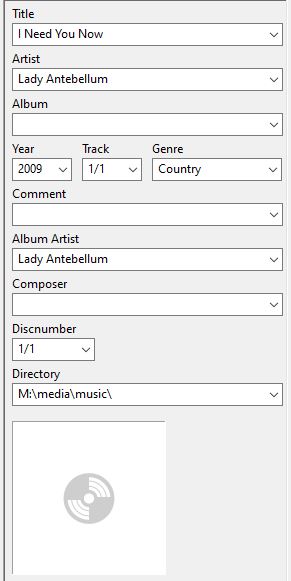
Server Version#: Version 1.18.0.1944
Web Client Version#: Version 4.8.4
I noticed that on occasion when I log into the web client on my Plex windows server that in the top corner I see the spinning icon and it is scanning the music library…though it appears to be scanning something it already scanned.
Note that I did an upgrade and forced a full scan a week or so back.
So when I go into the music library and sort it by unmatched I am surprised to see the following
If I do go into an entry to check it, it looks completely matched
I did a bit more playing around with the albums, checked all the tags in the files themselves (outside of Plex and they are correct) and even if I choose to Refresh Metadata, the album remains in the unmatched filter.
The only way that I was able to fix it was to use the Fix Match option…this would be a pain to have to do this with hundreds of individual entries (and my collection is probably very light weight compared to others).
All of the entries are filled out but still Plex considers this unmatched (and even the band info is all filled in above the album).
It has the following mp3 tags (the Directory is actually after I created and put one in just to see if Plex would automatically pick it up)…
However, even if I go with the structure of ArtistName\AlbumName\TrackName it still doesn’t pick up with a refresh metadata…I have to use the File Match option.
Here is another example of a similar file structure, but at the root of the media folder (i.e. no ArtistName folder)…
However, I just don’t recall in the past when the mp3 tags were all proper that there would be missing entries in Plex, especially since I use Local Media Assets for both Artists and Albums.
I am getting older so perhaps my brain isn’t firing like it used to
If I look at that Lady Antebellum track, it doesn’t have an Album tag so it’s logical that Plex puts [Unknown Album] there. But yes, it should also populate Title and Artist from the tags. Proper bug, that.
I’m seeing the same issue on my end; after spending the last 2 years carefully curating my music collection to ensure everything is tagged & pathed correctly, Plex is still showing 1050 out of 1071 artists as being unmatched. I really don’t relish the idea of doing a “Fix Match” on each one separately…
It has been a bit of time when I posted this but I found I had done the following things since which lead me to having no unmatched content.
Upgraded the server several times (currently on the beta channel, build 1.18.6.2368)
I’m not sure if the upgraded server helped or not because even though their release notes talked about improvements on the scanner, I did need to do some manual updates below on a few really oddball/non-mainstream albums
Used MusicBrainz Picard locally to curate the music on the hard drive
even though I had already done so with Mp3Tag I wanted to make sure the meta data on my files were in alignment to what Plex seems to like (i.e. MusicBrainz)
Logged into MusicBrainz to add unknown albums, waited about a week (not only to wait for approvals but for Plex to get in sync with the latest changes), and then went into Plex to manually match the items
It’s been a while since I tried a fresh/new library but so far any new music I put into the Plex library has properly matched.
I do not believe that this issue is resolved on the Plex music scanner.
I have this album which was not updated with MusicBrainz Picard (as it was not in their database) but was with the Mp3Tag and the initial scan when I added the album updated as expected.
However, the other day I removed a single track from that album, the Plex auto scan kicked in and all of the titles were removed from the album. I then refreshed only the album via the top right option to Refresh Metadata and they all came back and have been there ever since.
Hey, did you know that Windows Media Player does this extremely well. Yes that dilapidated software that Msft doesn’t support has this feature…and Plex doesn’t.